Attaching and Removing Adapter
•
Attaching
1.
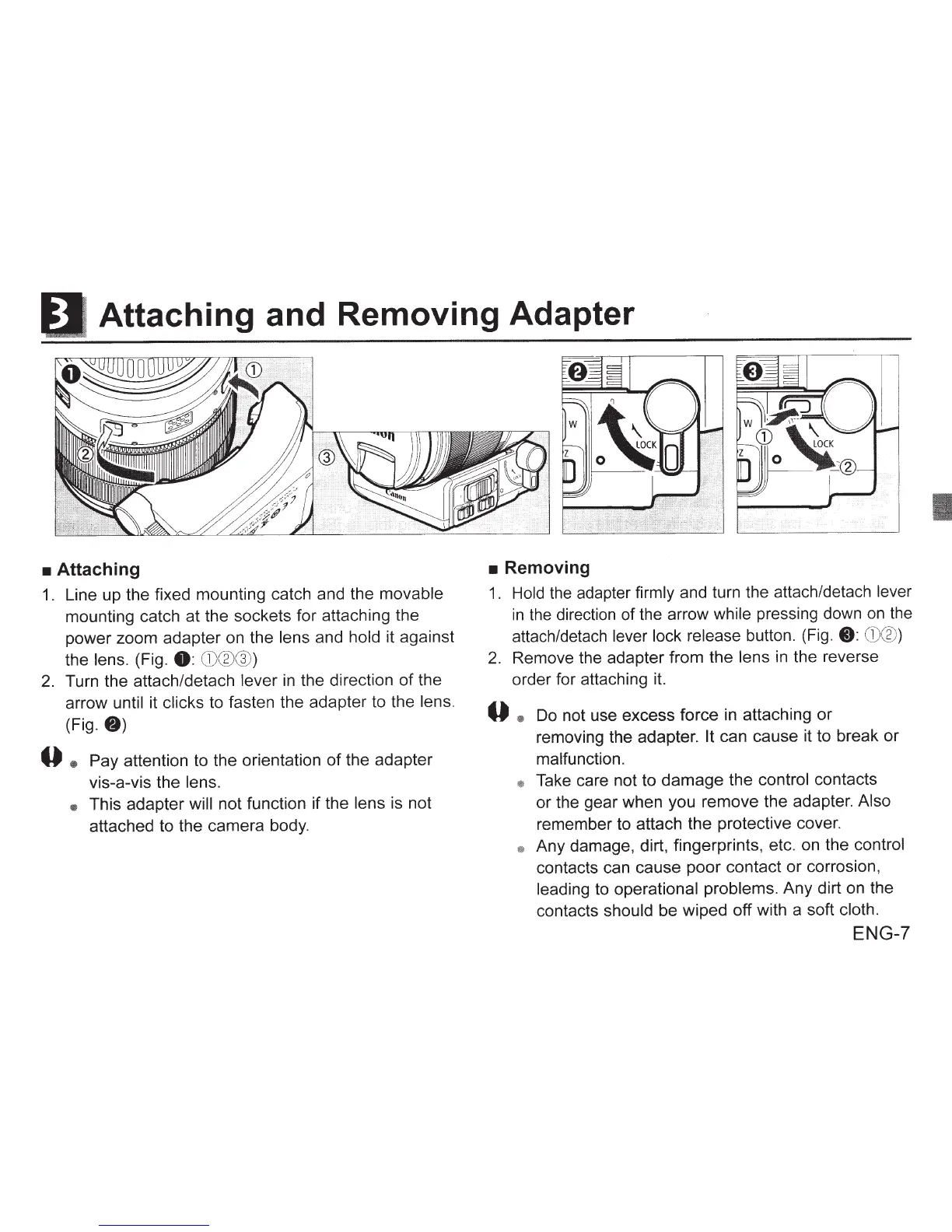
Line up the fixed mounting catch and the movable
mounting catch at the sockets for attaching the
power zoom adapter on the lens and hold it against
the
lens. (Fig.
8:
CD®®
)
2.
Turn the attach/detach lever
in
the direction
of
the
arrow
until
it
clicks
to fasten the adapter to the lens.
(Fig.
8)
0
*
Pay attention to the orientation
of
the adapter
vis-a-vis the
lens.
*
This adapter
will
not function if the
lens
is not
attached to the camera body.
•
Removing
1 .
Hold
the
adapter
firmly
and turn the attach/detach lever
in
the
direction of the arrow while pressing down
on
the
attach/detach lever lock release button. (Fig.
8:
CD®
)
2.
Remove the adapter from the lens
in
the reverse
order for attaching it.
0
@I
Do not use excess force in attaching or
removing the adapter.
It
can cause it to break
or
malfunction.
*
Take care not to damage the
control contacts
or the gear when you remove the adapter. Also
remember to attach the protective cover.
@;
Any damage, dirt, fingerprints, etc. on the control
contacts can cause poor contact
or
corrosion,
leading to operational problems. Any dirt on the
contacts should be wiped off with a soft
cloth.
ENG-7








 To Next Page