EasyManua.ls Logo

Canon Selphy CP730 - Direct Camera Printing

Canon Selphy CP730
28 pages
Print Icon
To Next Page IconTo Next Page
To Previous Page IconTo Previous Page
Loading...
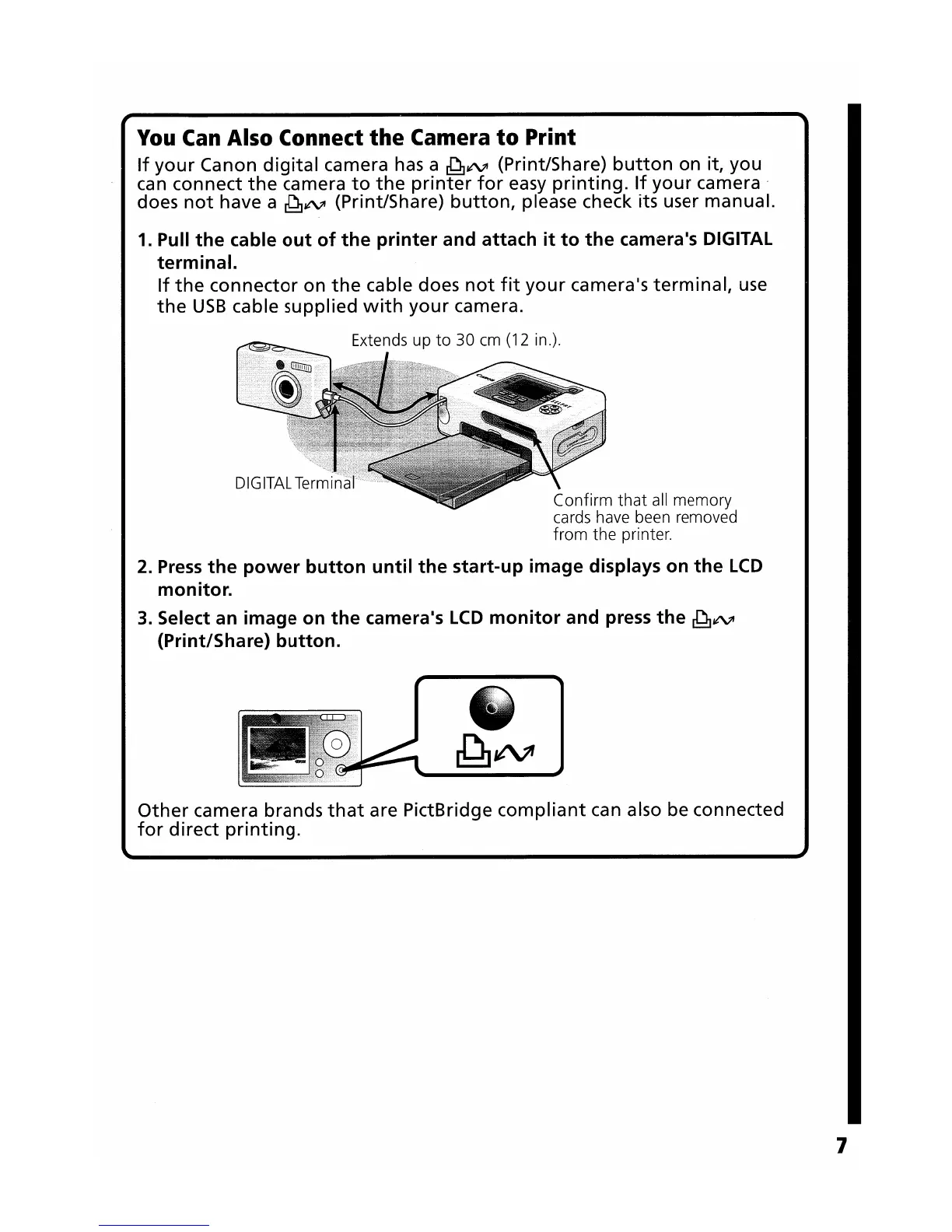
You
Can
Also Connect
the
Camera
to
Print
If
your
Canon
digital
camera
has
a
~¢'VI
(Print/Share)
button
on it, you
can connect
the
camera
to
the
printer
for
easy
printing.
If
your
camera'
does
not
have a
~¢'VI
(Print/Share)
button,
please check its user manual.
1. Pull
the
cable
out
of
the
printer
and attach
it
to
the
camera1s DIGITAL
terminal.
If
the
connector
on
the
cable does
not
fit
your
camera's
terminal,
use
the
USB
cable supplied
with
your
camera.
Confirm
that
all
memory
cards have been removed
from
the printer.
2.
Press
the
power
button
until
the
start-up
image
displays
on
the
LCD
monitor.
3. Select an
image
on
the
camera1s
LCD
monitor
and press
the
~¢'VI
(Print/Share)
button.
Other
camera brands
that
are PictBridge
compliant
can also be connected
for
direct
printing.
7