EasyManua.ls Logo

Canon TX - Page 32

Canon TX
44 pages
Print Icon
To Next Page IconTo Next Page
To Previous Page IconTo Previous Page
Loading...
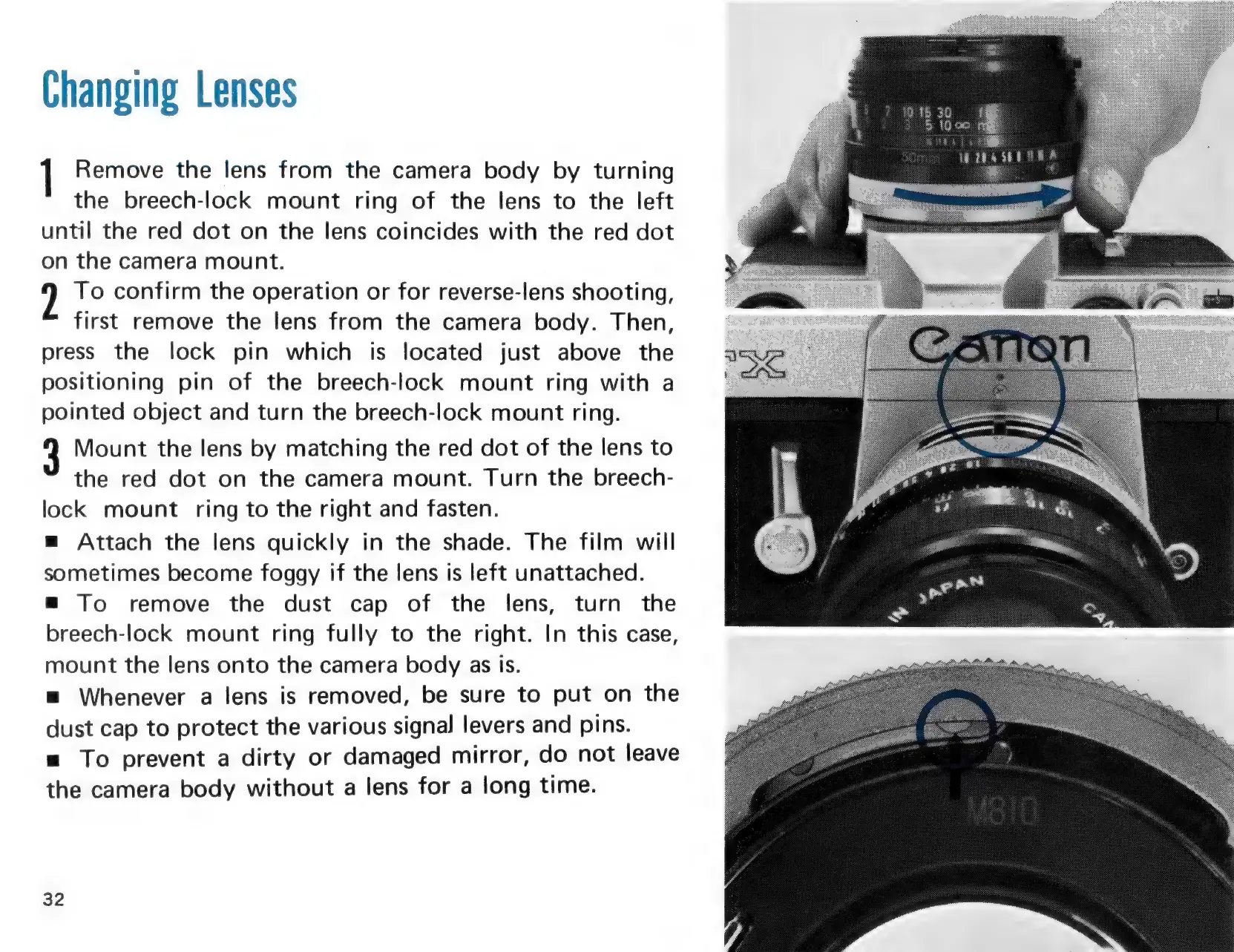
1
Remove
the
lens
from
the
camera
body
by
turning
the
breech-lock
mount
ring
of
the
lens
to
the
left
until
the
red
dot
on
the
lens
coincides
with
the
red
dot
on
the
camera
mount.
?
To
confirm
the
operation
or
for
reverse-lens
shooting,
first
remove
the
lens
from
the
camera
body.
Then,
press
the
lock
pin
which
is
located
just
above
the
positioning
pin
of
the
breech-lock
mount
ring
with
a
pointed
object
and
turn
the
breech-lock
mount
ring.
3
Mount
the
lens
by
matching
the
red
dot
of
the
lens
to
the
red
dot
on
the
camera
mount.
Turn
the
breech-
lock
mount
ring
to
the
right
and
fasten.
m
Attach
the
lens
quickly
in
the
shade.
The
film
will
sometimes
become
foggy
if
the
lens
is
left
unattached.
=
To
remove
the
dust
cap
of
the
lens,
turn
the
breech-lock
mount
ring
fully
to
the
right.
In
this
case,
mount
the
lens
onto
the
camera
body
as
Is.
=
Whenever
a
lens
is
removed,
be
sure
to
put
on
the
dust
cap
to
protect
the
various
signal
levers
and
pins.
=
To
prevent
a
dirty
or
damaged
mirror,
do
not
leave
the
camera
body
without
a
lens
for
a
long
time.
32
We
wanye

Related product manuals