30
Selecting a Registered Camera Server and Connecting
Procedure
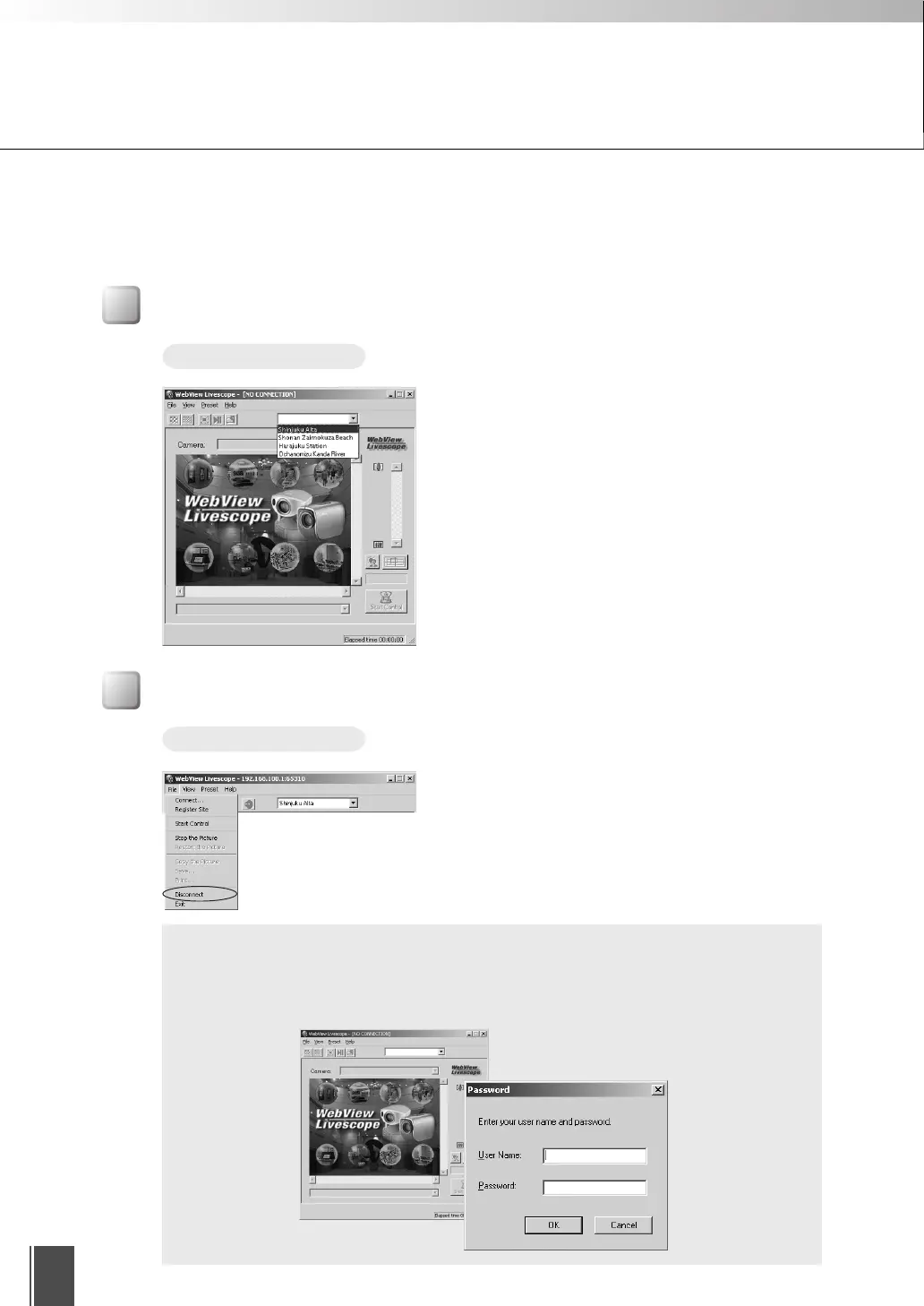
Select the connection target from the site selection
box. The camera servers displayed here are sites that
were registered by selecting “Add to camera site list”
when a connection was made by specifying a
connection target, or registered using the “Register
Connected Site button (→ p.39)”.
See p.47 for details on registering or changing a
server.
Disconnecting
Procedure
Choose Disconnect from the File menu, or close the
Viewer window to exit.
c
Note
If you connect to a site containing user access restrictions, you will be asked
to enter a user name and a password. Enter the correct user name and
password to complete the connection. (Refer to the User’s Manual of the
camera server.)
■ Add to camera site list
When this is ticked, camera server information that was entered is registered in the
viewer, and you can view video by simply selecting it from the selection box. Once
ticked, in the “Nickname” field enter the name with which you want to register.
Connecting to the Camera Server










 To Next Page