42
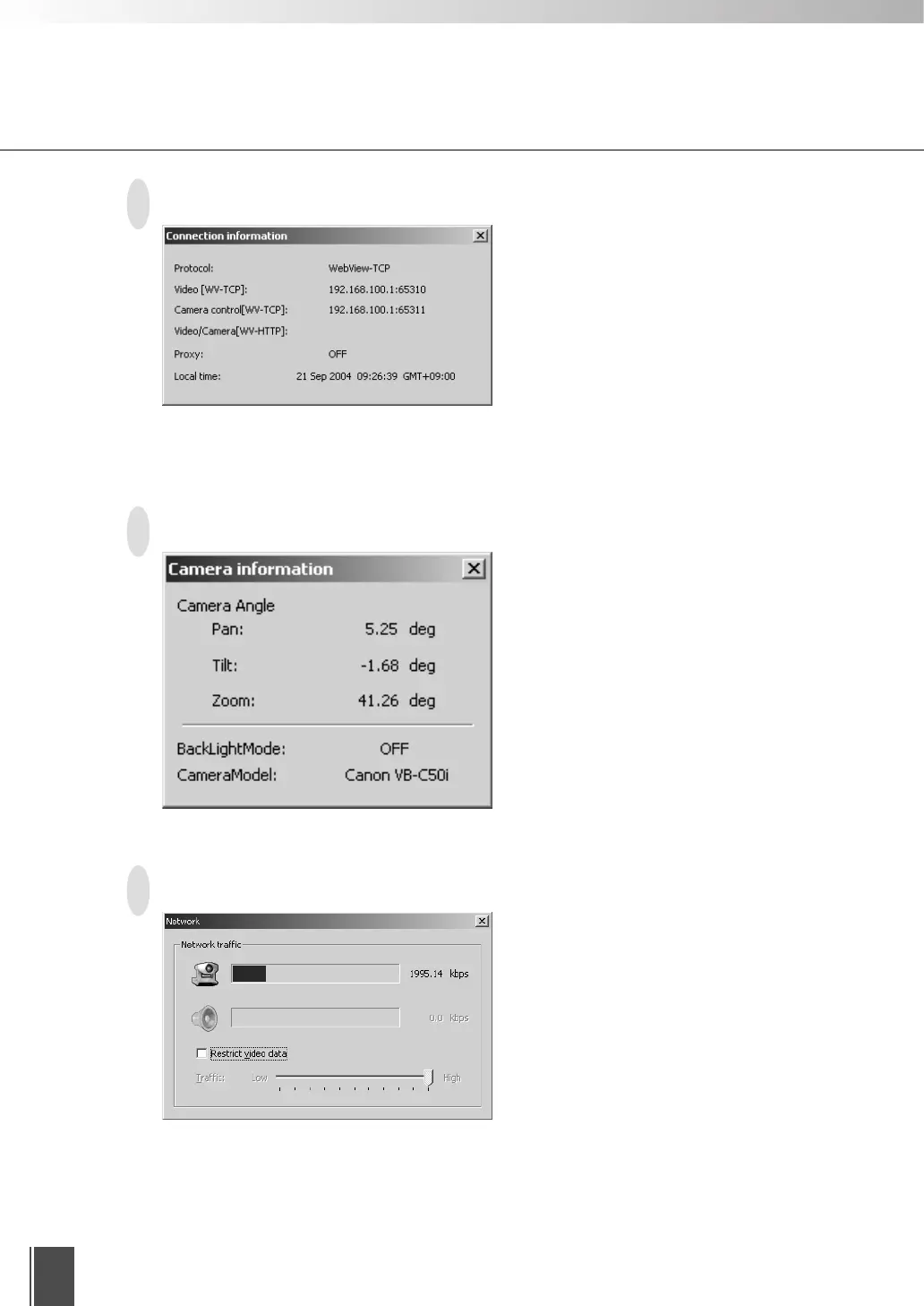
Connection Information
● Protocol
WebView-TCP or WebView-HTTP
● Video [WV-TCP]
IP address of camera server:port number
● Camera control [WV-TCP]
IP address of camera server:port number
● Video/Camera [WV-HTTP]
IP address of camera server:port number
● Proxy
Proxy usage information
● Local time
Local time on the camera server (GMT)
Camera Information
● Pan
Current camera pan angle
● Tilt
Current camera tilt angle
● Zoom
Current camera zoom (viewing angle)
value
● BackLightMode
Current backlight adjustment ON/OFF
status
● CameraModel
Model of the camera
Network
● Indicator (camera mark)
Video data network band
● Indicator (speaker mark)
Audio reception network band
* Not displayed if Audio is not connected.
● Restrict video data
You can control the video data band traffic.
Using the Viewer for PC










 To Next Page