91
By attaching the Canon Bluetooth Unit BU-30 to the USB port, you can connect Bluetooth®
GPS devices wirelessly. (Bluetooth® devices other than GPS devices cannot be connected).
When using non-Canon Bluetooth units, confirm normal operation before use.
Turn off the GPS device and camera before attaching the Bluetooth unit to the transmitter.
The transmitter’s USB port is not hot-pluggable. Bluetooth units cannot be connected or
disconnected indiscriminately. Follow the instructions in this section when attaching or
detaching Bluetooth units.
1
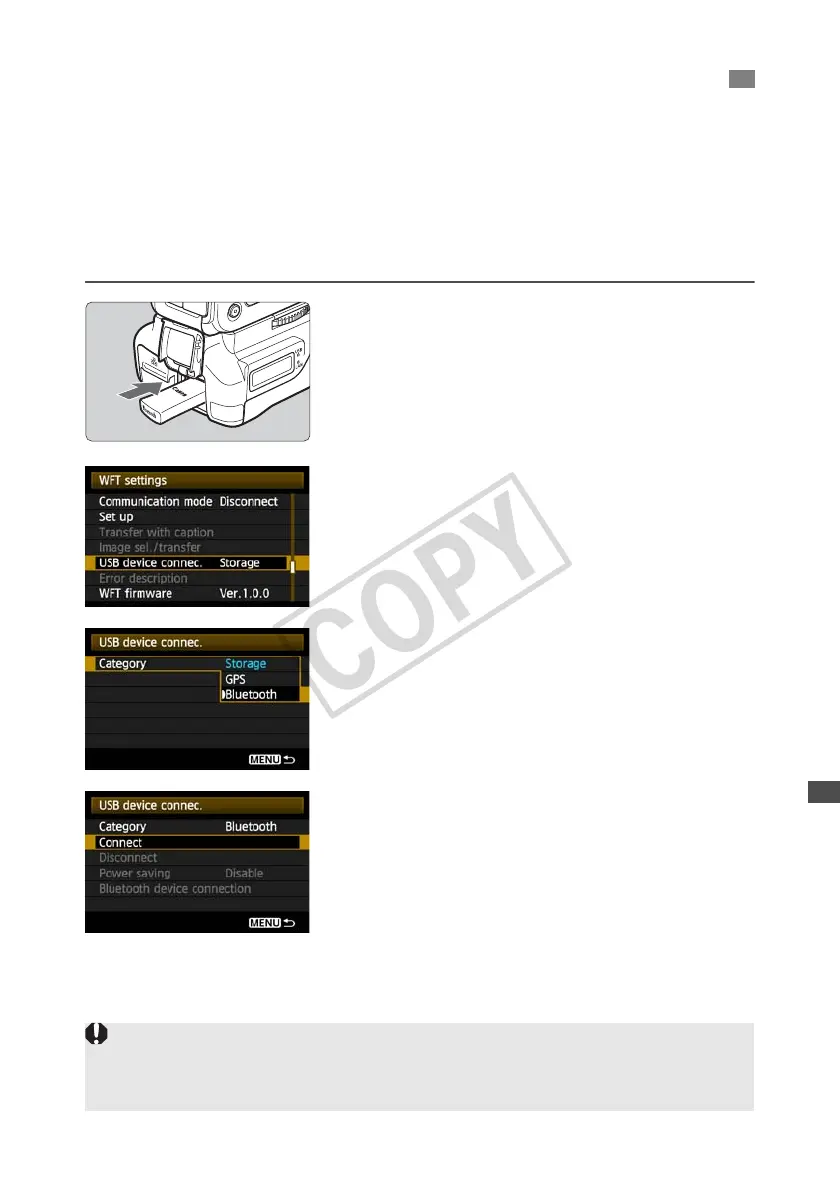
Attach the Bluetooth unit.
Open the port cover and attach the Bluetooth unit.
2
In [WFT settings], select [USB device
connec.]
If you will not use a wireless or wired LAN at the
same time as the Bluetooth unit, set
[Communication mode] to [Disconnect].
3
Select [Bluetooth].
4
Select [Connect].
Connecting GPS Devices via Bluetooth
When replacing the transmitter battery, always set the camera’s power switch to <
OFF
> before
opening the transmitter battery compartment cover. If the transmitter battery compartment cover is
opened without setting the camera’s power switch to <
OFF
>, you will need to reestablish the
connection to the Bluetooth unit.



 To Next Page
 Loading...



