Home
Canon
Digital Camera
WP-DC26
Page 36 (Removing the Camera)
Canon WP-DC26 - Removing the Camera; Post-Use Drying and Cleaning; Opening Case and Camera Removal; Interior Wiping
146 pages
Manual
Go to English
Save Page as PDF
To Next Page
To Next Page
To Previous Page
To Previous Page
Loading...
17
1
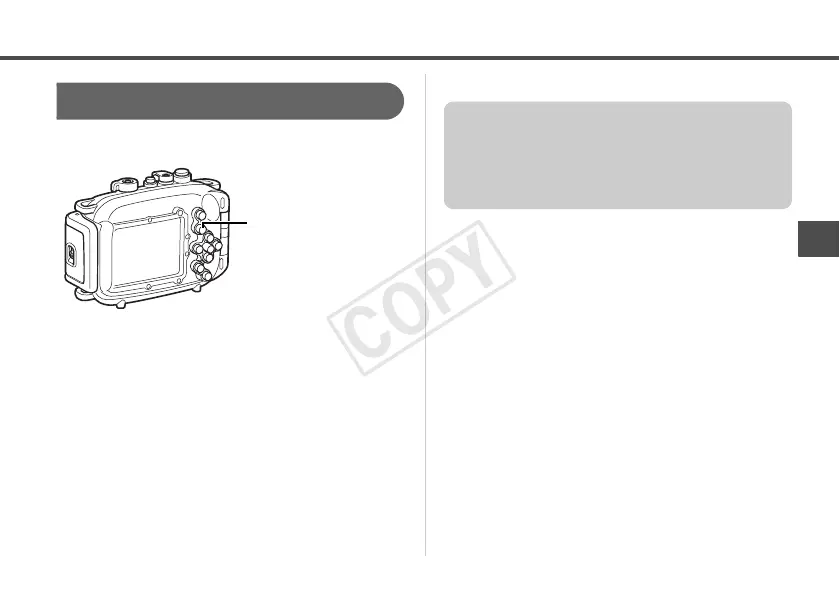
Press the
1
(Playback) button.
2
When you have finished using the
camera, turn
the camera off.
Playback
1
(Playback) Button
After you use the Waterpr
oof Case, be sure to
remove the camera from it. If you leave the
Waterproof Case containing the camera in
direct sunlight or in a high-temperatu
re place,
this may cause a fire or the case to burst.
C
OP
Y
35
37
Table of Contents
Main Page
User Guide
1
Safety Precautions
23
Handling Precautions
24
Care and Maintenance
26
Preparing the Camera
28
Using the Control Dial
33
Using the Flash
34
Removing the Camera
37
Specifications
39
Vorsichtsmaßnahmen bei der Bedienung
44
Pflege und Wartung
46
Bezeichnung der Teile
47
Vorbereitung der Kamera
48
Technische Daten
59
Precauciones de Seguridad
62
Precauciones de Manejo
64
Cuidado y Mantenimiento
66
Parte Frontal
67
Parte Posterior
67
Preparación de la Cámara
68
Toma de Fotografías
72
Utilización del Flash
75
Especificaciones
79
Clause de Non-Responsabilité
80
Contenu de L'emballage
82
Précautions de Sécurité
82
Précautions D'emploi
84
Entretien du Boîtier
86
Face Avant
87
Face Arrière
87
Préparation de L'appareil Photo
88
Utilisation du Flash
95
Fiche Technique
99
Dichiarazione DI Non Responsabilità
100
Precauzioni DI Sicurezza
102
Parte Anteriore
107
Parte Posteriore
107
Operazioni Preliminari
108
Preparazione Della Fotocamera
108
Specifiche Tecniche
119
Related product manuals
Canon WP-DC34
146 pages
Canon WP-DC35
138 pages
Canon WP-DC54
2 pages
Canon WP-DC51
3 pages
Canon Sure Shot WP-1
39 pages
Canon N10-W02
19 pages
Canon EOA 750D W
212 pages
Canon EOS Rebel T6i W
414 pages
Canon EOS REBEL T6 (W)
164 pages
Canon Xsi
196 pages
Canon EOS 90D
646 pages
Canon EOS C70
215 pages



 To Next Page