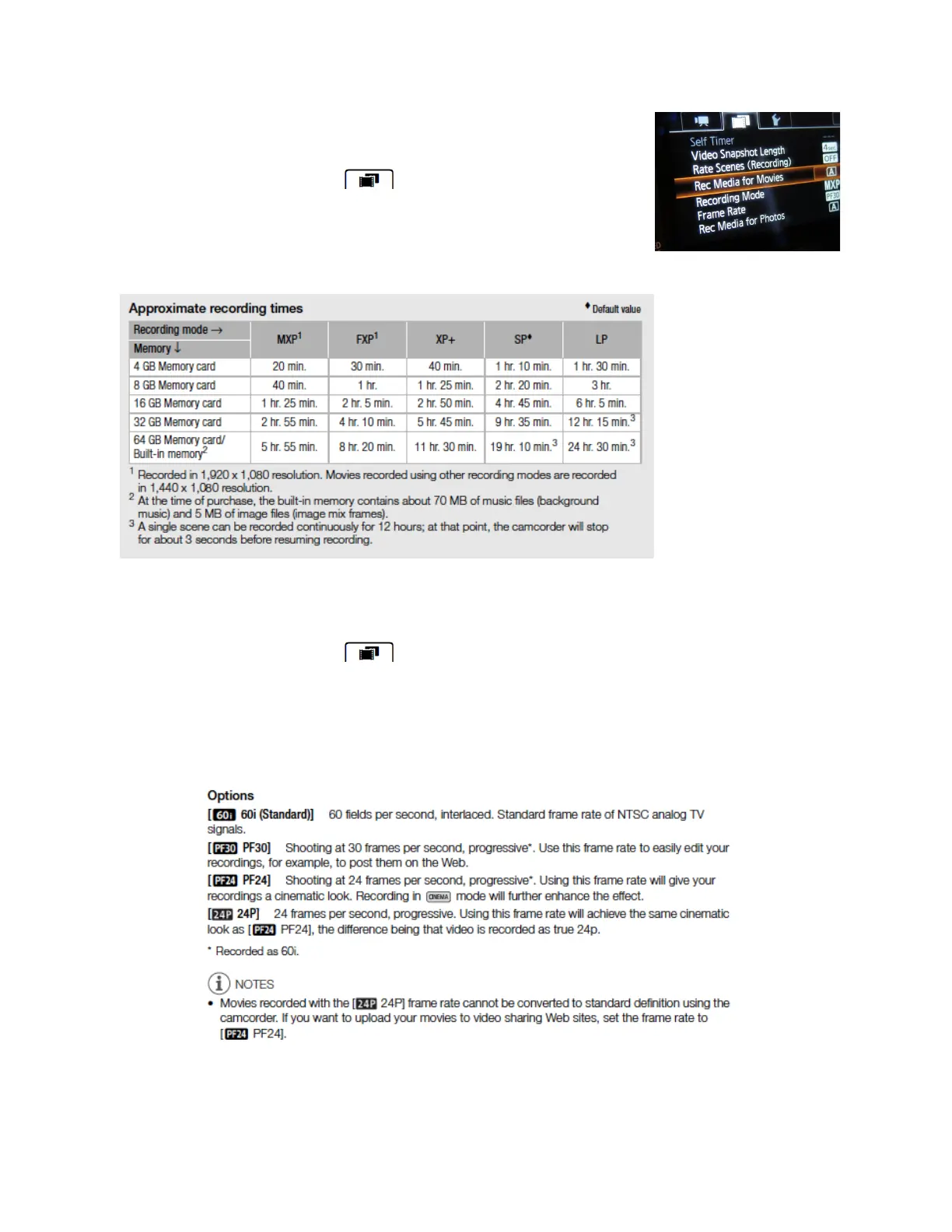
SETTING THE RECORDING MODE
• touch FUNC > MENU
•
touch the film tab
• > Recording Mode
• choose the recommended format : SP
• then touch the X tab to quit
*the higher the
recording quality,
the larger the file.
Final Cut Pro will
convert 1440 x
1080 resolution to
1920 x 1080 - so
you will have full
HD and more
room to record on
the SD card.
SETTING THE FRAME RATE
• touch FUNC > MENU
•
touch the film tab
• touch Frame Rate, then the recommended frame rate: PF 30
•touch the X tab to quit
*
Final Cut will convert 60i to 30 frame rate as it is the standard for editing, so
recording at 60i will just waste room on the SD card - the files will be twice a big.
CANON XA-10 BASIC SETUP! page 2





 To Next Page