EasyManua.ls Logo

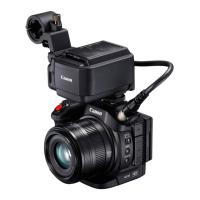
Canon XC15 - User Manual

Canon XC15
170 pages
Print Icon
To Next Page IconTo Next Page
Loading...
PUB. DIE-0491-000C
Instruction Manual
4K Camcorder
Firmware ver. 1.0.1.0

Table of Contents

Other manuals for Canon XC15

Question and Answer IconNeed help?

Do you have a question about the Canon XC15 and is the answer not in the manual?

Summary

Preparations

Charging the Battery Pack

Details the steps for charging the camcorder's battery pack using the AC adapter for initial use.

Recording Video and Taking Photos

Preparing to Record

Outlines the necessary steps before starting video or photo recording, including accessory setup.

Basic Recording

Covers the fundamental steps for recording video clips and taking photos with the camcorder.

Video Configuration: Resolution, System Frequency, Frame Rate, Bit Rate

Guides on setting resolution, system frequency, frame rate, and bit rate for optimal video recording.

Shooting Modes

Manual Exposure (M)

Explains how to manually control exposure settings like aperture, shutter speed, and ISO.

Aperture Priority AE (Av)

Details how the camcorder automatically sets shutter speed for optimal exposure based on aperture.

Shutter Priority AE (Tv)

Explains how the camcorder automatically sets aperture based on shutter speed for optimal exposure.

Automatic Gain and ISO Limits

Exposure

Exposure Lock

Describes how to lock exposure settings to maintain consistent brightness during shooting.

Touch Exposure

Explains how to adjust exposure by touching specific areas on the screen for precise control.

Adjusting the Focus

Autofocus (AF) Mode

Explains the camcorder's continuous autofocus system and how to use the focus ring.

Manual Focus (MF)

Details how to manually adjust focus using the focus ring, FUNC. menu, or remote.

Image Stabilizer

To activate Standard IS or Dynamic IS

Guides on activating Standard or Dynamic Image Stabilization for steadier shots.

To activate Powered IS

Explains how to activate Powered IS for enhanced stabilization when stationary.

Recording Audio

Connecting an External Microphone or External Audio Input Source to the Camera

Details connecting external microphones and audio sources via the MIC and INPUT terminals.

Slow & Fast Motion Mode

Pre-recording Mode

Customization

Customizing the FUNC. Menu

Guides on changing functions displayed on the FUNC. menu for quick access.

Assignable Buttons

Details how to assign various functions to the camcorder's assignable buttons for customized control.

Saving and Loading Menu Settings

Playback

Playing Back Recordings

Covers how to play back recorded clips and photos using the camcorder's index screens.

Deleting Recordings

External Connections

Connecting to an External Monitor

Wi-Fi Functions

Browser Remote: Controlling the Camcorder from a Network Device

Troubleshooting

Power source

Addresses issues related to the camcorder not turning on or shutting off unexpectedly.

Recording

Covers common recording problems such as the inability to start recording or focus issues.

Handling Precautions

Specifications

Summary

Preparations

Charging the Battery Pack

Details the steps for charging the camcorder's battery pack using the AC adapter for initial use.

Recording Video and Taking Photos

Preparing to Record

Outlines the necessary steps before starting video or photo recording, including accessory setup.

Basic Recording

Covers the fundamental steps for recording video clips and taking photos with the camcorder.

Video Configuration: Resolution, System Frequency, Frame Rate, Bit Rate

Guides on setting resolution, system frequency, frame rate, and bit rate for optimal video recording.

Shooting Modes

Manual Exposure (M)

Explains how to manually control exposure settings like aperture, shutter speed, and ISO.

Aperture Priority AE (Av)

Details how the camcorder automatically sets shutter speed for optimal exposure based on aperture.

Shutter Priority AE (Tv)

Explains how the camcorder automatically sets aperture based on shutter speed for optimal exposure.

Automatic Gain and ISO Limits

Exposure

Exposure Lock

Describes how to lock exposure settings to maintain consistent brightness during shooting.

Touch Exposure

Explains how to adjust exposure by touching specific areas on the screen for precise control.

Adjusting the Focus

Autofocus (AF) Mode

Explains the camcorder's continuous autofocus system and how to use the focus ring.

Manual Focus (MF)

Details how to manually adjust focus using the focus ring, FUNC. menu, or remote.

Image Stabilizer

To activate Standard IS or Dynamic IS

Guides on activating Standard or Dynamic Image Stabilization for steadier shots.

To activate Powered IS

Explains how to activate Powered IS for enhanced stabilization when stationary.

Recording Audio

Connecting an External Microphone or External Audio Input Source to the Camera

Details connecting external microphones and audio sources via the MIC and INPUT terminals.

Slow & Fast Motion Mode

Pre-recording Mode

Customization

Customizing the FUNC. Menu

Guides on changing functions displayed on the FUNC. menu for quick access.

Assignable Buttons

Details how to assign various functions to the camcorder's assignable buttons for customized control.

Saving and Loading Menu Settings

Playback

Playing Back Recordings

Covers how to play back recorded clips and photos using the camcorder's index screens.

Deleting Recordings

External Connections

Connecting to an External Monitor

Wi-Fi Functions

Browser Remote: Controlling the Camcorder from a Network Device

Troubleshooting

Power source

Addresses issues related to the camcorder not turning on or shutting off unexpectedly.

Recording

Covers common recording problems such as the inability to start recording or focus issues.

Handling Precautions

Specifications

Canon XC15 Specifications

General IconGeneral
Sensor Type1.0-inch CMOS
Effective Pixels12.0 megapixels
ISO Range100-20000
Image StabilizationOptical
BatteryLP-E6N
Video Resolution4K UHD (3840 x 2160)
LCD Screen3.0-inch LCD, 1.03 million dots
Storage MediaCFast 2.0, SD Card
Maximum Aperturef/2.8 - f/5.6
ND FilterBuilt-in ND filter, 3-stop
Shutter Speed1/2000 to 1/8 sec
Audio RecordingBuilt-in stereo microphone

Related product manuals