EasyManua.ls Logo

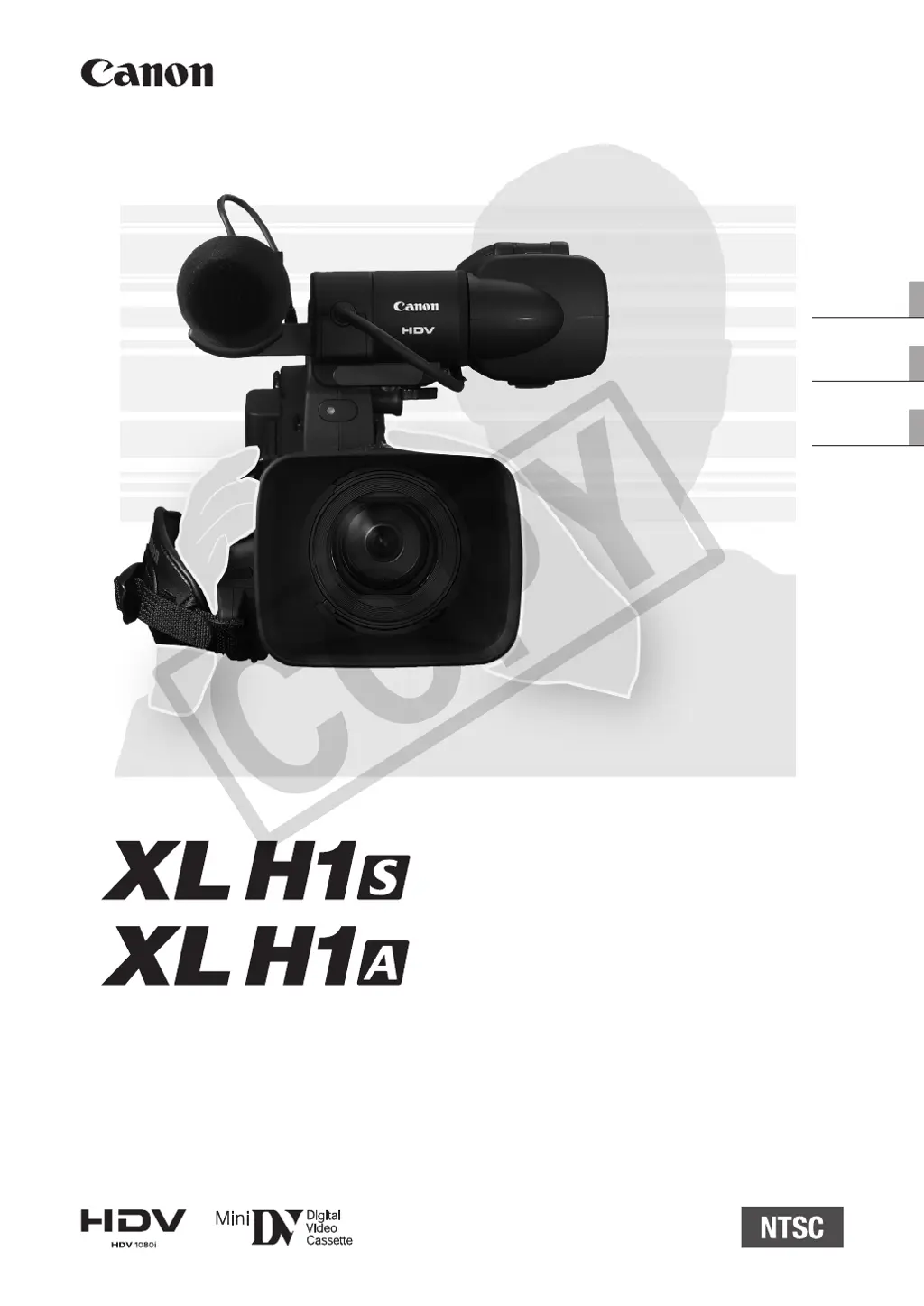
Canon XL H1S - User Manual

Canon XL H1S
163 pages
Print Icon
To Next Page IconTo Next Page
Loading...
35
HD Video Camera Recorder
Instruction Manual
Caméscope et lecteur vidéo HD
Manuel d'instruction
Videocámara y grabadora HD
Manual de Instrucciones
PUB. DIM-870
English
Français
Español
NTSC
COPY

Table of Contents

Questions and Answers

  • R
    Ricky HernandezSep 23, 2025
    What does it mean when flashes red on my Canon XL H1S?
    • M
      Mrs. Lori Mitchell DDSSep 23, 2025
      If flashes red on your Canon Camcorder, a card error has occurred. Turn off the camcorder. Remove and reinsert the memory card. Initialize the memory card if flashing persists.
  • H
    hmunozAug 25, 2025
    What to do if my Canon XL H1S Camcorder will not focus?
    • L
      Lisa HullAug 25, 2025
      If your Canon Camcorder will not focus, it could be due to the following reasons: * Autofocus may not work on that subject. Try to focus manually. * The viewfinder may not be adjusted. Adjust the viewfinder with the dioptric adjustment lever. * The lens might be dirty. Clean the lens.
  • A
    Antonio BlackAug 25, 2025
    Why does my Canon XL H1S Camcorder switch off by itself?
    • S
      Selena HarrisAug 26, 2025
      Your Canon Camcorder might be switching off by itself because the power save function has been activated. Try turning the camcorder back on.
  • K
    Kyle WhiteAug 27, 2025
    What to do if pressing the Start/Stop button will not start recording on my Canon XL H1S?
    • D
      Daniel AndersonAug 27, 2025
      If pressing the Start/Stop button on your Canon Camcorder doesn't start recording, it could be due to several reasons: * A cassette may not be loaded. Load a cassette. * The dial may not be set to a recording program. Set the dial to a recording program. * The lock switch might be set to prevent the operation of the controls on the carrying handle. Slide the lock switch to the left to enable the operation of the carrying handle controls.
  • O
    owebsterAug 27, 2025
    How to fix a Canon Camcorder when the screen switches on and off?
    • S
      Steven HicksAug 27, 2025
      If the screen of your Canon Camcorder switches on and off, the battery pack is likely exhausted. Replace or charge the battery pack.
  • S
    Steven HoodSep 14, 2025
    What to do if tape is running, but the image will not appear on the TV screen from my Canon XL H1S?
    • R
      Ronald RodriguezSep 14, 2025
      If the tape is running, but the image will not appear on the TV screen from your Canon Camcorder, consider the following: * The video heads are dirty. Clean the video heads. * You attempted to play back or dub a copyright-protected tape. Stop playback/dubbing. * The video output cable is not connected correctly. Verify that the video cable is connected properly.
  • T
    Tracy TannerSep 12, 2025
    How to fix low audio recording level on my Canon XL H1S?
    • E
      elawsonSep 12, 2025
      If the audio is recorded at a very low level on your Canon Camcorder, check if: * The REC LEVEL switch is set to M, and the recording level is set too low. Adjust the audio level correctly. * The microphone attenuator is turned on. Set the FRONT MIC ATT. switch or the switch to OFF.
  • C
    christopher73Sep 13, 2025
    What to do if pressing the playback button does not start playback on my Canon XL H1S Camcorder?
    • C
      Colin DanielsSep 13, 2025
      If pressing the playback button does not start playback on your Canon Camcorder, it could be because: * The camcorder is turned off or is not set to mode. Set the camcorder to mode. * A cassette is not loaded. Load a cassette.
  • W
    wgloverSep 4, 2025
    What does it mean when “SET THE TIME ZONE, DATE AND TIME” appears on the screen of my Canon XL H1S?
    • L
      Lisa DiazSep 5, 2025
      If “SET THE TIME ZONE, DATE AND TIME” appears on the screen of your Canon Camcorder, it means the time zone, date and time are not set, or the built-in rechargeable lithium battery is exhausted. Set the time zone, date and time. If necessary, power the camcorder with the compact power adapter and leave it connected with the dial set to OFF for at least 24 hours to recharge the built-in battery before making the settings.
  • A
    Andrea WeberSep 2, 2025
    What does it mean when “REMOVE THE CASSETTE” appears on the screen of my Canon XL H1S Camcorder?
    • N
      nmorrisSep 2, 2025
      If “REMOVE THE CASSETTE” appears on the screen of your Canon Camcorder, it means the camcorder stopped operating to protect the tape. Remove the cassette and reinsert it.

Canon XL H1S Specifications

General IconGeneral
BrandCanon
ModelXL H1S
CategoryCamcorder
LanguageEnglish

Related product manuals