EasyManua.ls Logo

Canon ZR30MC - User Manual

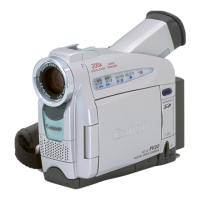
Canon ZR30MC
6 pages
Print Icon
To Next Page IconTo Next Page
Loading...
www.canondv.com
The Perfect Companion
for Making Digital Home Movies
Question and Answer IconNeed help?

Do you have a question about the Canon ZR30MC and is the answer not in the manual?

Summary

High quality digital video

DV Format

Describes the benefits of DV format for amazing picture and sound quality.

10 x Optical Zoom Lens plus 200 x Digital Zoom

Details the optical and digital zoom capabilities for capturing distant subjects.

Progressive Photo (ZR30 MG and ZR25 MG only)

Explains the Progressive Photo function for sharp still images of moving subjects.

Digital Photo Mode

Covers the camcorder's ability to function as a digital still camera.

Image Stabilizer

Highlights the image stabilization system for smooth, shake-free pictures.

Loaded with features

Program Auto Exposure

Automatically adjusts internal controls for optimal video in various shooting conditions.

Seamless Multimedia Connectivity

IEEE 1394 DV Terminal

Details the DV IN/OUT terminal for transferring video in pure digital form.

MultiMediaCard and SD Memory Card (ZR30 MC and ZR25 MG only)

Explains using memory cards for storing and managing still images.

Power Sources

Specifications

Provides detailed technical specifications for power, recording, lens, and dimensions.

Summary

High quality digital video

DV Format

Describes the benefits of DV format for amazing picture and sound quality.

10 x Optical Zoom Lens plus 200 x Digital Zoom

Details the optical and digital zoom capabilities for capturing distant subjects.

Progressive Photo (ZR30 MG and ZR25 MG only)

Explains the Progressive Photo function for sharp still images of moving subjects.

Digital Photo Mode

Covers the camcorder's ability to function as a digital still camera.

Image Stabilizer

Highlights the image stabilization system for smooth, shake-free pictures.

Loaded with features

Program Auto Exposure

Automatically adjusts internal controls for optimal video in various shooting conditions.

Seamless Multimedia Connectivity

IEEE 1394 DV Terminal

Details the DV IN/OUT terminal for transferring video in pure digital form.

MultiMediaCard and SD Memory Card (ZR30 MC and ZR25 MG only)

Explains using memory cards for storing and managing still images.

Power Sources

Specifications

Provides detailed technical specifications for power, recording, lens, and dimensions.

Canon ZR30MC Specifications

General IconGeneral
TypeMiniDV
Image Sensor1/4 inch CCD
Optical Zoom20x
Digital Zoom400x
Image StabilizationElectronic
Exposure ControlAutomatic
White BalanceAutomatic
Recording MediaMiniDV
LCD Screen2.5-inch color LCD
Video Resolution720x480 pixels
Audio Format16-bit PCM stereo
Effective Pixels680, 000
FocusAuto, Manual
Shutter Speed1/60 sec
MicrophoneStereo
InterfaceUSB, IEEE 1394 (FireWire)
Power SupplyRechargeable battery

Related product manuals