Need help?
Do you have a question about the Canopus ADVC-55 and is the answer not in the manual?
Legal statement regarding copyright protection and fair use of materials.
Details of the ADVC-55 limited warranty, coverage period, and exclusions.
Crucial warnings about avoiding disassembly, wet environments, heat, damage, and misuse.
Advice on potential health effects, such as seizures from flashing lights.
Warnings about unstable placement and incorrect usage to prevent harm or damage.
Information on FCC compliance, testing, and the device's declaration of conformity.
Important notes, disclaimers, and trademark information about the product.
Guidance on how to use this user manual and interpret its content.
Highlights the main advantages and features of the ADVC-55 device.
Lists the items included in the product package.
Provides detailed technical specifications of the ADVC-55 unit.
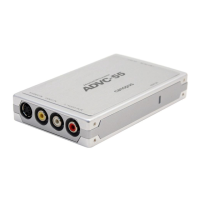
Identifies and describes the various input and output ports on the ADVC-55.
Explains how to configure the ADVC-55 using its DIP switches.
Step-by-step guide on connecting and capturing analog video to a computer.
Instructions for copying analog video data onto a DV camcorder.
Details on connecting the optional AC adapter for power supply.
 General
| Brand | Canopus |
|---|---|
| Model | ADVC-55 |
| Category | Media Converter |
| Language | English |

 To Next Page