MAP1 IP Configuration Page 6 of 12
July 2021 • Rev. 1.2
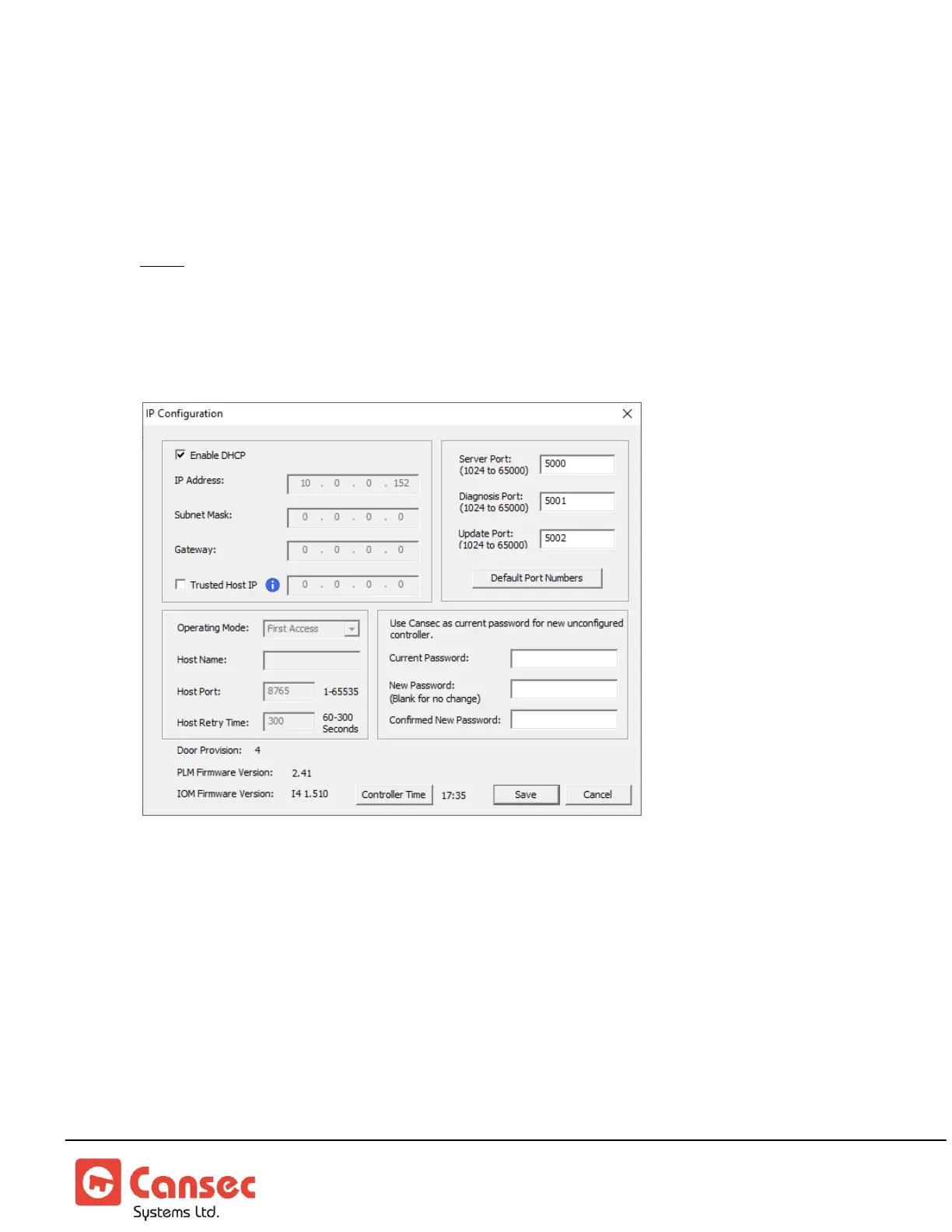
5. Double click on one of the detected controllers or select it and click Configure. For
static IP address setting unselect Enable DHCP and consult with IT personnel
before entering the IP address, Subnet Mask, Gateway IP Address and Port numbers.
Select Enable DHCP if static IP address is not required.
Note: The optional Trusted Host IP can be entered to instruct the controller to accept data
connection (server port 5000) only from the host computer having the
First Access
Express
software installed. Other connections for diagnosing and updating are not
limited by this Trusted Host IP and can be connected from any host. If you have an old
firmware, please contact Cansec support.
6. The factory default or current password for a new un-configured MAP1 controller is
Cansec. The password must be changed to something else other than Cansec.
7. Click Save. The controller saves the new settings and reboots for the settings to take
effect.



 To Next Page