10
Control panel
USE OF THE APPLIANCE
Display
Display Designation Description
0 Zero The heating zone is activated.
1…9 Power level Selection of the cooking level.
Pan failure Inadequate pan or pan conflict.
E Error message Electronic failure.
H Residual heat The heating zone is hot.
B Booster The Booster is activated.
Locking Control panel locking.
Keep warm, Melting, Simmering Maintain automatically at approximately 44, 70 and 94°C
II Pause The hob is in pause.
Pan display
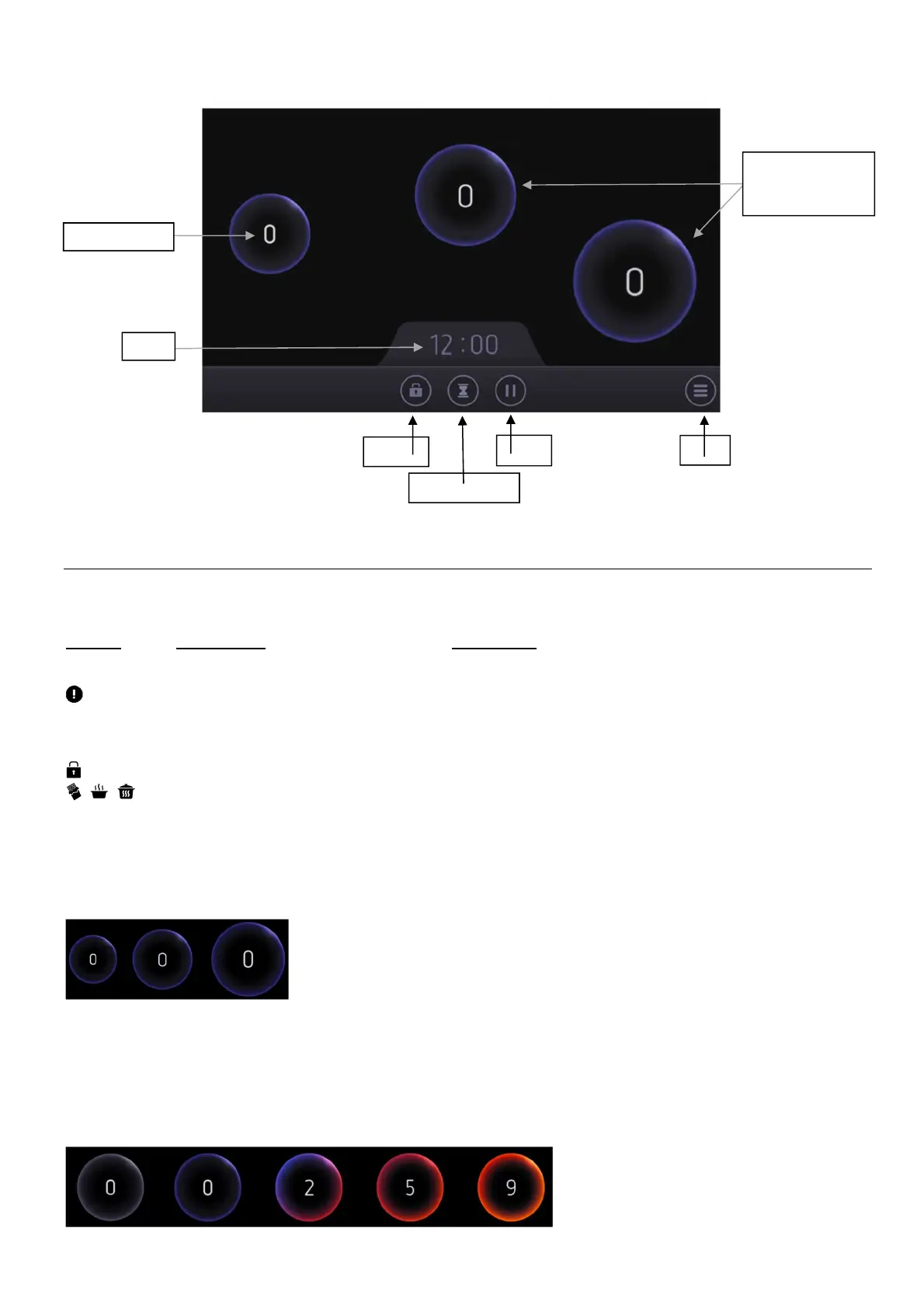
There are 3 types of display possible for your pan, according to pan dimensions: small, medium and large.
In the same way, the colour of the pan display will evolve according to the power level selected:
• Grey No power / pan lifted
• Blue Power level 0
• Purple Power level 1 to 3.5
• Red Power level 4 to 6.5
• Orange Power level 7 to B
Menu
Pause
Minute minder
Keylock
Clock
Power display
Pan position
(size according to
pan dimension)



 To Next Page