Instruction manual CM130
16
Please keep this instruction manual for future reference
BUILT IN FURNITURE
NOTE:
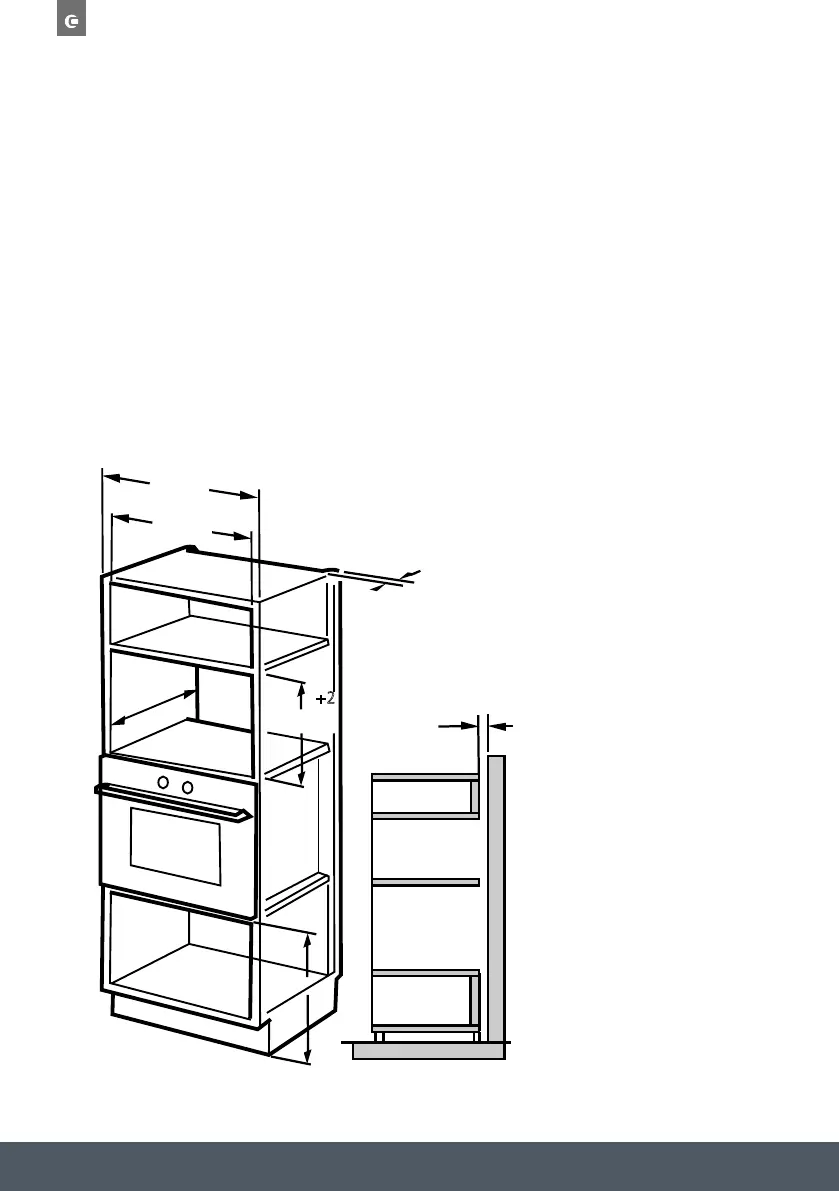
The fitted cabinet the appliance is being installed into must not have a back wall behind
the appliance. A gap must be maintained between a wall and the base of the unit above. Specific
gap size can be referenced by the diagrams.
Minimum installation height: 85cm
WARNING:
Do not cover ventilation slot or air intake points.
Instruction manual CM12618
Please keep this instruction manual for future reference
ELECTR ICAL C ONNEC TION
NOTE:
The oven is fitted with a plug and must only be connected to a property installed earthed socket.
The socket must only be installed and the connecting cable must only be replaced by a qualified
electrician, and in accordance with the appropriate regulations. If the plug is no longer accessible
following installation, an all-pole isolating switch must be present on the installation side with a
contact gap of at least 3mm.
BUILT-IN FURNITU R E
» The fittedcabinet the appliance is being installed into must not have a back wall behind
the appliance.
» Minimum height 85cm.A gap must be maintained between the wall and the base of the unit
above. Specific gap size can bereferenced by the diagrams.
»
(min)
500mm
380mm
600mm
+8
+
2
560mm
45mm
45mm
Installation Instructions
Please Read the Manual Carefully Before Installation
A. Built-in furniture
B.Prep are the cabi inet
put the template on the bottom plane of cabinet.
1. Read the instruction on the BOTTOM CA INET TEMPLATE ,
2. Make the marks on the bottom plane of cabinet according to marks"a" of
of the template
a
a
CENTER LINE
FRONT EDGE
LEFT EDGE
T EDGE RIGH
3. Remove the bottom cabinet template and fix the bracket with screw A.
a
a
Screw A
Bracket
Bracket
Screw A
Centre line
850mm
B.Prep are the cabi inet
put the template on the bottom plane of cabinet.
1. Read the instruction on the BOTTOM CA INET TEMPLATE ,
2. Make the marks on the bottom plane of cabinet according to marks"a" of
of the template
a
a
CENTER LINE
FRONT EDGE
LEFT EDGE
T EDGE RIGH
3. Remove the bottom cabinet template and fix the bracket with screw A.
a
a
Screw A
Bracket
Bracket
Screw A
Centre line


 To Next Page