14 Instruction manual Wi6150 & Wi6155 Please keep this instruction manual for future reference
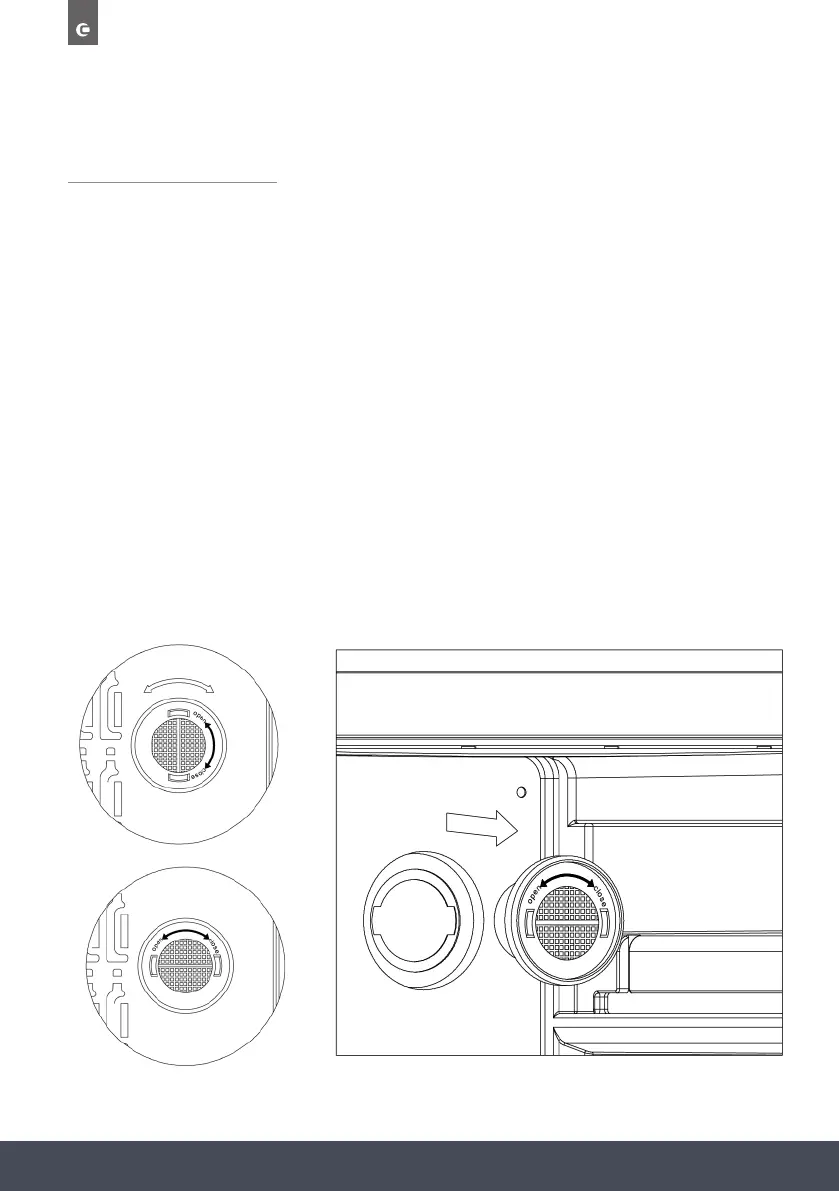
HOW TO REPLACE THE CHARCOAL FILTER
1. Open the door and remove the top 2 shelves (see removing the shelves).
2. Turn the filter as per Fig A.
3. As per Fig B, the filter should line up with the notches as shown.
4. Pull filter out (Fig C).
5. Insert replacement filter and twist as per Fig A to lock into position.
6. Re-install the shelves.
NOTE:
The charcoal filter should be replaced every 3-6 months depending on the unit’s exposure level
to odour.
Visit www.caple.co.uk to purchase the replacement charcoal filters.
Ø CONTROL PANEL (upper zone and middle zones)
Ø CONTROL PANEL (Lower zone)
“
++
”
Press this button to increase the temperature by 1ºC
“
- ”
Press this button to decrease the temperature by 1ºC.
Lower zone = 10-18ºC
How to replace the charcoal filter
Ø CONTROL PANEL (upper zone and middle zones)
Ø CONTROL PANEL (Lower zone)
“
++
”
Press this button to increase the temperature by 1ºC
“
- ”
Press this button to decrease the temperature by 1ºC.
Lower zone = 10-18ºC
How to replace the charcoal filter
Fig. A - Locked
Fig. B - Unlocked
Fig. C



 To Next Page