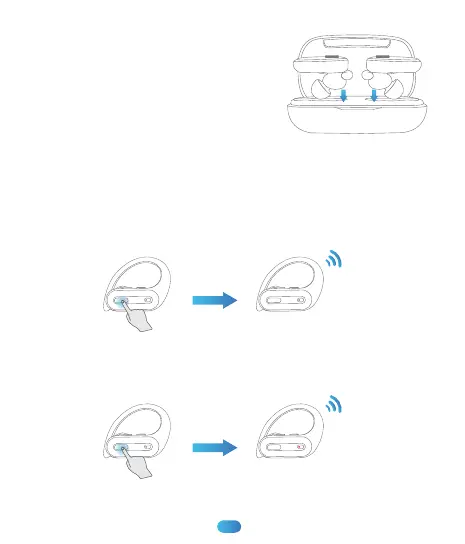
3. Put the earbuds back into the charging
case, the earbuds will disconnect & power
off automatically.
Manually Power on/off
1. Press & hold both earbuds’ (L & R) MFB button for about 2 secs,
earbud’s LED light flashes red and green alternately, then turn off,
which means the earbud turns on and is ready to pair.
2. In non-music mode, press & hold either earbud’s MFB button (L/R) for
about 5 secs, both earbuds will turn off at the same time with a prompt
sound “power off”.
2s
Power on
5s
Power o
08


 To Next Page