17 18
194°
360°
MEMO
20%
TOP
K
P18P17
2017.01月
初
版
Mac
Illustrator
CS6
DC3000
Checking the mounting position Checking the field of vision
When mounting the camera, ensure to meet all the below requirements.
After checking the video using your smartphone, determine where the camera is mounted inside your car and
how the power cable is arranged. In doing this, follow the instructions below.
*Install the Product properly according to this manual. Car products mounted incorrectly may be regarded as
a violation of your local traffic laws. Keep the camera body attached to the mount while driving and during
inspection.
While checking the video on your smartphone app, confirm an approximate position for the camera and
approximate angle of the lens.
*Do not start mounting yet.
After determining an appropriate mounting position, remove the power cable from the camera body and
detach the camera body from the mount.
Using
this Product
Safely Preparation Installation
Capturing
Images/Video
Viewing/Deleting
Media
Changing
Camera Settings Troubleshooting
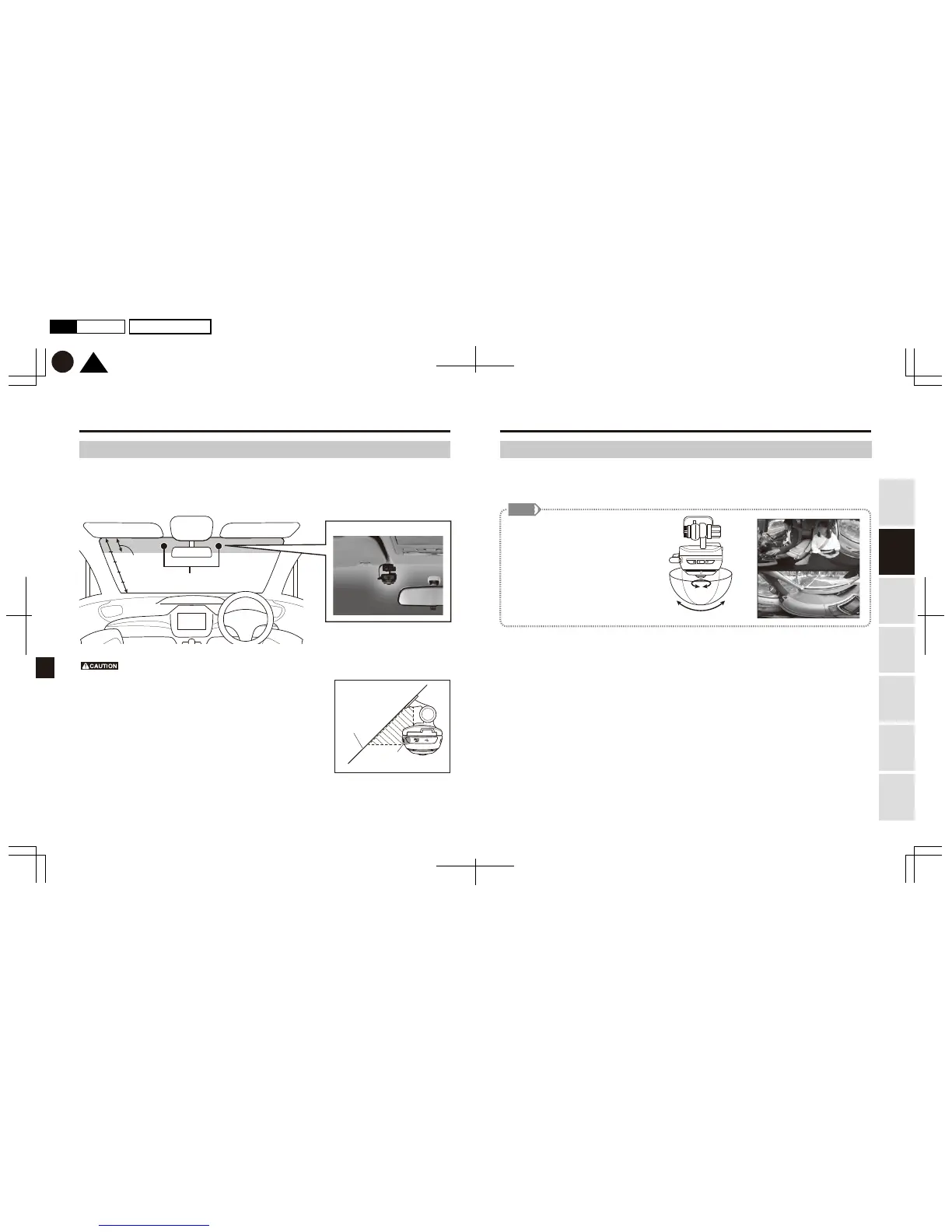
Recommended mounting position
Front
windshield
GPS antenna
<Example of a mounted camera>
*The mounted camera does not interfere with the driver’s vision and operation of
the vehicle.
*The mounted camera does not block the rearview mirror, or obstruct the vehicle’s
airbags.
*The camera is mounted within the upper 20% portion of the windshield. (See
illustration above)
*The camera is mounted so that its lens is within the wiping range of the windshield
wipers.
*The taped part of the camera does not overlap any heated wire printed on the
windshield or antennae.
*If additional security or safety cameras are already in place, the camera to be
mounted should not be within the view of such camera.
*No cable or metallic objects should be between the front windshield and the GPS
antenna. (see illustration on the right)
View angle of recorded video
This Product is a whole-sky, 360-degree
camera. Its recording range is
hemispherical, with viewing angles 360°
horizontally, and 194° vertically. (Figure 1)
If the camera is mounted with the lens
facing directly below, you can simultane-
ously record video of inside and outside of
your car. (Figure 2)
Figure 1 Figure 2


 To Next Page