45
Smart TV CB24iTV, CB28iTV & CB32iTV | 49892, 49891 & 49890UK
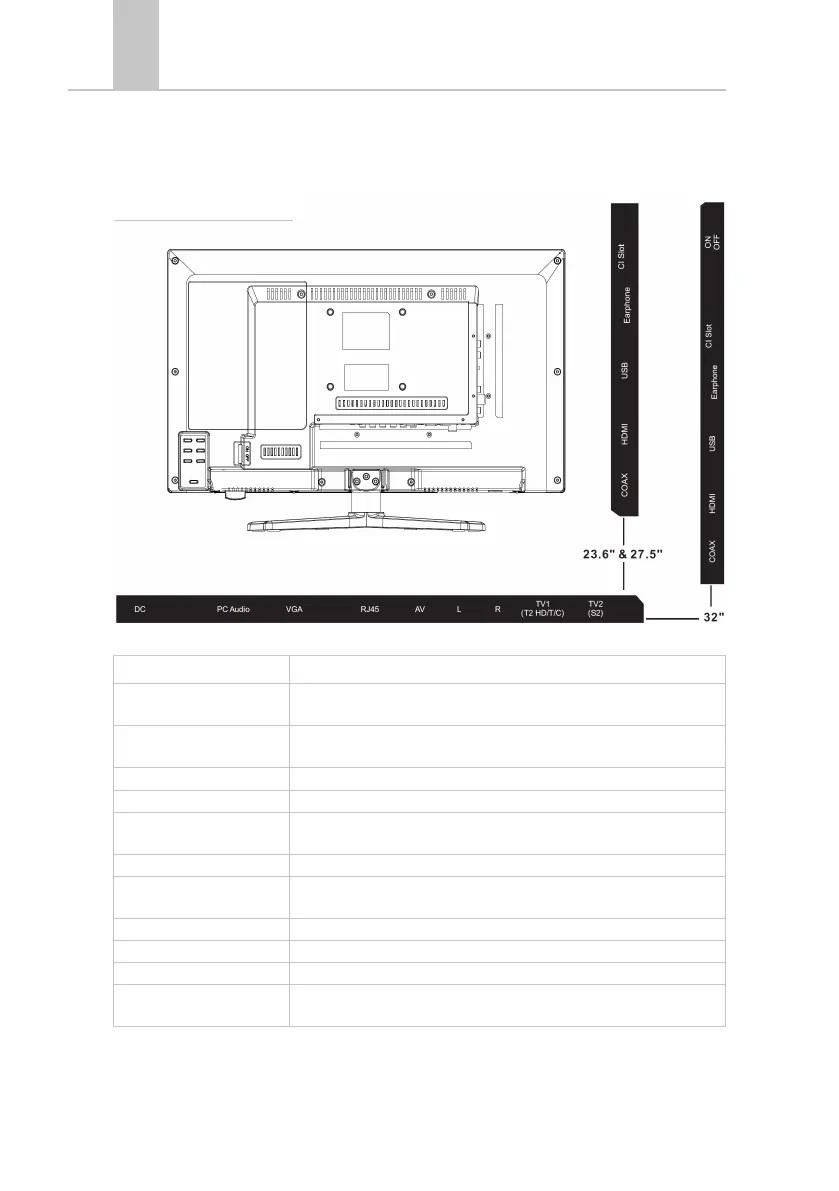
DC Power supply for the power supply (12V / 3A).
PC AUDIO Connection for the PC audio output. Only usable in combination with
the VGA connection.
VGA Connection to use the TV as a PC monitor. Connect the D-Sub 15Pin
analog plug of your PC.
RJ45 Connecting the LAN cable for the SMART functions.
AV / L / R AV output for connecting an external AV device.
TV1 (T2HD / C) Cable
Antenna
Connection of the DVB-T antenna or cable system.
TV2 (S2) Satellite Connection of the satellite system.
COAX-S/PDIF Digital audio output for connecting external audio devices (such as AV
receivers, Soundbars).
HDMI Connecting an external HDMI device (Blu-ray player, etc.).
USB BUCHSE Connection for USB sticks and hard disks (max 1TB).
EARPHONE Connection for headphones.
CI + SLOT Slot for CI + modules for decrypting locked TV programs. Module is not
included.
3. CONNECTIONS
Back of the device



 To Next Page