46
Smart TV CB24iTV, CB28iTV & CB32iTV | 49892, 49891 & 49890UK
4. REMOTE CONTROL
The remote uses infrared (IR). Hold the remote control in the direction of the front of the LED
TV. If the remote control is out of reach or angle, the remote control may not operate properly.
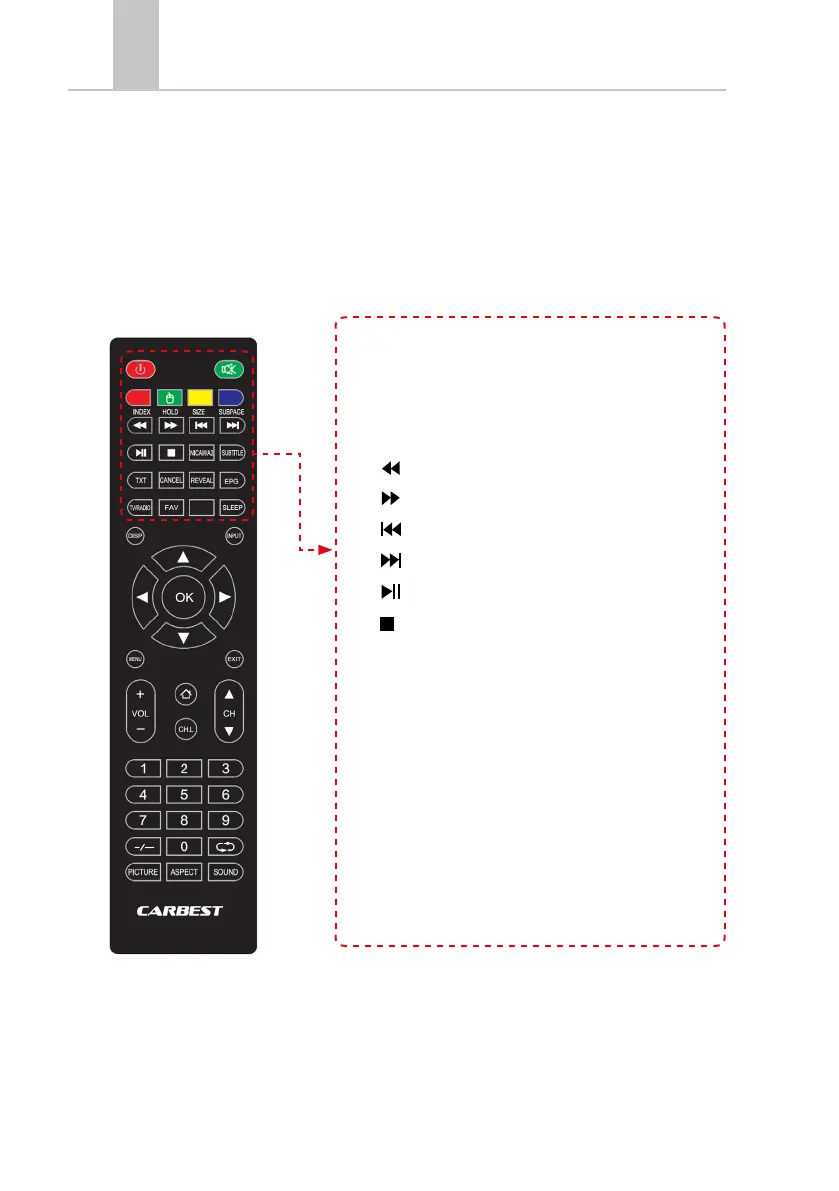
• Power: On / Off- switching
• MUTE: Mute TV
• COLORED BUTTONS: Shortcut keys
MOUSE function (Green): Mouse mode On / Off
• / Fast Backward: USB
• / Fast Forward: USB
• / Skip Backward: USB
• / Skip Backward: USB
• PLAY / PAUSE: USB
• / STOP: USB
• NICAM/A2: Change audio channel.
• Subtitle: Subtitle Enable / Disable
• TXT: Teletext switching on / off
• CANCEL: Cancel function in text mode.
• REVEAL: Show or hide hidden words in Teletex mode.
• EPG: Displays program and shipment information.
• TV / RADIO: TV / Radio Mode (DVB-S / T / C).
• FAV: Open Favorites list.
• SLEEP: Automatic switch off on / off.



 To Next Page