3
Resins overview
In this topic, you’ll learn about the different types of resins we make for the printer, how to store them properly to keep them
fresh, and how to pick the best one for your application. To purchase resins, contact Carbon.
Types of resins
Carbon has two main types of resin: one-part and two-part.
One-part resins
One-part resins are quicker to prepare, print, and finish than our other resins. They are also less expensive, and you can reuse
any leftover from a print. Compared to our other resins, however, they have lower mechanical strength and abrasion resistance.
They are cured with UV light as they print, and given a final cure with UV light during post-processing.
Two-part resins
Two-part resins are strong and abrasion resistant. They are cured in two stages: first on the printer with UV light, and later with
heat in a convection oven. Two-part resins are shipped in cartridges containing two liquids that you combine with a dispenser as
you fill the cassette. The ratio of these two liquids will be conveyed using a standard convention, Part A:Part B.
Storing resins
Because UV light chemically alters our resins, minimize their exposure to light. While you’re working, you can leave resin
containers out with their caps on, and cover cassettes, cups, and other containers with aluminum foil. Be sure to clean a
resin-filled cassette as soon as its pot life has expired. This prevents the resin from solidifying, which could damage the cassette.
Use all resins within their shelf life because they thicken with age, making them more difficult to print with and wash off printed
parts. Resins also thicken and may crystallize at low room temperatures, so store them in a dark cabinet at 64-77°F (17-25°C).
We include expiration dates on our resin container labels to help you manage your inventory. You can expect a minimum
six-month shelf life on all resins. For more information about storing resins, download their Safety Data Sheets via the link on the
Carbon Academy (https://academy.carbon3d.com/learn/article/material-sds-tds).
Choosing resins
Visit the Carbon Materials pages (carbon3d.com/materials) to download the technical data sheets and compare the various
mechanical properties to help you choose the best resin for your application.
4
Waste management
The printing workflow produces general waste, as well as hazardous waste that you need to collect and dispose of in a proper
way. Consult your local regulations for specifics regarding how to organize your waste collection containers, clean up spills, and
remove waste from your lab.
5
Safety hazard reference
Signal words and symbols
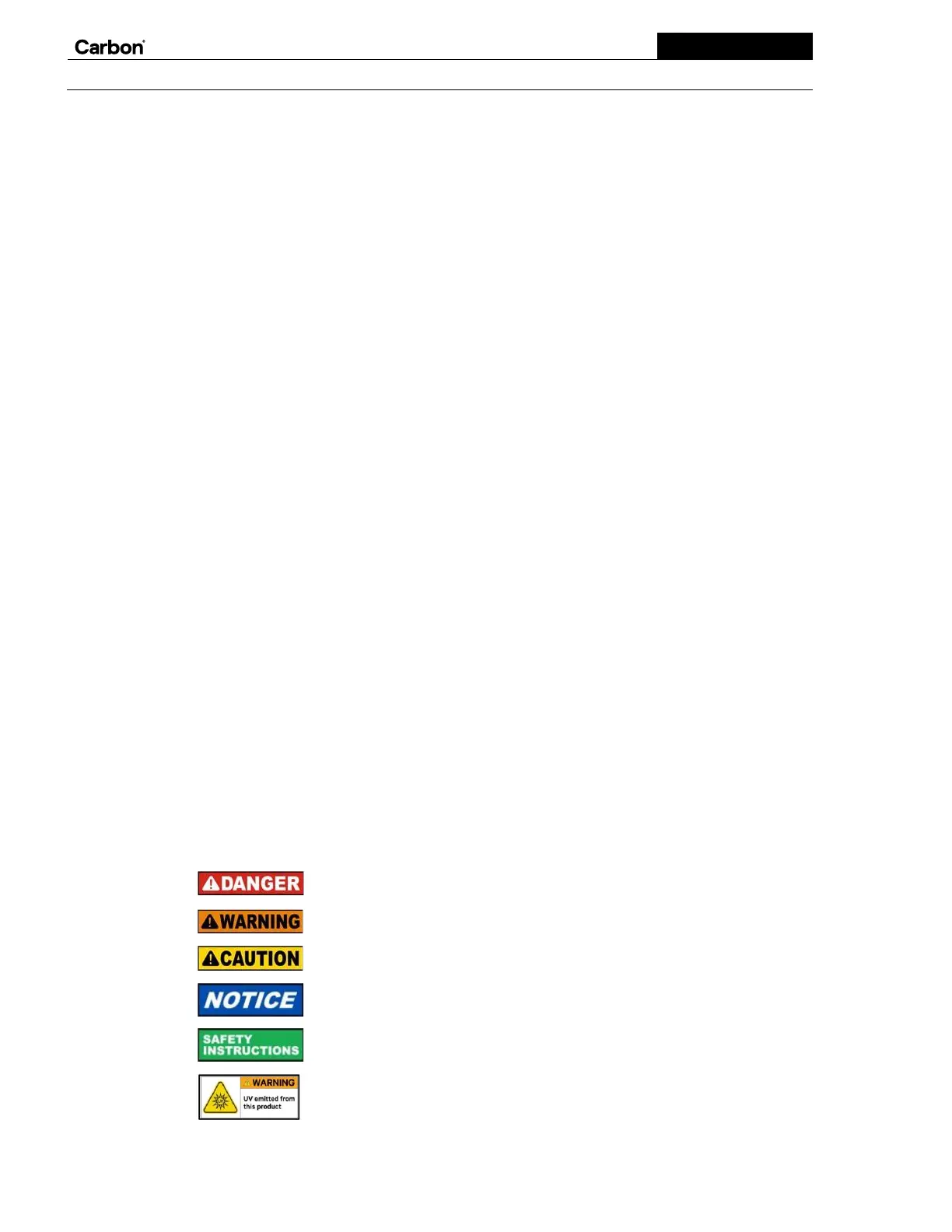
DANGER indicates a hazardous situation which, if not avoided, will result in death or serious
injury.
WARNING indicates a hazardous situation which, if not avoided, could result in death or serious
injury.
CAUTION indicates a hazardous situation which, if not avoided, could result in minor or moderate
injury.
NOTICE is used to address practices not related to physical injury.
SAFETY INSTRUCTIONS indicates specific safety-related instructions or procedures.
WARNING indicates a specific hazardous situation due to UV light which, if not avoided, could
result in serious injury.


 To Next Page