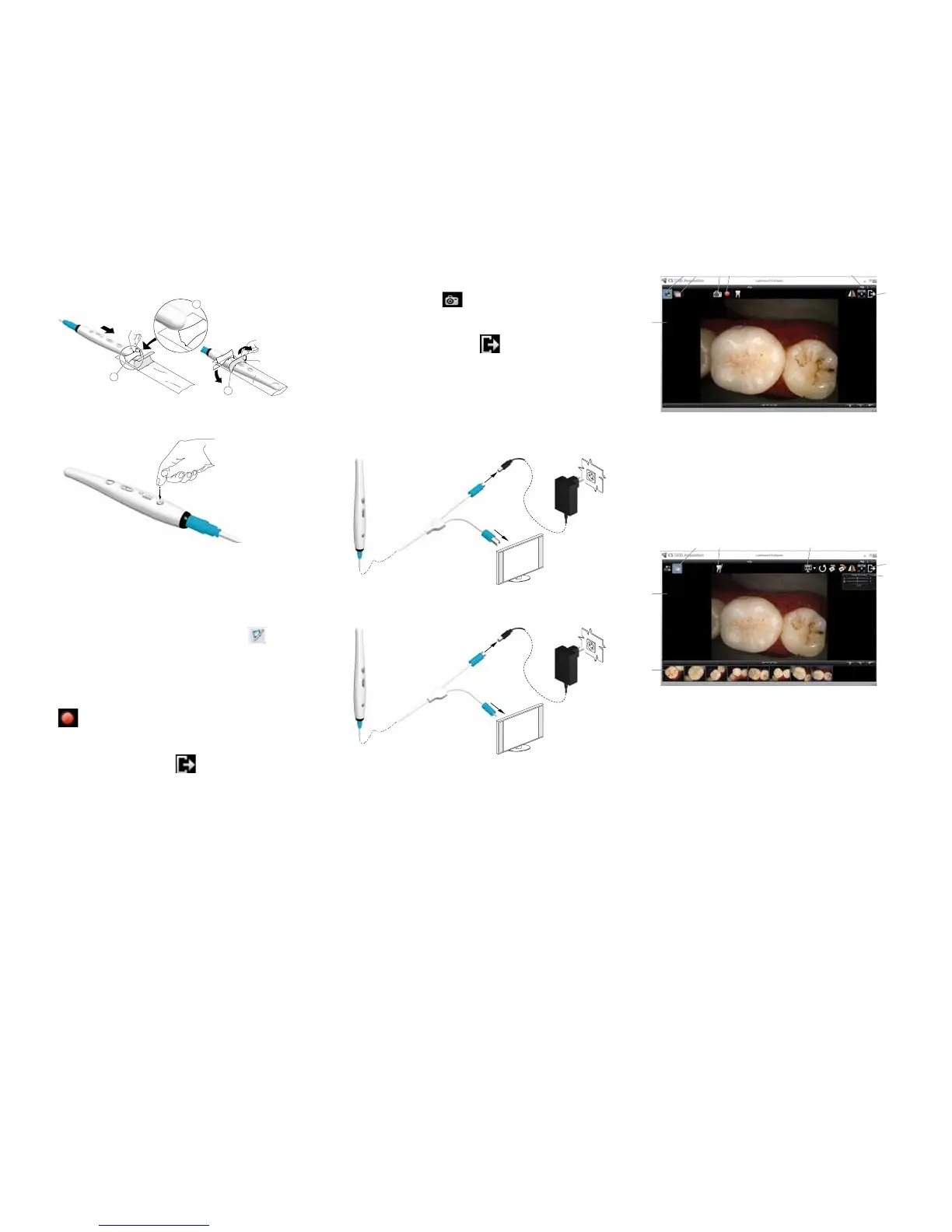
Capturing or Viewing Images on a Monitor
1. Connect the camera to a monitor.
S-Video Connection
AV Connection
2. Repeatsteps1-3fromRecording or Viewing
Videos.
3. Pressthereviewbuttonfor3seconds.ThePatient
Numberdialogboxisdisplayed.
4. Pressthereviewbuttonstoassignanumbertothe
patient.
5. PresstheCapturebuttontoconrmtheselection.The
livevideomodeisdisplayed.
6. Havethepatientfullyopentheirmouth.
7. Holdthecameraovertheareaofinterest.
8. Press the Capture button on the camera to capture an
image.
9. Pressthereviewbuttonstoreviewonebyoneallthe
stored images.
10. Removeanddisposeoftheprotectivesheathwhen
youhavenishedwiththecurrentpatient.
Recording or Viewing Videos
1. Wipethelensofthecamerawithamoistlint-free
cloth or lens tissue.
2. Install a sheath on the camera.
3. Power the camera on.
4. StarttheKODAKDentalImagingSoftware.
IfusingimagingsoftwareviaTWAINinterface,see
CS1200UserandInstallationGuide.
5. Createoropenapatientrecord,ifapplicable.
6. InKODAKDentalImagingSoftware,click
and
selectyourcamera.
7. Havethepatientfullyopentheirmouth.
8. Holdthecameraovertheareaofinterest.Thevideo
imageappearsinthepreviewscreen.
9. Torecordthevideo,ontheAcquisitioninterface,click
to record and reclick to stop the recording.
10. Usethetoolbaroptionstoadjust,save,ordelete
recordedvideos.
11. Whenyouaredone,click toclosetheAcquisition
interface.
12. Removeanddisposeoftheprotectivesheath.
©CarestreamHealth,Inc.,2011.TheKodaktrademark
andtradedressareusedunderlicensefromKodak.
CarestreamDental
ADivisionofCarestreamHealth,Inc.
150VeronaSt.
Rochester,NY14608
USA
For more information, visit: www.carestreamdental.com
To give documentation feedback, visit:
www.carestreamdental.com/documentationfeedback
9H2304 Ed02 2011-08
1. PreviewScreen
2. Livevideobutton
3. Reviewbutton
4. Capture button
5. Videorecordbutton
6. Preference button
7. Exit button
1. ReviewScreen
2. ImageGallery
3. Reviewbutton
4. Toothchartcommentbutton
5. Select a format button
6. ImageProcessingDialogbox
7. Exit button
Acquisition Interface Overview
Live Video
Review Screen
7
1
2
3 4 5
6
1
2 3 4 5 6
7
Capturing or Viewing Images
1. Repeatsteps1-8fromRecording or Viewing
Videos.
2. Tocaptureanimage:Pressthecapturebuttononthe
camera.ORClick ontheAcquisitioninterface.
3. Usethetoolbaroptionstoadjust,save,ordelete
captured images.
4. Whenyouaredone,click toclosetheAcquisition
interface.
5. Removeanddisposeoftheprotectivesheath.


 To Previous Page
 Loading...



