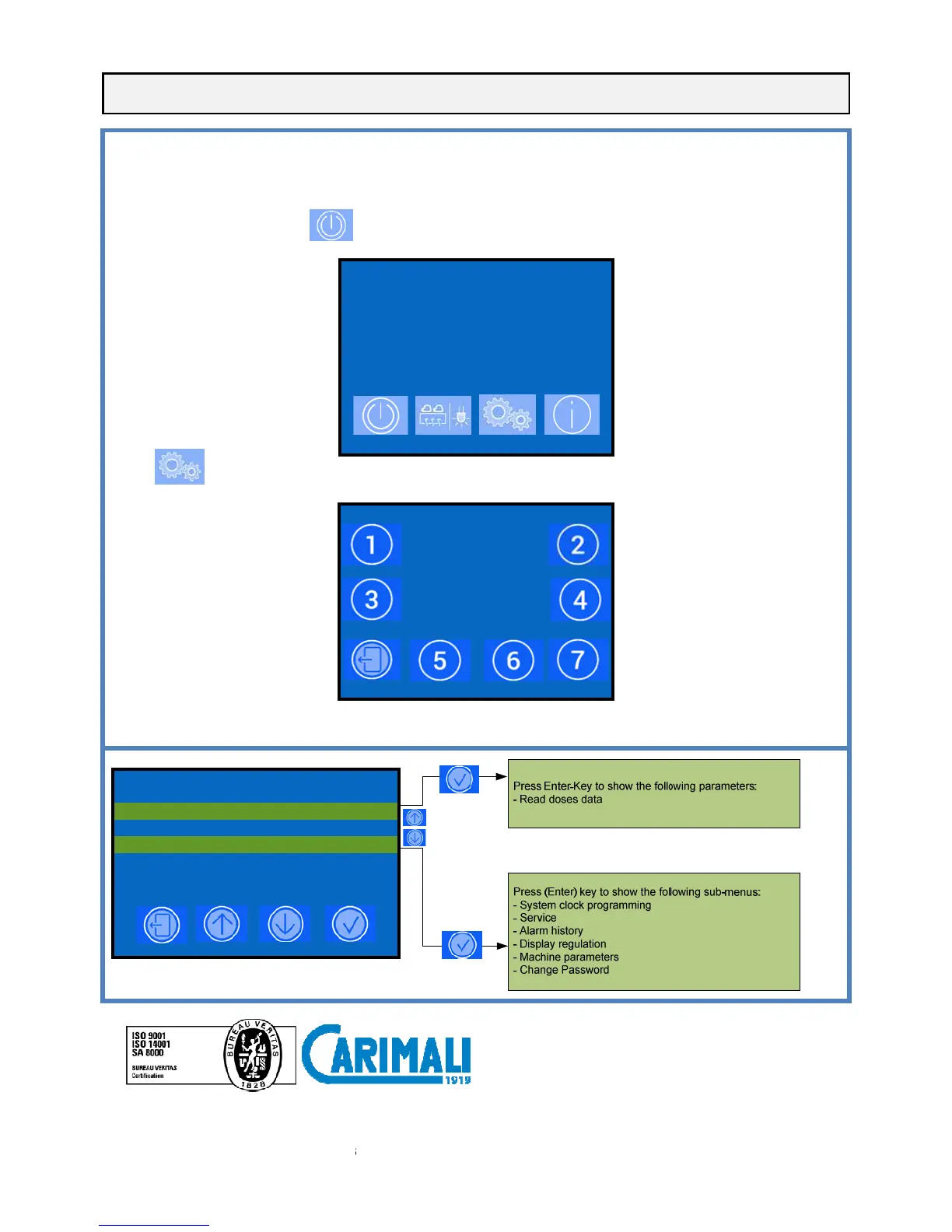
ACCESS THE MAIN SETTING MENUS WITH PASSWORD
To enter the programming environments, a password is required which define the access rights to the different environments.
To insert the passwords proceed as follows:
- Turn the machine OFF pressing
to access the password section
Enter the following passwords:
- Owner 2 2 2 2 2
Carimali S.p.A. con socio
T: +39 035 4949555 F: +39 035 905447
ACCESS THE MAIN SETTING MENUS WITH PASSWORD
To enter the programming environments, a password is required which define the access rights to the different environments.
To insert the passwords proceed as follows:
for 5 seconds, the display shows:
2015-FEB-16 TUE 04:54
OFF
to access the password section
:
INSERT PASSWORD
- - - - -
- 24040 Chignolo d'Isola (BG) -
T: +39 035 4949555 F: +39 035 905447
ACCESS THE MAIN SETTING MENUS WITH PASSWORD
To enter the programming environments, a password is required which define the access rights to the different environments.











 To Previous Page