EasyManua.ls Logo

Carimali GENIUS - 5-Led Touchpad; Dispensing Mode; Programming Mode; Display Description

Carimali GENIUS
36 pages
Print Icon
To Next Page IconTo Next Page
To Previous Page IconTo Previous Page
Loading...
19
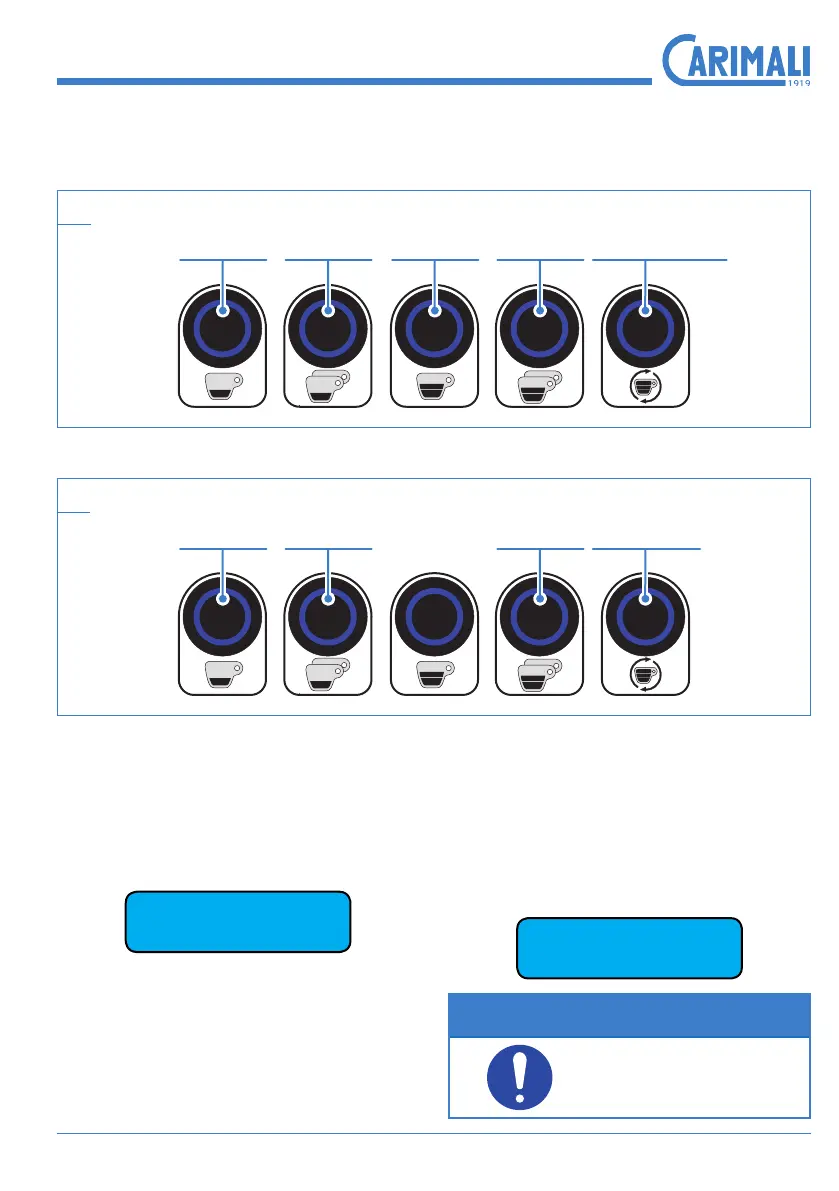
2.2 5-LED TOUCHPAD
2.2.1 Dispensing Mode
2.2.2 Programming Mode
2.3 DISPLAY DESCRIPTION
2.3.1 Switching on
When switching the machine on, the
display loads the software and shows
the version.
CARIMALI
Genius E1 1.04d
2.3.2 Boiler lling
This operation starts automatically
when switching the machine on and
stops when the boiler is lled up to the
max. level.
Filling Boiler
NOTE
During this phase the
buttons ash slowly.
10
11
Continuous coffee
dispensing
Double long
coffee
Single long
coffee
Double short
coffee
Single short
coffee
ENTER
button
ESC
button
Increase
button
(+)
Decrease
button
(-)

Related product manuals