31
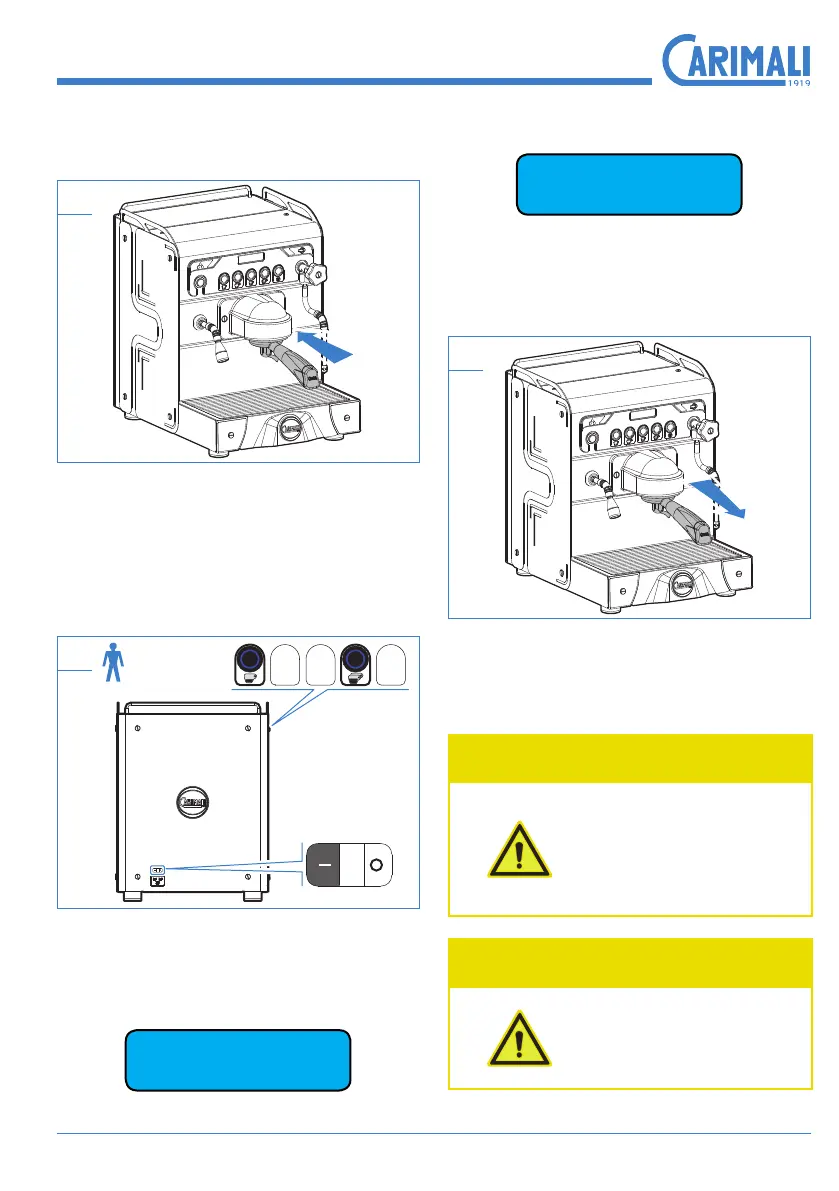
Insertthelterholderintothecoffee
group.
30
To access the washing mode, hold
the dispensing buttons of single short
coffee and double long coffee at the
same time.
31
Duringthewashingcycle,intherst
line, the display shows the steps
missing at the end of the cycle.
n
GRx Cleaning
Press to turn the machine off after the
coffee group washing cycle.
Off
Removethelterholder,washitun-
der running water and remove any
coffee residues with a soft cloth.
32
Drythelterholderthoroughlybefore
inserting it into the group.
WARNING
Before proceeding
with the normal use
of the machine, car-
ry out some test dis-
pensing cycles.
WARNING
Do not wash the parts
andthelterholderin
the dishwasher.










 To Next Page