Connecting the drum pads
Before connecting the drum cables, make sure that the power switch is set to the OFF position.
Connect the wiring loom main plug to the drum signal input port on the underside of the module.
Fasten tightly with the 2 locating screws on the plug (these will screw in around 4 full turns).
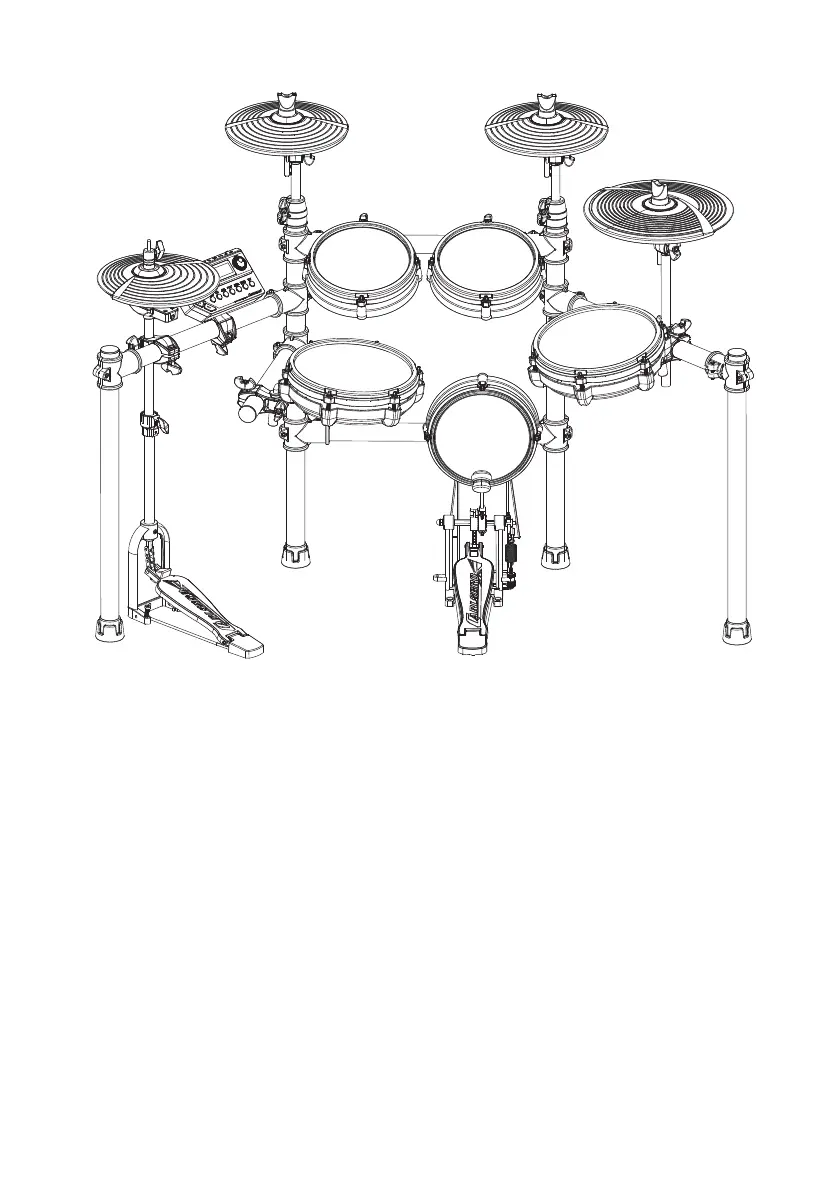
Follow the labels on the end of each cable to match the diagram above, using the stickers on the
individual pads and parts for further reference.
CRASH
CRASH 2
RIDE
TOM 1
TOM 2
Hi-Hat control
SNARE
KICK
Cable ‘HH CTRL’ (blue) plugs into the Hi-Hat control.
Cable ‘Hi-Hat’ (white) plugs into the Hi-Hat cymbal.
Cable ‘Kick’ (grey) plugs into the Kick pedal.
Cable ‘Snare’ (yellow) plugs into the mesh snare pad with rubber rim.
Cable ‘Tom1’ (orange) plugs into the the 1st mesh Tom pad.
Cable ‘Tom2’ (purple) plugs into the 2nd mesh Tom pad.
Cable ‘Tom3’ (black) plugs into the 3rd mesh Tom pad.
Cable ‘Crash’ (red) plugs into the crash cymbal pad position.
Cable ‘Ride’ (green) plugs into the ride cymbal pad position.
Separately packaged Cable ‘CRASH2’ (black) plugs into the CRASH 2 cymbal pad and the EXT
CYMBAL socket on the rear of the sound module.
SOUND MODULE
TOM 3
5



 To Next Page