07 CLEANING AND MAINTENANCE
Clean the appliance regularly to make it last longer. A timer built into
the appliance adds the trimming times. After 30 minutes of trimming,
the cleaning symbol (10) will start flashing in the display to remind
you to thoroughly clean the appliance. If you switch the appliance
off while the cleaning symbol is flashing, the trimming timer will
restart.
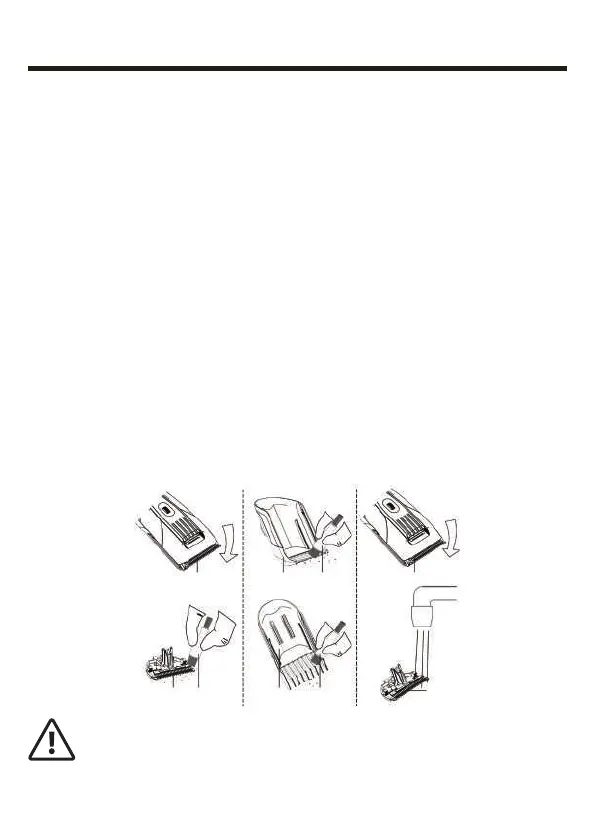
1. Turn the appliance off, disconnect the USB cable and take the
attachment off. Remove the cutting block and rinse it under running
water. Use the brush (17) if necessary. Use the brush to clean the
cutting unit installation slot. Dry the cutting unit thoroughly before
reinstalling it.
2. Use the brush to clean the precision trimmer.
3. Wash the attachments under running water, using a mild detergent
if necessary. Use the brush for better cleaning. Dry the attachments
thoroughly before using again.
4. After cleaning, oil the blades.
5. Store the appliance in a dark, cool place out of the children’s reach.
When storing make sure that the USB cable is not tangled.
CAUTION!
• Never immerse the appliance in water.
• Do not use any corrosive or abrasive cleaning agents.
This might damage the surface of the appliance.
EN 12



 To Next Page