29
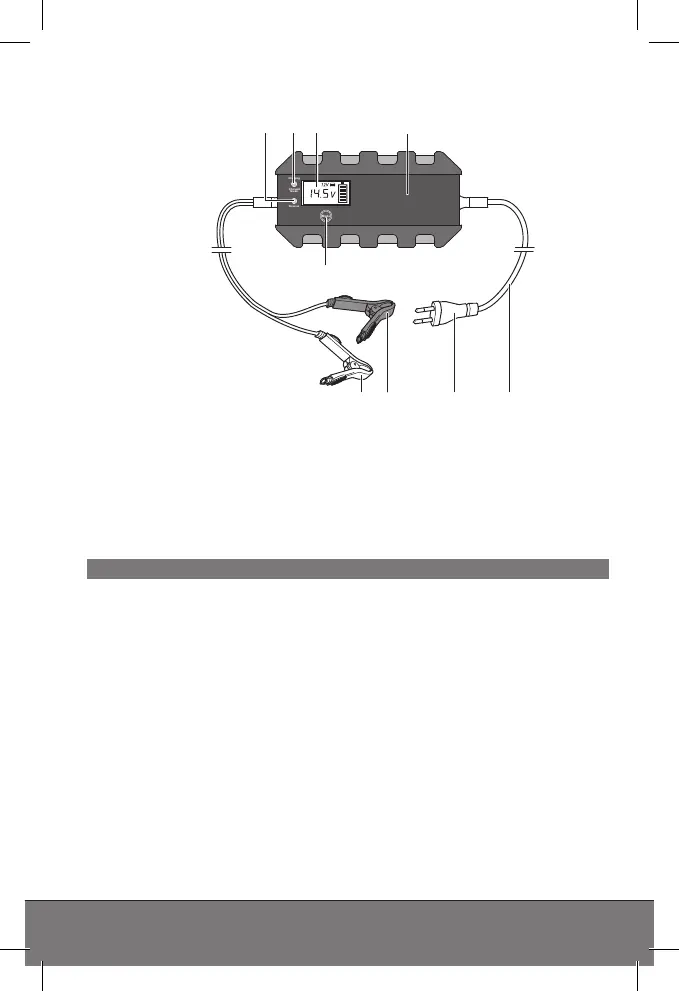
PRODUCT OVERVIEW
1. LED „Reverse“
2. LED „Charging“/“Charged
Green“
3. Display
4. Battery charger
5. MODE button
6. Power cord
7. Power plug
8. Terminal connection cable
(+) with clamp (red)
9. Terminal connection cable (-)
with clamp (black)
Functions
The charger has dierent charging modes to choose from based on
the battery type, battery condition and the environmental condi-
tions. The charging modes are activated based on the detected
battery voltage.
The charger features a micro-computer unit (MCU). After selecting
the desired charging mode the charger will recognise the battery
connected (voltage, capacity, condition) and compute the necessa-
ry charging parameters (charging voltage, charging current). This
allows for ecient and safe charging. When selecting a charging
mode not suitable for the battery or if the battery is defective, the
charging cycle still not start. The charger switches to error indicator.
The “trickle charge“ function allows the charger to be permanently
connected. A full charge will be maintained.
Mode
Reverse
Charged
Green
Charging
4321
7 689
5



 To Next Page