32
Microprocessor Battery Charger DP4.0 / DP6.0 / DP10.0
OPERATION
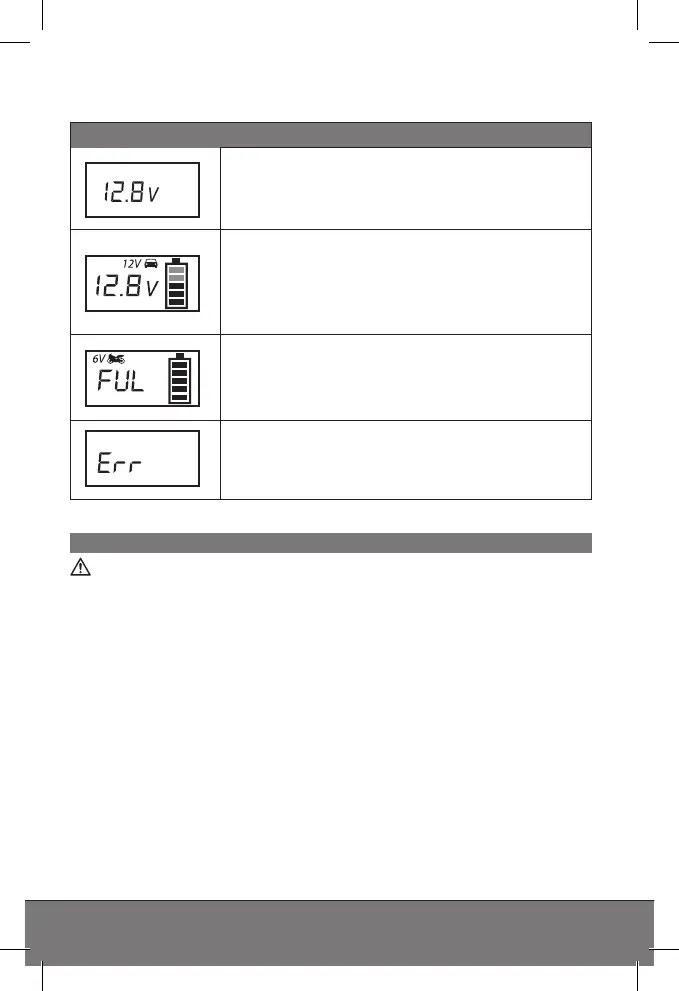
Status indicators
Start indicator (Standby) after correctly con-
necting a battery. Displays the current battery
voltage.
Displays the charging process in the respecti-
ve mode (the blocks inside the battery symbol
will flash according to the charging status).
Displays the current battery voltage and the
charging mode selected.
Battery fully charged. (all blocks inside the
battery symbol are full). Displays the current
battery voltage and the charging mode selec-
ted.
Error indicator when selecting an incorrect
charging mode, incorrect connection, short
circuit (defective battery) or overheating.
Before use
Warning!
Before using this device be sure to read the operating manual for
the battery and the vehicle and understand all safety notices.
• Use safety goggles and acid-proof safety gloves.
• Ensure adequate ventilation.
• Ensure the battery poles are clean. If the battery has removable
vent caps, fill each battery cell with distilled water to the level re-
commended by the battery manufacturer. Do not overfill the cells.


 To Next Page