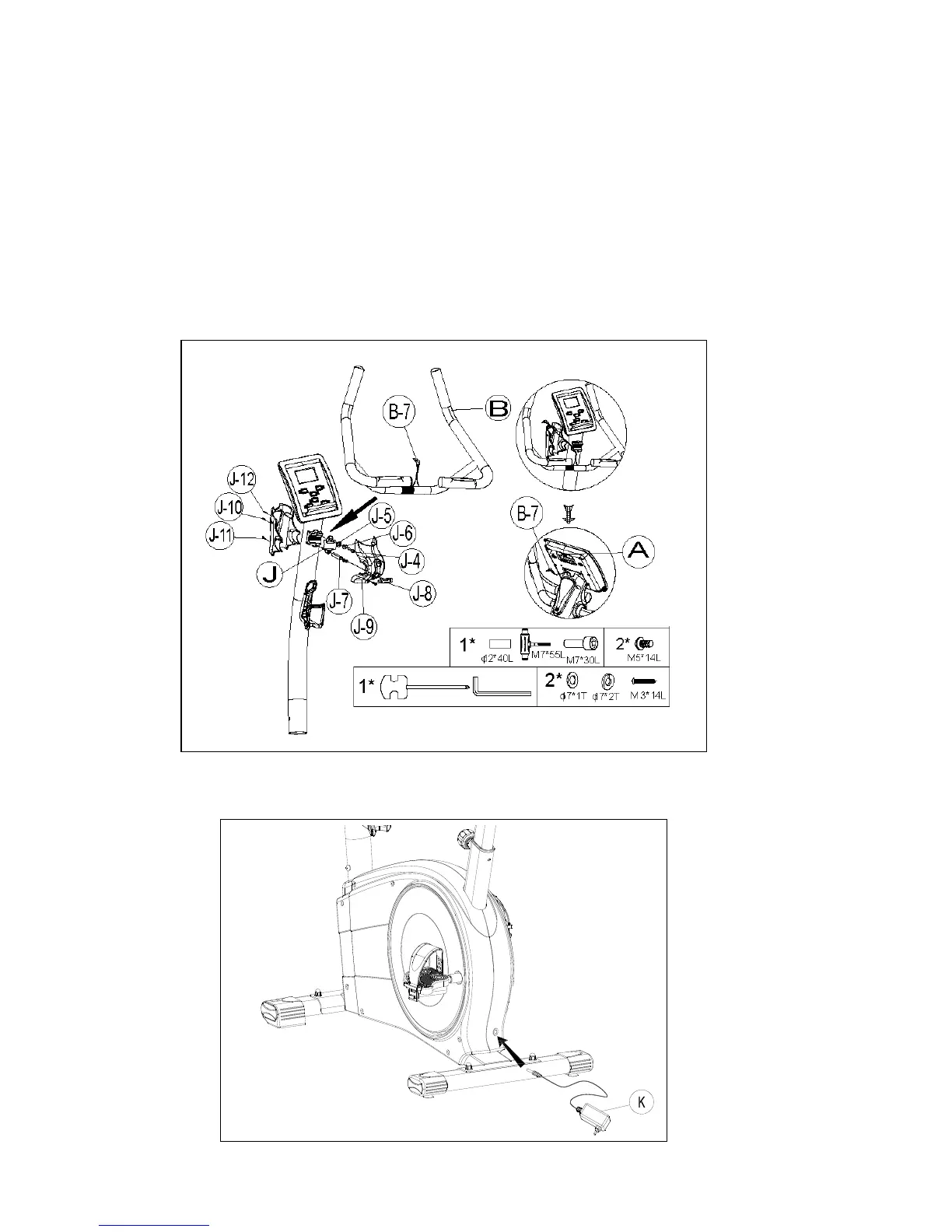
Step 6- Handlebar Assembly
1. Attach the Handlebar (pt.B) to the Handlebar post (pt.C) using the Metal cover (pt.J). Fix
firmly with one Flat washers (pt.J-5), one Spring washer (pt.J-6) and one Fixing bolt
(pt.J-4).
2. Attach the Rear cover (pt.J-11) to the Handlebar post (pt.C) using two of M3x14L Screws
(pt.C-12) and one of M5xP0.8x14L Screws (pt.J-10) .
3. Attach the Front cover (pt.J-9) to the Handlebar post (pt.C) using M5 xP0.8x14L Screws
(pt.J-10) the Handlebar T-Knob (pt.J-8) using one set of Flat washer (pt.J-5), Spring washer
(pt.J-6) and one Bushing (pt.J-7).
4. Connect as the Hand pulse wire (pt.B-7) to the computer (pt.A).
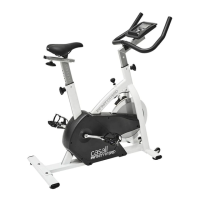
Step 7-
Connect the adaptor (pt.K) to the DC hole (located on the back of the chain cover).


 To Next Page