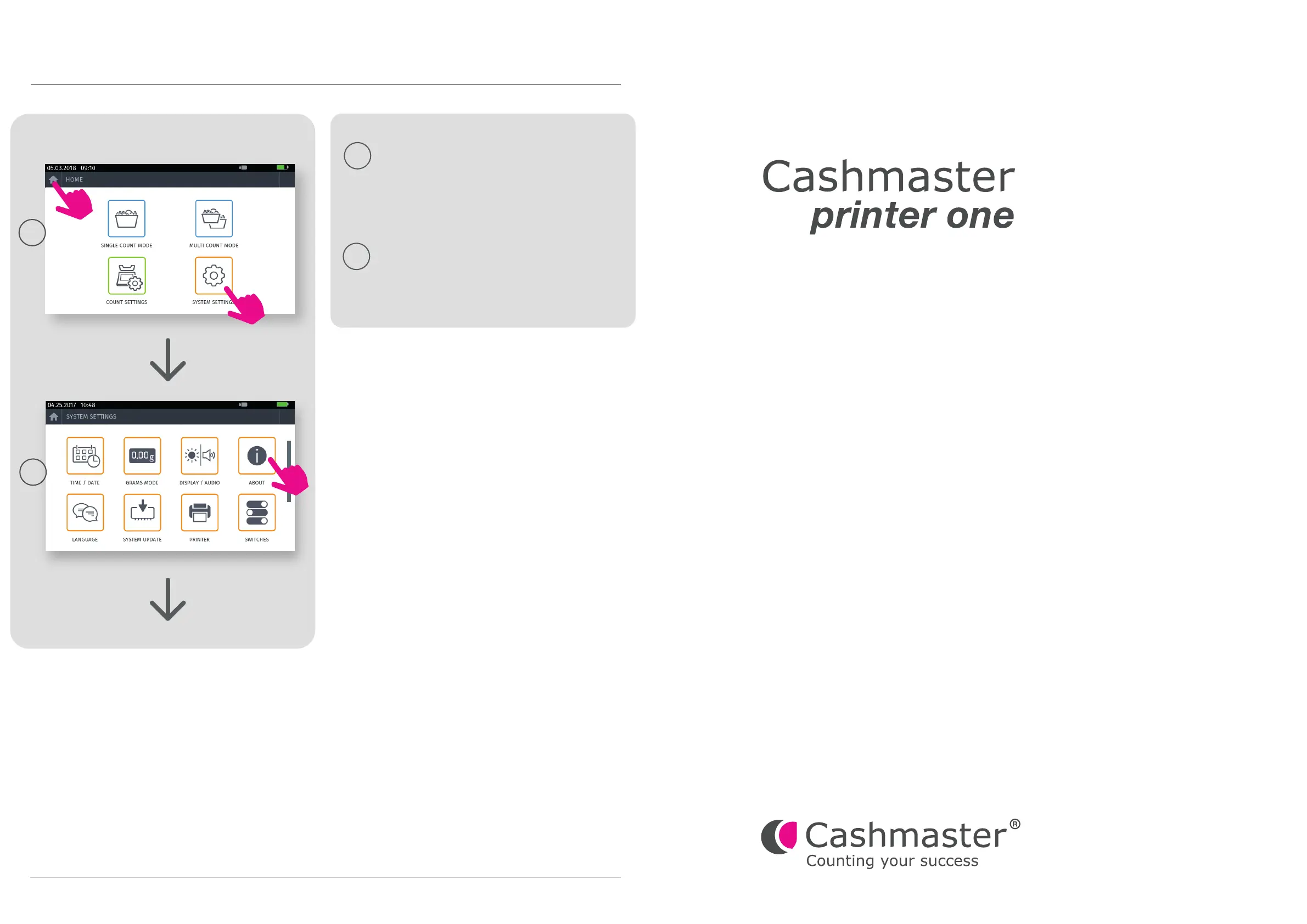
Step 3: Verification
3.1
1.
2.
3.2
3.4
Congratulations! Your Cashmaster One is updated!
You can now remove the USB flash drive and press the
‘HOME’ button to return to the home menu.
3.3 Verify the following parameters:
Cashmaster Printer One: Connected
Bootloader: CB8013C
Firmware: CM9002A
North America
t: +1 877 227 4627
e: enquiriesusa@cashmaster.com
Germany
t: +49 (0) 2463 999 339
e: germany@cashmaster.com
GLOBAL SUPPORT
cashmaster.com
Cashmaster One range - Product firmware updates
10521A 3
Product Firmware Update
Hong Kong and Asia
t: +852 2157 9363
e: enquiriesasia@cashmaster.com
UK and all other customers
t: +44 (0) 1383 410 121
e: support@cashmaster.com
*
The software numbers are provided as an example only.
*
*


 To Previous Page