EasyManua.ls Logo

Casio 3552 - User Manual

Casio 3552
30 pages
Print Icon
To Next Page IconTo Next Page
Loading...
Contents
Precautions
Operating Precautions
User Maintenance
Battery Replacement
Mobile Link Precautions
Before Getting Started...
General Guide
Indicators
Navigating Between Modes
Selecting a Timekeeping Mode Digital Display
Format
Power Saving
Viewing the Face in the Dark
Useful Features
Linking with a Phone
Getting Ready
Auto Time Adjustment
Receiving CASIO WATCHES Information On
the Watch
Configuring Power Saving Function Settings
Viewing Pedometer Data
Viewing Stopwatch Data
Configuring World Time Settings
Phone Finder
Configuring Watch Settings
Changing the Home City Summer Time Setting
Recording Your Current Location (TIME &
PLACE)
Connection
Connecting with a Phone
Disconnecting from Your Phone
Using the Watch in a Medical Facility or
Aircraft
Unpairing
If you purchase another phone
Time Adjustment
Using Watch Operations to Adjust the Time
Setting
Dual Time
Using CASIO WATCHES to Configure World
Time City Settings
Configuring Dual Time Settings
Swapping the Home City Time and Dual Time
Alarm
Using CASIO WATCHES to Configure Alarm
Settings
Configuring Alarm Settings
Enabling the Hourly Time Signal
Turning Off an Alarm or the Hourly Time Signal
Moving to Another Time Zone
Stopwatch
Split Times and Lap Times
Measuring Elapsed Time
Measuring a Split Time or Lap Time
Viewing the Current Time While in the
Stopwatch Mode
Viewing Measured Time Data
Viewing Saved Data
Deleting a Particular Record
Deleting All Records
Timer
Using CASIO WATCHES to Configure Timer
Settings
Setting the Countdown Start Time
Using the Timer
Pedometer
Counting Steps
Displaying the Step Count
Resetting Today’s Step Count
Specifying a Daily Step Target
Step Reminder
Clearing a Step Reminder Alert Indicator
Enabling/Disabling Step Reminder
Causes of Incorrect Step Count
Other Settings
Enabling the Button Operation Tone
Configuring Power Saving Function Settings
Resetting Watch Settings
Other Information
Supported Phones
Specifications
Copyrights and Registered Copyrights
Troubleshooting
Watch Operation Guide 3552
1
MA2402-EB
OPUM-I
© 2024 CASIO COMPUTER CO., LTD.

Table of Contents

Question and Answer IconNeed help?

Do you have a question about the Casio 3552 and is the answer not in the manual?

Summary

Precautions

Operating Precautions

Covers water resistance, band care, and general usage advice.

Environmental and Component Care

Environmental Precautions

Addresses temperature, impact, magnetism, static, and chemical exposure risks.

Storage and Component Care

Proper storage, care for resin, leather, and metal components.

Display, Maintenance, and Safety

Display and Data Management

Covers liquid crystal display and watch data memory backup.

Sensor Care and Maintenance

Guidelines for handling sensors and general user maintenance.

Dangers of Poor Watch Care

Risks of rust, premature wear, and skin irritation from improper care.

Battery and Mobile Link Precautions

Battery Replacement

Proper procedure and water resistance checks during battery replacement.

Mobile Link Precautions

Legal, aircraft use, and general precautions for mobile link functions.

Getting Started

Watch Features Overview

Introduces key functionalities like phone linking, alarms, and pedometer.

General Guide and Indicators

Explains basic operations and watch display icons.

Watch Navigation and Connectivity

Navigating Watch Modes

How to switch between different watch modes using button C.

Display Format and Phone Connection

Changing Timekeeping display and initiating phone connection.

Power Saving and Illumination

Power Saving Modes

Explains watch power saving levels and battery life.

Viewing the Face in the Dark

How to use the backlight and Auto Light features.

Advanced Features Configuration

Auto Light Settings

Steps to configure Auto Light and illumination duration.

Useful Features via Phone App

Overview of phone pairing and world time city configuration.

Linking with a Phone

Auto Time Adjustment

Automatic time correction via phone connection.

Phone Integration Features

Immediate Time Correction

Manually initiating time correction by connecting with a phone.

App Information Reception

Receiving updates and information from the CASIO WATCHES app.

Power Saving Configuration

Using the phone app to manage power saving.

Pedometer and Stopwatch Data

Viewing Pedometer Data

Accessing step count and calorie data via the app.

Viewing Stopwatch Data

Sending stopwatch records to the app for analysis.

Configuring World Time Settings

Setting World Time cities and summer time via the app.

World Time and Time Zone Management

World Time City Selection

Choosing World Time cities using the CASIO WATCHES app.

Summer Time Configuration

Setting automatic or manual summer time switching.

Swapping Home and World Time

Exchanging Home Time and World Time city settings.

Phone Finder and Settings Configuration

Phone Finder Function

Using the watch to locate a connected phone.

Configuring Watch Settings via App

Adjusting alarms and timers using the phone application.

Home City Summer Time via App

Changing Home City summer time settings through the app.

Location Recording and Phone Connection Management

Recording Current Location

Saving and viewing location data on the phone app.

Establishing Phone Connection

Detailed steps for connecting the watch with a paired phone.

Disconnecting and Aircraft;Medical Use

Terminating connection and disabling auto time for specific locations.

Unpairing Watch and Phone

Removing pairing information from both devices.

Pairing Information and Manual Time Setting

Deleting Pairing Information

Removing watch pairing data with a specific phone.

Manual Time Adjustment

Correcting date and time settings directly on the watch.

Time Display and Dual Time Configuration

12;24-Hour Format Switching

Toggling the time display format on the watch.

Dual Time Functionality

Displaying time in various global time zones.

World Time and Dual Time Configuration

Setting World Time cities and dual time settings via the app.

Time Zone Swapping and Alarm Settings

Swapping Home and Dual Time

Exchanging Home City and Dual Time settings.

Alarm Configuration

Setting alarms and hourly time signals directly on the watch.

Alarm Settings via App

Configuring alarms using the CASIO WATCHES phone application.

Hourly Time Signal and Time Zone Movement

Hourly Time Signal Control

Enabling or disabling the hourly beep notification.

Turning Alarms Off

Steps to disable sounding alarms or the hourly time signal.

Moving to Another Time Zone

Adjusting watch settings for a destination location.

Stopwatch Operations and Data Viewing

After Arriving Adjustments

Swapping time zones after reaching a destination.

Stopwatch Overview

Functionality for measuring elapsed time and storing records.

Measuring Elapsed Time

How to measure elapsed time using the stopwatch.

Split and Lap Time Measurement

Recording split times and lap times during stopwatch use.

Stopwatch Data Management

Measuring Split;Lap Time

Detailed steps for measuring split and lap times.

Viewing Time in Stopwatch Mode

Checking current time without exiting Stopwatch Mode.

Viewing Measured and Saved Data

Accessing split, lap, and saved stopwatch measurements.

Stopwatch Data Deletion and Timer Function

Deleting Stopwatch Records

Removing individual or all stopwatch records from memory.

Timer Overview

Functionality of the countdown timer and its beeper.

Setting Countdown Start Time

Steps to set the start time for the countdown timer.

Timer Operation and Pedometer Use

Using the Timer

Performing timer operations like start, pause, and resume.

Pedometer Overview

Functionality of the watch's pedometer for tracking steps.

Counting Steps Accurately

How the watch counts steps and factors affecting accuracy.

Pedometer Progress and Settings

Daily Step Target Progress

Viewing progress towards the daily step goal.

Step Count Graph Interpretation

Understanding the hourly step count graph.

Resetting Step Count and Setting Target

Manually resetting the step count and setting a daily step goal.

Step Reminders and Other Settings

Step Reminder Function

Alerts for inactivity and how to clear them.

Step Count Accuracy Factors

Causes of incorrect step counting.

Button Operation Tone

Enabling or disabling the audible tone for button presses.

Function Configuration and Reset

Configuring Power Saving Settings

Managing power saving modes via the phone app.

Resetting Watch Settings

Restoring all watch settings to factory defaults.

Troubleshooting and Specifications

Connection Troubleshooting

Solutions for common phone connection issues.

Feature Specifications Summary

Key specs for Timer, Dual Time, Alarm, Mobile Link, and other features.

Copyright Information

Legal notice regarding trademarks and software.

Phone Reconnection and Model Change

Reconnecting Watch and Phone

Troubleshooting steps for reconnection issues.

Changing Phone Model

Steps for pairing the watch with a new phone.

Time Correction and Pedometer Issues

Auto Time Correction Function

When and how auto time correction occurs.

Pedometer Troubleshooting

Issues with step count display and counting.

Alarm and Hourly Signal Troubleshooting

Problems with alarms and hourly time signals not sounding.

Indicators and Battery Information

Understanding Watch Indicators

Explanation of various icons displayed on the watch.

Battery Status and Replacement

Information on low battery indicators and replacement.

Finding More Information

Guidance on accessing additional support resources.

Overview

This document describes the operation and maintenance of a CASIO watch, model 3552, focusing on its various functions and how to interact with them, particularly through its Mobile Link capabilities.

General Operation

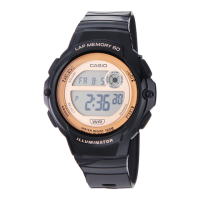
The watch features a digital display with indicators for the day of the week, hour, minute, second, year, month, and day. It uses four buttons (A, B, C, D) for navigation and settings. Button B activates illumination. Button C cycles through modes and returns to Timekeeping Mode with a long press. Button D changes settings when a setting screen is displayed.

Time Adjustment

The watch can adjust its time settings in two ways:

  • Using Watch Operations: This allows manual adjustment of time and date settings, including seconds, hours, minutes, 12/24-hour timekeeping, year, month, and day. It also allows enabling/disabling the step reminder, setting the daily step target, and configuring illumination duration and power saving.
  • Using Mobile Link: When paired with a phone, the watch can automatically correct its time settings four times a day according to a preset schedule. Users can also trigger immediate time correction by connecting the watch to the phone. This function also records the current location (TIME & PLACE) on the phone.

Dual Time

The Dual Time mode allows tracking the current time in another time zone.

  • Using CASIO WATCHES: The phone app can be used to configure World Time City settings, selecting from approximately 300 cities. It also supports automatic summer time switching for the World Time City.
  • Configuring Dual Time Settings: Users can manually set the hour and minute for the Dual Time.
  • Swapping Home City and Dual Time: This feature allows users to quickly swap the Home City time with the Dual Time, useful when traveling to a different time zone.

Alarm

The watch supports up to five independent alarms and an hourly time signal.

  • Using CASIO WATCHES: Alarm settings can be configured via the phone app.
  • Configuring Alarm Settings: Users can manually set the hour and minute for each alarm. The hourly time signal can also be enabled or disabled. An alarm sounds for 10 seconds when its set time is reached.
  • Turning Off Alarms/Hourly Time Signal: Alarms and the hourly time signal can be turned off manually.

Stopwatch

The stopwatch measures elapsed time in 1/100-second units for the first hour, then in 1-second units up to 24 hours. It also supports split and lap time measurements.

  • Measuring Elapsed Time: Basic start, stop, and resume functions are available.
  • Measuring Split/Lap Times: The watch can record up to 200 split and lap times, displaying both simultaneously.
  • Viewing Current Time: While in Stopwatch Mode, the current time can be displayed in the lower section of the screen.
  • Viewing Measured Time Data: Stored split and lap times can be viewed in Recall Mode, showing the measurement number and date.
  • Sending Stopwatch Data to Phone: Measured data can be transferred to the CASIO WATCHES app for detailed viewing and management.

Timer

The countdown timer can be set from 1 second up to 60 minutes.

  • Using CASIO WATCHES: Timer settings can be configured via the phone app.
  • Setting Countdown Start Time: Users can manually set the minutes and seconds for the countdown.
  • Using the Timer: Functions include start, pause, and resume. A beeper sounds for 10 seconds when the countdown reaches zero.

Pedometer

The watch counts steps taken during daily activities.

  • Counting Steps: The watch uses a 3-axis accelerometer to count steps. It displays step count and progress towards a daily step target.
  • Displaying Step Count: The step count can be viewed on the watch display, along with a graph showing hourly step counts.
  • Resetting Step Count: Today's step count can be manually reset to zero. It automatically resets at midnight.
  • Daily Step Target: Users can specify a daily step goal (1,000 to 50,000 steps) via the watch or phone app.
  • Step Reminder: The watch alerts users if they haven't walked enough during a specific period, encouraging activity. This feature can be enabled/disabled.

Other Settings

  • Button Operation Tone: The tone that sounds when a button is pressed can be enabled or disabled.
  • Power Saving: The watch can enter a power-saving state by turning off its display after a period of inactivity, extending battery life. This can be configured via the watch or phone app.
  • Resetting Watch Settings: All watch settings (including Pedometer, Stopwatch, Timer, and Alarm) can be reset to their initial factory defaults. This also deletes pairing information with a phone.

The watch connects to a phone via Bluetooth using the "CASIO WATCHES" app.

  • Pairing: To pair, install the app, enable Bluetooth on the phone, and follow the in-app instructions while holding down button C on the watch.
  • Connection: Once paired, the watch automatically connects to the phone for time adjustments and data transfer. Connections are terminated automatically after time correction or after a fixed period of inactivity.
  • Disconnecting: Pressing any button besides B on the watch terminates the Bluetooth connection.
  • Medical Facility/Aircraft Use: Auto time adjustment can be disabled for environments where radio wave emission is restricted.
  • Unpairing: Pairing information can be deleted from both the phone app and the watch.
  • Changing Phones: If a new phone is purchased, the watch needs to be unpaired from the old phone and then paired with the new one.

Maintenance

  • Water Resistance: Watches marked WATER RESIST or WATER RESISTANT are protected against sweat and splashes, but usage precautions apply (e.g., avoid operating buttons underwater, hot water, soaps). Gaskets should be replaced periodically.
  • Temperature: Avoid extreme temperatures to prevent malfunction or display issues.
  • Impact: While designed for daily use, strong impacts can cause malfunction.
  • Magnetism/Electrostatic Charge: Avoid strong magnetic fields and electrostatic charges, which can damage electronic components or cause display errors.
  • Chemicals: Avoid contact with chemicals (thinners, gasoline, solvents, oils, paints, cosmetics) to prevent discoloration or damage.
  • Storage: For long-term storage, clean the watch thoroughly and store it in a cool, dry place.
  • Resin Components: Avoid prolonged contact with other items while wet, direct sunlight, and dirt to prevent discoloration and deterioration.
  • Leather Band: Keep leather bands dry and clean to prevent color transfer, discoloration, and deterioration.
  • Metal Components: Clean metal components regularly to prevent rust, especially after exposure to sweat or water.
  • Bacteria and Odor Resistant Band: Keep the band clean to maintain its bacteria and odor resistance.
  • Liquid Crystal Display: Display figures may be difficult to read from certain angles.
  • Watch with Data Memory: Data in watch memory can be lost during battery replacement or repair, so important data should be backed up.
  • Watch Sensors: Sensors are precision instruments; avoid disassembling them or allowing dirt to enter.
  • User Maintenance: Regularly wipe the watch with a soft cloth. Rinse with fresh water after exposure to seawater or mud. For metal or resin bands with metal parts, use a soft toothbrush with mild detergent. For resin bands, wash with water. For leather bands, wipe with a soft cloth. Periodically operate the crown and buttons to maintain proper function.
  • Battery Replacement: Battery replacement should be done by an authorized service center using the specified battery type. Low battery power is indicated by flashing indicators, dim display, or blank display.

Troubleshooting

The manual provides troubleshooting steps for common issues, including:

  • Pairing/Connection Issues: Solutions for when the watch cannot pair or reconnect with a phone, including checking app status, Bluetooth settings, and Airplane Mode.
  • Time Correction Issues: Explanations for why auto time correction might not be performed and how to resolve incorrect time displays.
  • Pedometer Issues: Addressing incorrect step counts, non-increasing step counts, and [ERR] displays, suggesting proper wearing and potential sensor malfunction.
  • Alarm/Hourly Time Signal Issues: Guidance on configuring settings if alarms or the hourly time signal do not sound.
  • General Watch Mode/Time Issues: How to identify the current mode and correct time discrepancies.
  • Battery Issues: Explanations for low battery indicators and when to seek battery replacement.

Casio 3552 Specifications

General IconGeneral
Model3552
TypeDigital
DisplayLCD
FeaturesStopwatch, Alarm, Calendar
MaterialResin

Related product manuals