EasyManua.ls Logo

Casio CFX-9800G - Page 113

Casio CFX-9800G
206 pages
Print Icon
To Next Page IconTo Next Page
To Previous Page IconTo Previous Page
Loading...
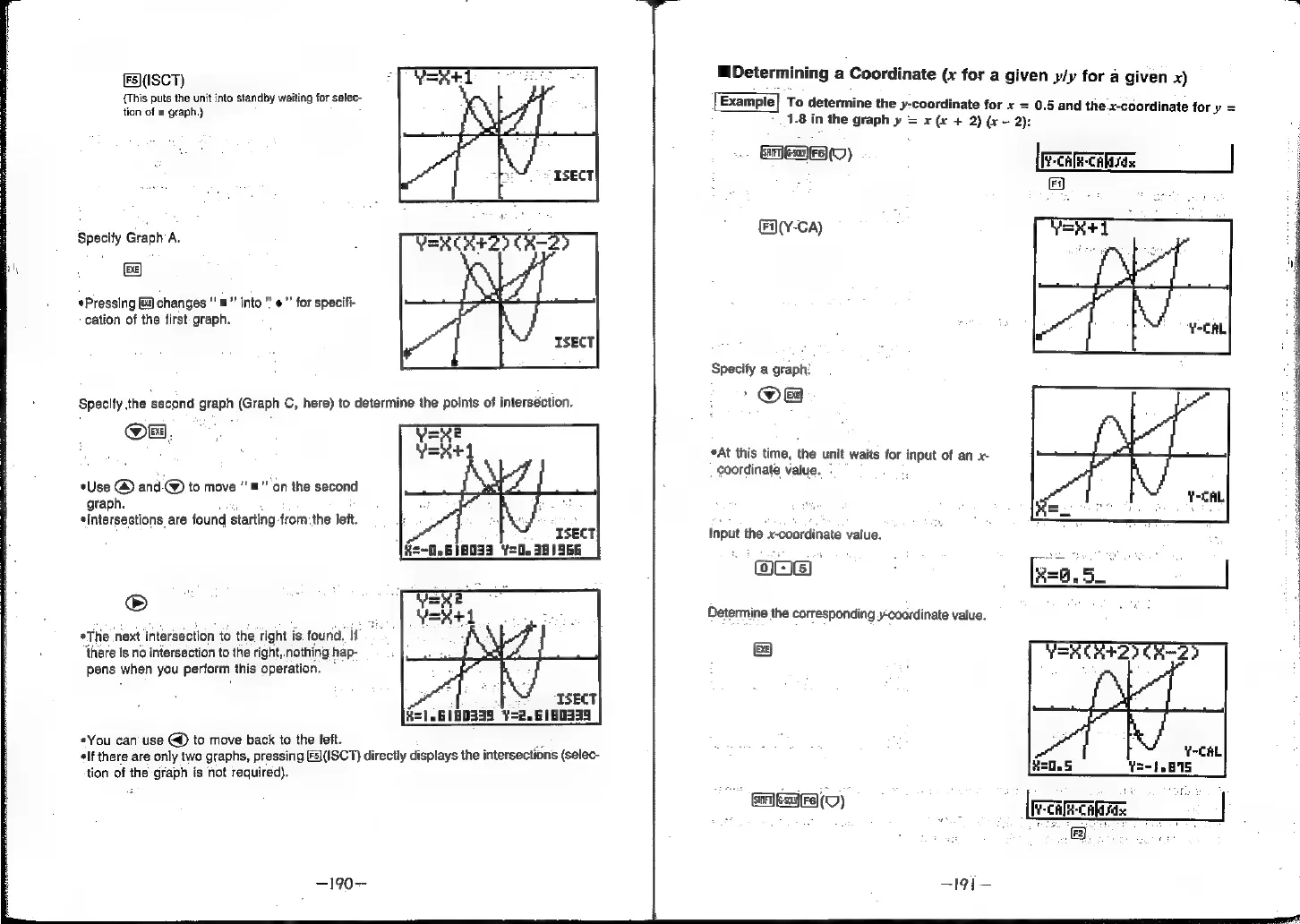
Fs)(ISCT)
{This
puts
the
unit into
standby
waiting
for
selec-
tion
of
a
graph.)
Specify
Graph
A.
Be)
*Pressing
&#)
changes
“=”
into
“'
#”
for
specifi-
cation
of
the
first
graph.
*Use
@
and.@)
to
move
‘=’
on
the
second
graph.
«Intersections
are
found
starting
fromthe
left.
®
*The
next
intersection
to
the
right
is
found.
ig
there
is
no
intersection
to
the
right,.nothing
hap-
pens
when
you
perform
this
operation.
©
«You
can’
use
to
move
back
to
the
left.
‘a
¢lf
there
are
only
two
graphs,
pressing
[F3\(ISCT)
directly
displays
the
intersections
(selec-
tion
of
the
graph
is
not
required).
Determining
a
Coordinate
(x
for
a
given
y/y
for
a
given
x)
To
determine
the
y-coordinate
for
x
=
0.5
and
the
x-coordinate
for
y
=
1.8
in
the
graph
y
=
x
(x
+
2)
(x
-
2):
Gan
ESaIFA(O)
CAR
CAN
Sdx
Fy
fY-Ca)
Specify
a
graph:
_@OB
*At
this
time,
the
unit
waits
for
input
of
an
x-
coordinate
value.
Input
the
x-coordinate
value.
OnE
Determine
the
corresponding
coordinate
value.
&
Y-CAL
5-1
.B15
GALERIE)
;
|
reaecaaras
oe
|
[7
ee