EasyManua.ls Logo

Casio CFX-9800G - Page 115

Casio CFX-9800G
206 pages
Print Icon
To Next Page IconTo Next Page
To Previous Page IconTo Previous Page
Loading...
*Depending
on
the
range’
parameter
settings,
there
may
be’
some
‘error
‘in
solutions
produced
by
Graph
Solve.
on
.
#If
no
solution
can
be
found
for
any
of
the
above
operations,
the
message.
“No.solution”
appears
on
the
display.’
-:
ESE
Res
The
following
conditions
can
interfere
with
calculation
precision
and
may
make
it
impos-
sible
to
obtain
a
solution.
*When
the
solution
is
a
point
of
tangenéy
to
the
x-axis.‘
“When
the.
solution
is
a
point
of
tangency
between
two
graphs.
8-12
Other
Graph
Functions
The
functions
described
in
this
section
can
be
used
with
rectangular
coordinate,
polar
coordinate,
parametric,
inequality,
and
statistical
graphs.
The
procedures
described
here
can
be
performed
in
the
COMP,
SD,
REG,
MAT,
or
TABLE
Mode
or,in
the
GRAPH
Mode.
The
following
examples
show
operation
for
the
COMP
Mode
only.
MSetting
the
Type
of
Graphing
Method
(G-type)
You
can
use
the
set
up
display
to
specify
either
of
the
following
two
graphing
methods
by
changirig
the
G-type
setting
(page
22).
Connects
plotted
points
with
lines
"
(CON)
Only
points
are.plotted.
(without
connection)
“1
(F8)(PLT)
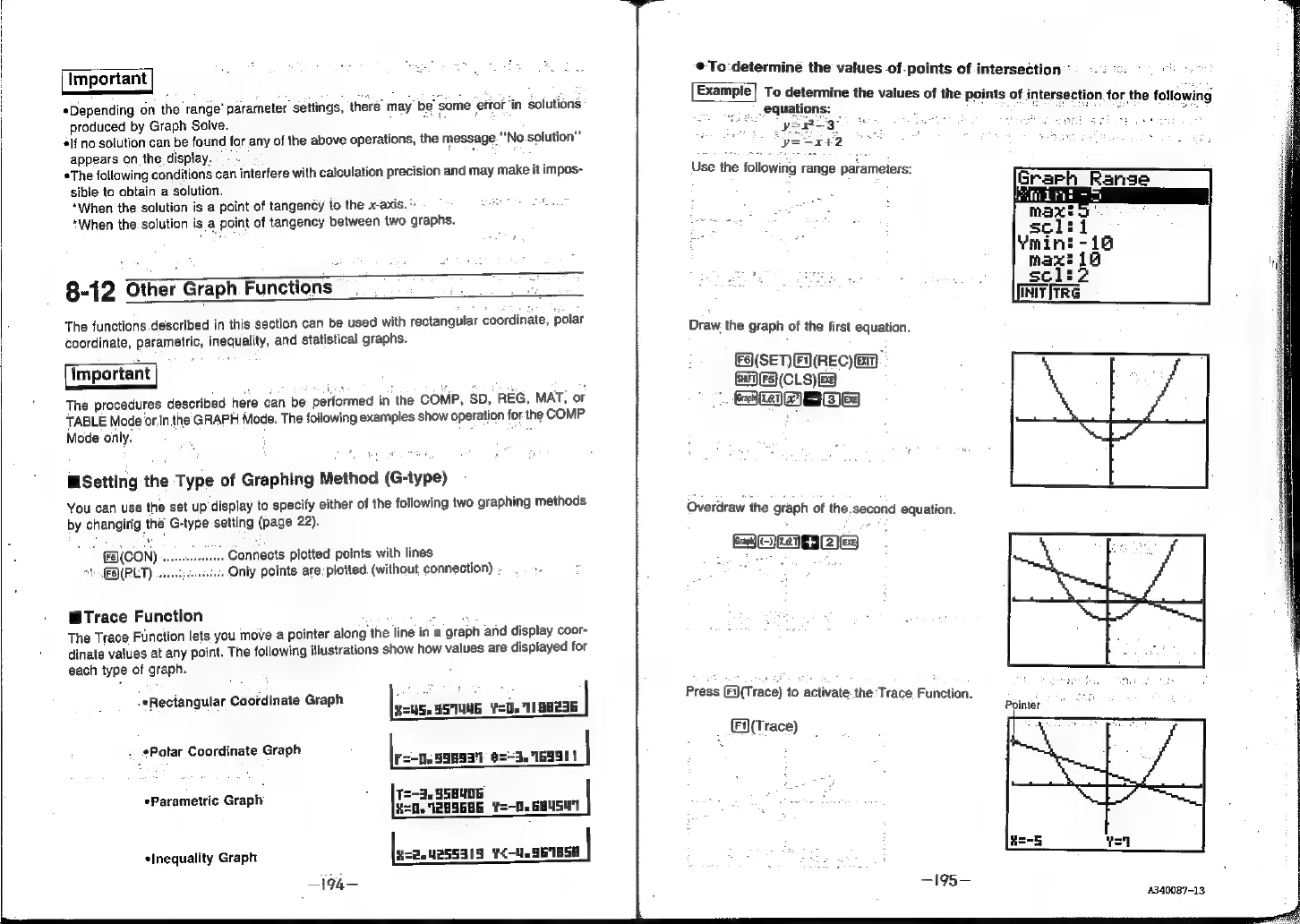
WTrace
Function
ee
The
Trace
Function
lets
you
move
a
pointer
along
the
line
in
a
graph
and
display
coor-
dinate
values
at
any
point.
The
following
illustrations
show
how
values
are
displayed
for
each
type
of
graph.
REUS.5STUUG
¥=U.711
88236
:
#Potar
Coordinate
Graph
.
:
:
F=-0.99893')
6=-3.
169511
«Parametric
Gra|
Ih
.
fe
SSBU05
|
P
H=D12HS6H6
¥=-0.
684501
¢Inequality
Graph
lass.
42z5Sa15
¥<-W.56185H
|
-194-
-*Rectangular
Coordinate
Graph
¢@To:determiné
the
values
of-points
of
intersection
:
To
determine
the
values
of
the
points
of
intersection.
fo
ee
equations:
:
Use
the
following
range
parameters:
Draw.
the
graph
of
the
first
equation.
FA(SET)FX(REC)
EM
F5(CLS)Ee
a]
eves
Overdraw
the
graph
of
the.second
equation.
Co
yea]
+
[ea
ea)
Press
(Fi(Trace)
to
activate
the:Trace
Function.
_
En(trace)
—195—
ma:
soliz
Initfrre
r
the
following
Pointer
4340087-13