EasyManua.ls Logo

Casio CFX-9800G - Page 116

Casio CFX-9800G
206 pages
Print Icon
To Next Page IconTo Next Page
To Previous Page IconTo Previous Page
Loading...
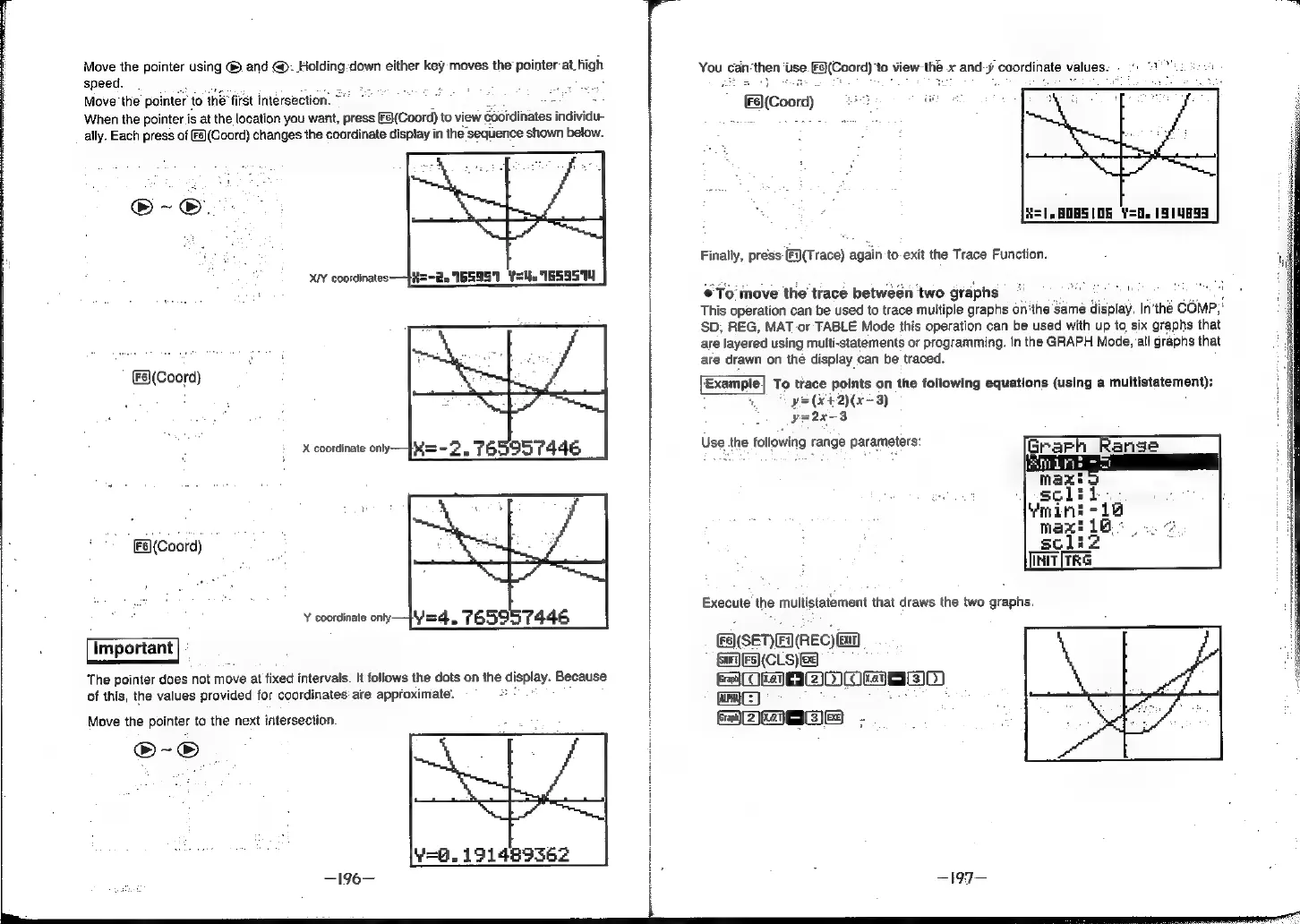
Move
the
pointer
using
®.
and
@.
Holding-down
either
key
moves
the
pointer
at.
high
speed.
Move
the
pointer
to
ine
first
intersection.
q
When
the
pointer
is
at
the
location
you
want,
press
[Fs}(Coord)
to
view
Gootdinates
individu-
ally.
Each
press
of
s)(Coord)
changes
the
coordinate
display
in
the
sequence
shown
below.
®-o.
XI
coordinates
—f#=-2e
165951
Y=.
"1659514
(F§\(Coord)
X
coordinate
only:
[F6)]
(Coord)
Y
coordinate
only
Yq
The
pointer
does
not
move
at
fixed
intervals.
It
follows
the
dots
on
the
display.
Because
of
this,
the
values
provided
for
coordinates’
are
approximate.
Move
the
pointer
to
the
next
intersection.
®-®
Y=8.
191489362
—196—
You
can
‘then
use
F3\(Coord)
‘to
view
thé
x
and-y
coordinate
values:
©
0
21°"
:2
82+
©
BlCoo)
aes
iw,
*
H=1.H0B5(08
Y=0.
1514893
Finally,
press
(Fi)(Trace)
again
to-exit
the
Trace
Function.
To
move
the
trace
between
two
graphs
i
This
operation
can
be
used
to
trace
multiple
graphs
on'the
Same
display.
In'the
COMP,
SD,
REG,
MAT-or
TABLE
Mode
this
operation
can
be
used
with
up
to,
six
graphs
that
are
layered
using
multi-statements
or
programming.
In
the
GRAPH
Mode,
all
graphs
that
are
drawn
on
the
display
can
be
traced.
‘Example]
To
trace
points
on
the
following
equations
(using
a
multistatement):
y=
(¥+2)(x-3)
yo2x-3
Use
the
following
range
parameters:
(s)(SET)F)(REC)@n)
|
GES(CLS)ES
SOMO
OMEasIS
tA
ame
es
ie
be