EasyManua.ls Logo

Casio CFX-9800G - Page 118

Casio CFX-9800G
206 pages
Print Icon
To Next Page IconTo Next Page
To Previous Page IconTo Previous Page
Loading...
elf
a
display
statement
(4)
caused
the
first
graph
to
be
drawn
{indicated
when
the
mes-
sage
‘‘—
Disp
—”
is
shown
on
the
display),
drawing
the,
subsequent
graph
after
activat-
ing
the
trace
function
causes
the
previous
coordinates
(“x=
andy
=")to
be
cleared
from
the
display.
°
:
:
:
-
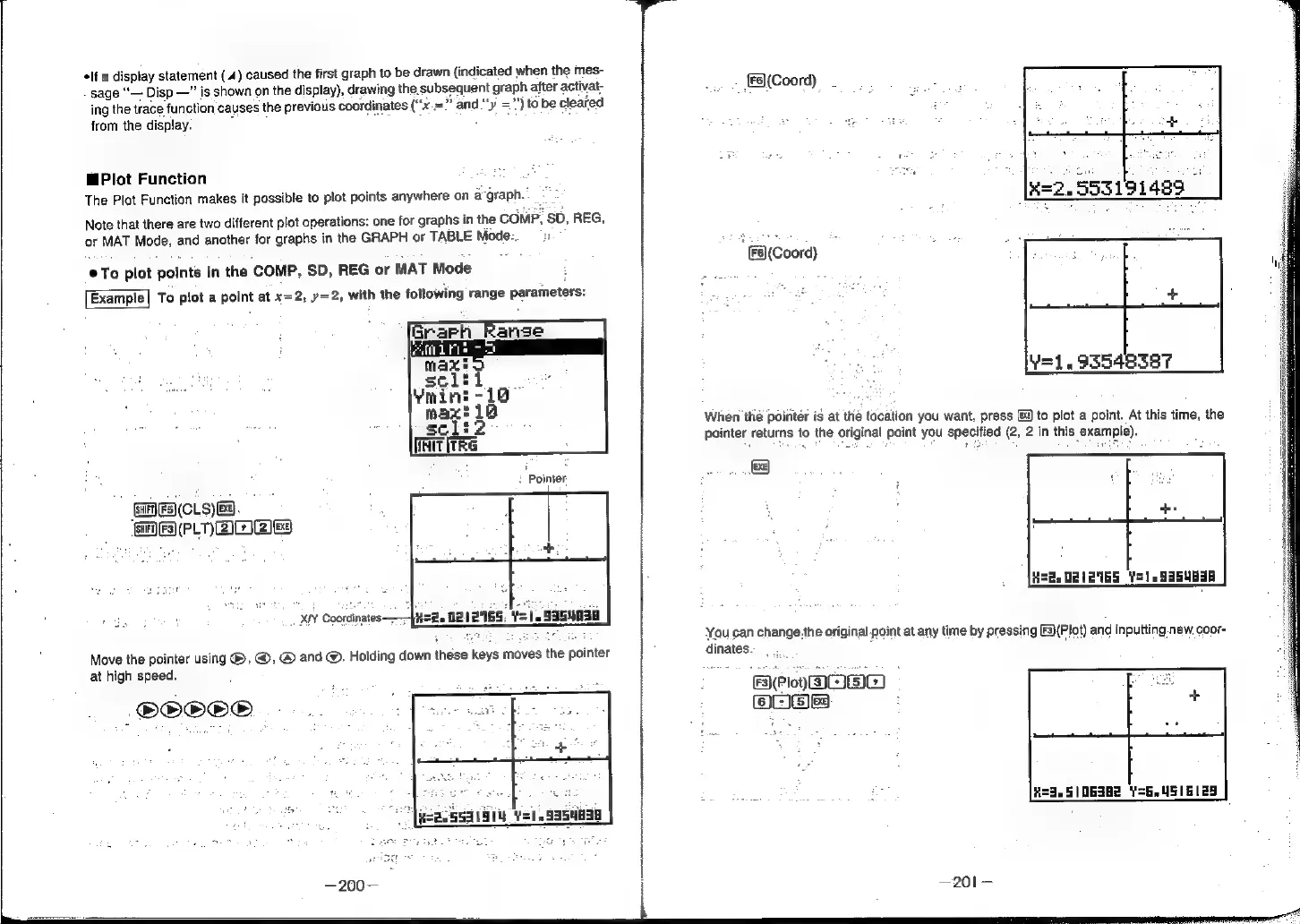
MPlot
Function
:
The
Plot
Function
makes
it
possible
to
plot
points
anywhere
on
a-graph.
Note
that
there
are
two
different
plot
operations:
one
for
graphs
in
the
COMP,
sD,
REG,
or
MAT
Mode,
and
another
for
graphs
in
the
GRAPH
or
TABLE
Mode-.
1
@To
plot
points
in
the
COMP,
SD,
REG
or
MAT
Mode
Exampte|
To
plot
a
point
at
x=2,
y=2,
with
the
following
range
parameters:
Pointer
@AIERICLS)
EB.
MF
PLOALZ
XY
Coordinates;
Tysg,
OBZ
165,
Y=
19354838
Move
the
pointer
using
®,
@,
@
and
@.
Holding
down
these
keys
moves
the
pointer
at
high
speed.
G®®S®
{8(Coord)
*
(Coord)
1.93548387
When
the
pointer
is
at
the
tocation
you
want,
press
9
to
plot
a
point.
At
this
time,
the
pointer
returns
to
the
original
point
you
specified
(2,
2
in
this
example).
Bez
DA
GS
Y=)
.93SUbaR
You
can
change.the
original
point
at
any
time
by
pressing
[F3)(Plot)
and
inputting.new
coor-
dinates.
BPon@oe)
3
ea
FES}
R=3.51/06382
Y=6.4516129