EasyManua.ls Logo

Casio CFX-9800G - Page 119

Casio CFX-9800G
206 pages
Print Icon
To Next Page IconTo Next Page
To Previous Page IconTo Previous Page
Loading...
Notes
7
i
Use
the
cursor
keys
to
move
the
pointer
around
the
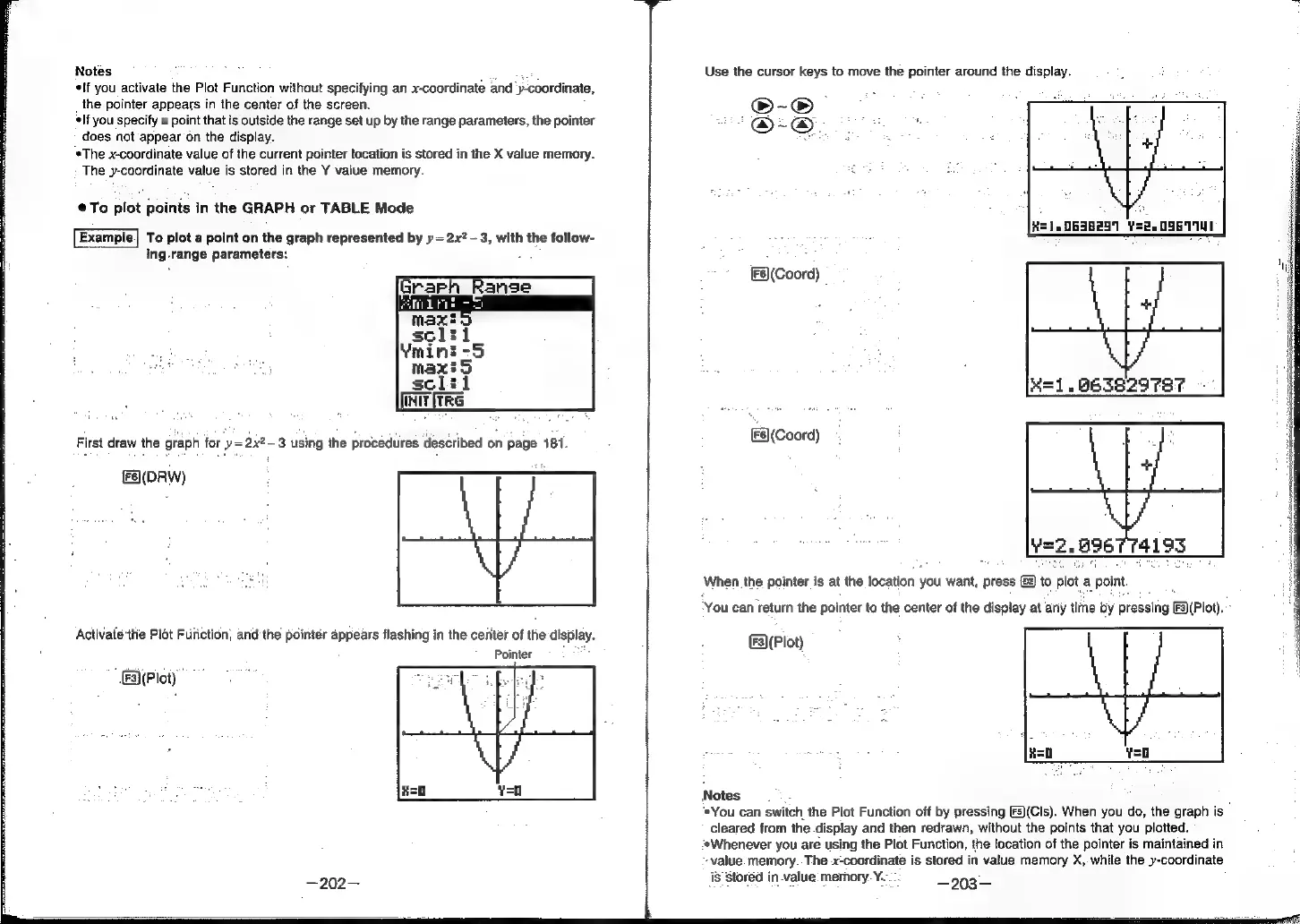
display.
*If
you
activate
the
Plot
Function
without
specifying
an
x-coordinate
and
y-coordinate,
the
pointer
appears
in
the
center
of
the
screen.
oO-~S
If
you
specify
a
point
that
is
outside
the
range
set
up
by
the
range
parameters,
the
pointer
ae
@-@
oe
a
does
not
appear
on
the
display.
wh
$
H
<
*The
x-coordinate
value
of
the
current
pointer
location
is
stored
in
the
X
value
memory.
The
y-coordinate
value
is
stored
in
the
Y
value
memory.
To
plot
points
in
the
GRAPH
or
TABLE
Mode
Example.|
To
plot
a
point
on
the
graph
represented
by
y=
2.x?
3,
with
the
follow-
ing
range
parameters:
[F6)
(Coord)
K=1.
663829787
First
draw
the
graph
for
‘y=2x2-3
using
the
procedures
described
on
page
181.
E8(Coord)
(Fe(DRW)
rat
When
the
pointer
is at
the
location
you
want,
press
©)
to
plot
a
point.
'
You
can
return
the
pointer
to
the
center
of
the
display
at
any
time
by
pressing
[3)(Plot).
~
Activate
the
Plot
Furiction,
and
the
pointer
appears
flashing
in
the
center
of
the
display.
(lot)
Pointer
"
Fa\(Ploty
Notes.
®You
can
switch
the
Plot
Function
off
by
pressing
[5)(Cls).
When
you
do,
the
graph
is
cleared
from
the
display
and
then
redrawn,
without
the
points
that
you
plotted.
‘*Whenever
you
are
using
the
Plot
Function,
the
location
of
the
pointer
is
maintained
in
-value.
memory..The
x-coordinate
is
stored
in
value
memory
X,
while
the
y-coordinate
is
stored
in
value
memory.
¥.-:
—203—
—202—