EasyManua.ls Logo

Casio CFX-9800G - Page 120

Casio CFX-9800G
206 pages
Print Icon
To Next Page IconTo Next Page
To Previous Page IconTo Previous Page
Loading...
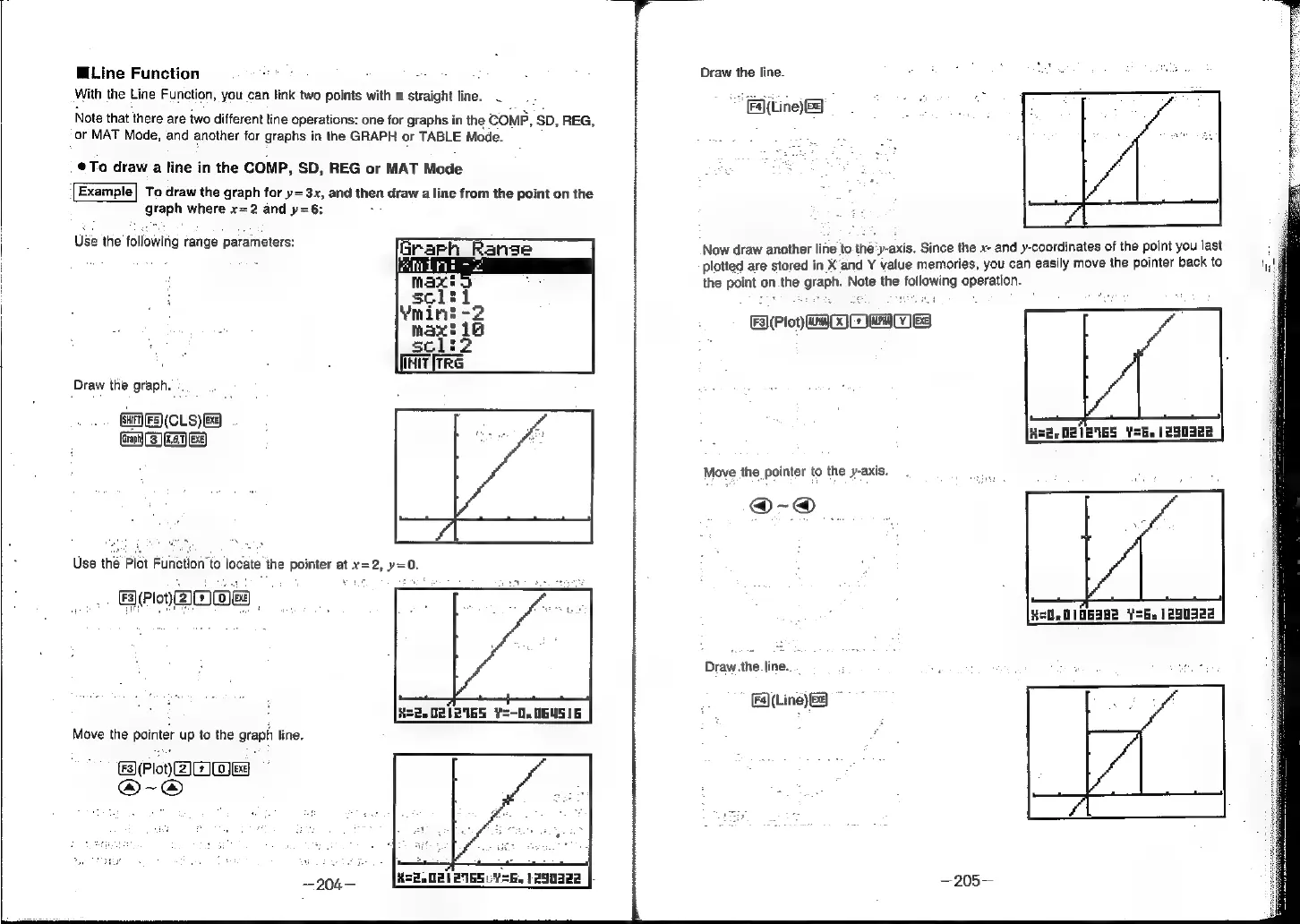
Line
Function
With
the
Line
Function,
you
can
link
two
points
with
a
straight
line.
Note
that
there
are
two
different
line
operations:
one
for
graphs
in
the
comp,
SD,
REG,
‘or
MAT
Mode,
and
another
for
graphs
in
the
GRAPH
or
TABLE
Mode.
¢@To
draw
a
line
in
the
COMP,
SD,
REG
or
MAT
Mode
'[Example]
To
draw
the
graph
for
y=3x,
and
then
draw
a
line
from
the
point
on
the
graph
where
x=2
and
y=6:
:
Use
the
following
range
parameters:
Init
irre
Draw
the
graph.
E(CLS)
Use
the
Plot
Function’to
locate
the
pointer
at
x=2, y=0.
(Plo)
DOE
Rte
0812165
¥=-0.
064516
Move
the
pointer
up
to
the
graph
line.
BWPoYyAnwE
@-@
—204—
22,021
PIGS
Y=.
290g
|-
Draw
the
line.
*
Fallin)
&
Now
draw
another
line
to.
the'y-axis.
Since
the
x-
and
y-coordinates
of
the
point
you
last
plotted
are
stored
in
X’and
Y
value
memories,
you
can
easily
move
the
pointer
back
to
the
point
on
the
graph.
Note
the
following
operation.
F3](Plot)
ao
er
1S)
R=
O21EIGS
VSb.
1250328
Move
the
pointer
to
the
y-axis.
@-@
He0.
0106382
¥=6.
1290322
Draw.the
line...
Fa](Line)
Be)
~
—205—