EasyManua.ls Logo

Casio CFX-9800G - Page 126

Casio CFX-9800G
206 pages
Print Icon
To Next Page IconTo Next Page
To Previous Page IconTo Previous Page
Loading...
Input
the
zoom
factors
for
the
x-axis
and
y-axis.
€\(FCT)
5)
eel
See
EXIT)
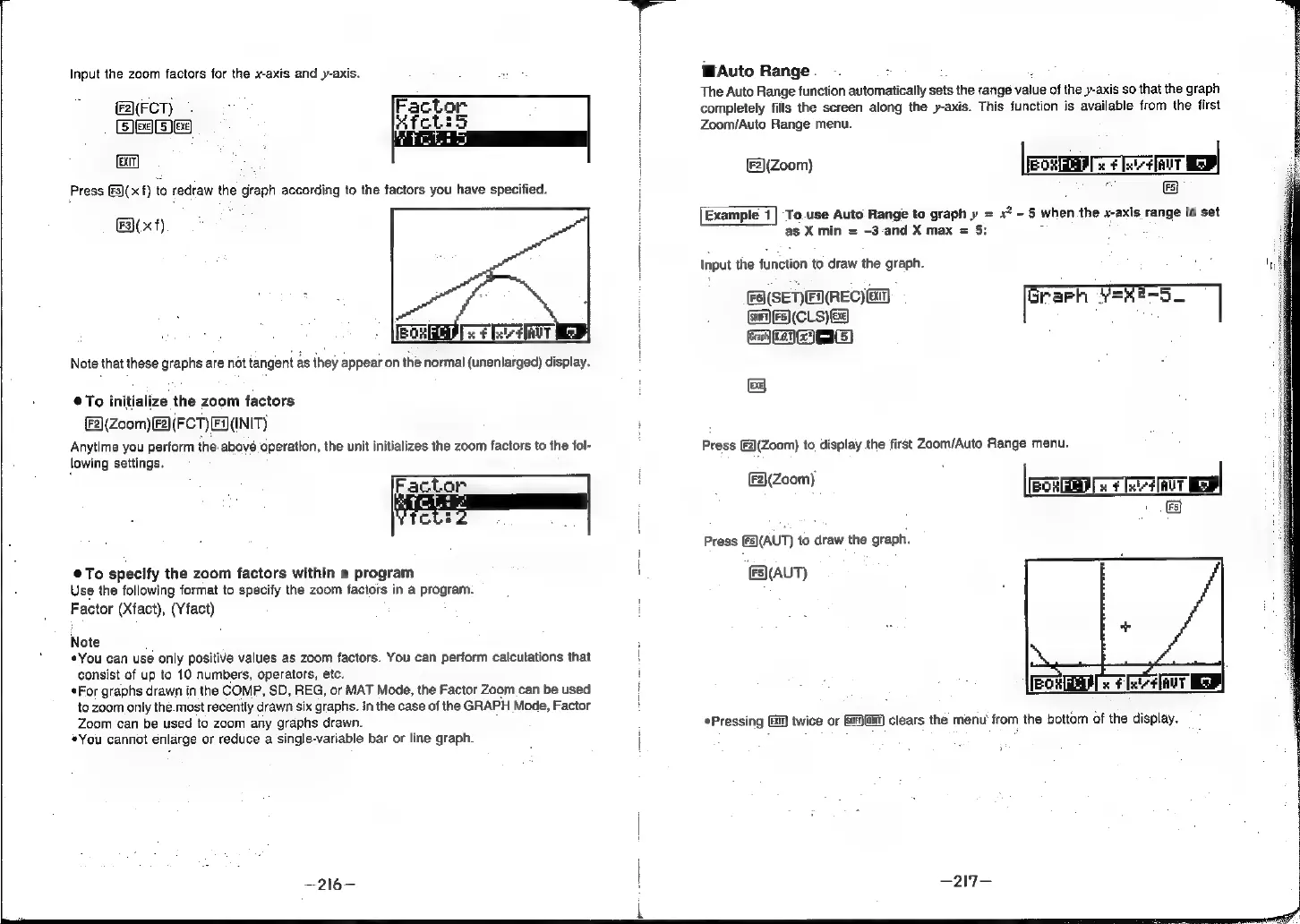
Press
[3)(
xf)
Esl
x
Note
that
these
graphs
are
not
tangent
as
they
appear
on
the
normal
(unenlarged)
display.
To
initialize
the
zoom
factors
2)(Zoom)(F2\(FCT)
EN(INIT)
Anytime
you
perform
the-abové
operation,
the
unit
initializes
the
zoom
factors
to
the
fol-
lowing
settings.
Factor
CLE
To
specify
the
zoom
factors
within
a
program
Use
the
following
format
to
specify
the
zoom
factors
in
a
program.
Factor
(Xfact),
(Yfact)
Note
«You
can use
only
positive
values
as
zoom
factors.
You
can
perform
calcutations
that
consist
of
up
to
10
numbers,
operators,
etc.
For
graphs
drawn
in
the
COMP,
SD,
REG,
or
MAT
Mode,
the
Factor
Zoom
can
be
used
to
zoom
only
the.most
recently
drawn
six
graphs.
In
the
case
of
the
GRAPH
Mode,
Factor
Zoom
can
be
used
to
zoom
any
graphs
drawn.
*You
cannot
enlarge
or
reduce
a
single-variable
bar
or
line
graph.
WAuto
Range.
i
.
The
Auto
Range
function
automatically
sets
the
rangé
value
of
the
y-axis
so
that
the
graph
completely
fills
the
screen
along
the
y-axis.
This
function
is
available
from
the
first
Zoom/Auto
Range
menu.
(Zoom)
(ERIS:
LEDC
o
FS)
Example
1|
To.use
Auto
Range
to
graph
»
=
x?
-
5
when
the
x-axis
range
is
set
as
X
min
=
-3-and
X
max
=
5:
jo
A
Input
the
function
to
draw
the
graph.
FaSENFI(REC)ED
Graph
Y=42—-o_
(say)
[Fs]
(CLS)
Ex)
MAmG)
EXE]
Press
[F2\(Zoom)
to
display
the
first
Zoom/Auto
Range
menu.
ould
xf
Ix
¢]AUT
'
(F2}(Zoom)
Press
[F5)(AUT)
to
draw
the
graph.
(AUT)
Pressing
Gi
twice
or
GiGi)
clears
the
menu
from
the
bottom
of
the
display.