EasyManua.ls Logo

Casio CFX-9800G - Page 125

Casio CFX-9800G
206 pages
Print Icon
To Next Page IconTo Next Page
To Previous Page IconTo Previous Page
Loading...
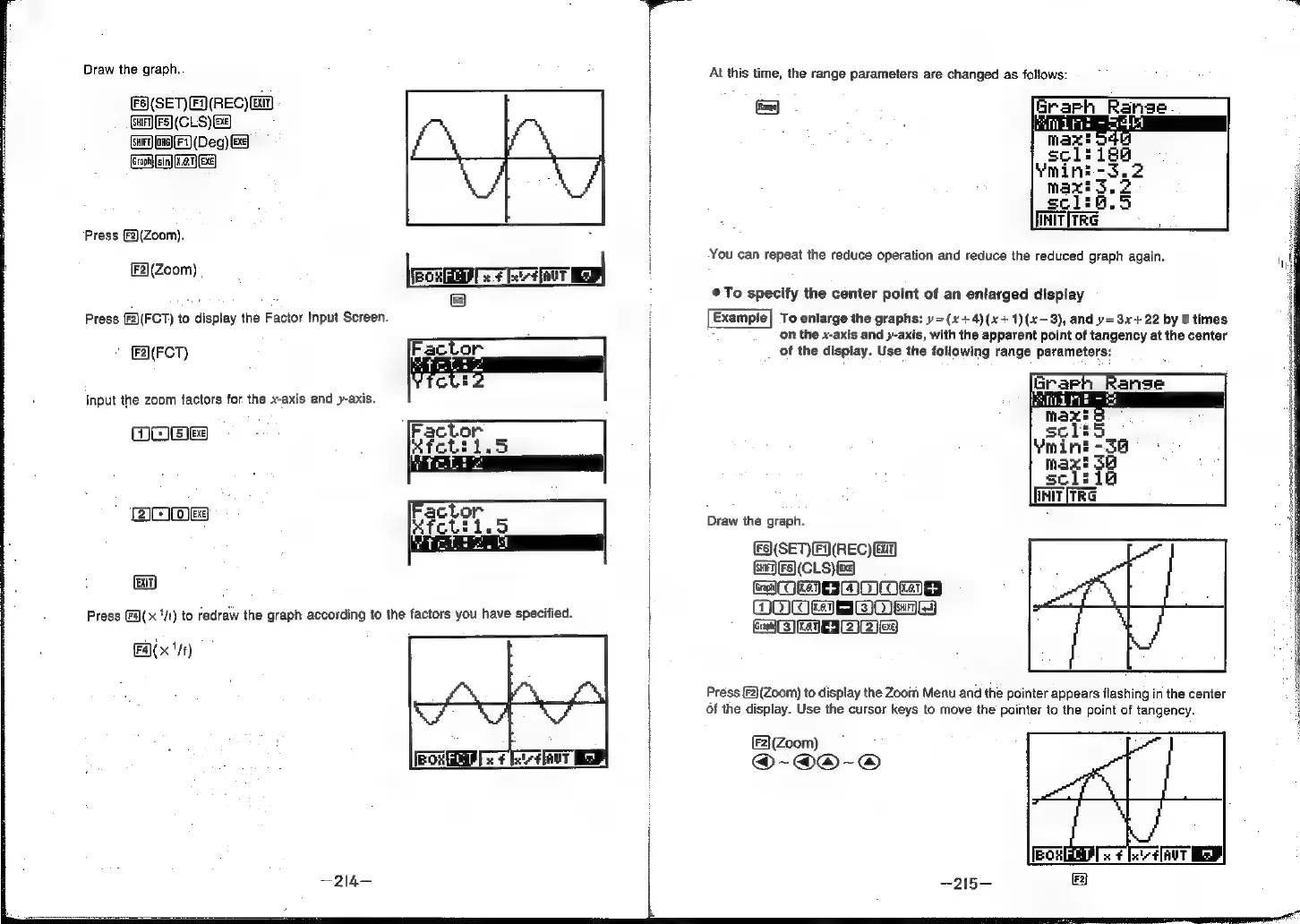
Draw
the
graph.
At
this
time,
the
range
parameters
are
changed
as
follows:
(SEN
FIREC)
EM
(un
[Fs]
(CLS)
&¢)
Suir
on6)(F1)
(Deg)
BE
(Graph)
sin)
Ke.1)
(BE)
initiree
You
can
repeat
the
reduce
operation
and
reduce
the
reduced
graph
again.
Press
(F2)(Zoom).
:
F2](Zoom)
.
{Eo
ema
Mr
Ou
To
specify
the
center
point
of
an
enlarged
display
(Fz)
Press
[F2)(FCT)
to
display
the
Factor
Input
Screen.
Example]
To
enlarge
the
graphs:
y=(x+4)(x+1)(x—3),
and
y=3x+
22
by
5
times
on
the
x-axis
and
y-axis,
with
the
apparent
point
of
tangency
at
the
center
F2](FCT)
Factor
of
the
display.
Use
the
fotlowing
range
parameters:
Input
the
zoom
factors
for
the
x-axis
and
y-axis.
OO@es
DIAM)
Draw
the
graph.
(Fs)(SET)[F)(REC)
a)
SHIFT)
(FS)
(CLS)&
(nH)
;
re
ORME
MDI
Een.
Press
F(x
'/t)
to
redraw
the
graph
according
to
the
factors
you
have
specified.
EE
|
+-
(eA)
Press
{F2}(Zoom)
to
display
the
Zoom
Menu
and
the
pointer
appears
flashing
in
the
center
of
the
display.
Use
the
cursor
keys
to
move
the
pointer
to
the
point
of
tangency.