EasyManua.ls Logo

Casio CFX-9800G - Page 39

Casio CFX-9800G
206 pages
Print Icon
To Next Page IconTo Next Page
To Previous Page IconTo Previous Page
Loading...
©
To
clear
all
value
memory
contents
a
COG
Ca
(Mc)
Be)
aA
Shao,
ee
Teag
6
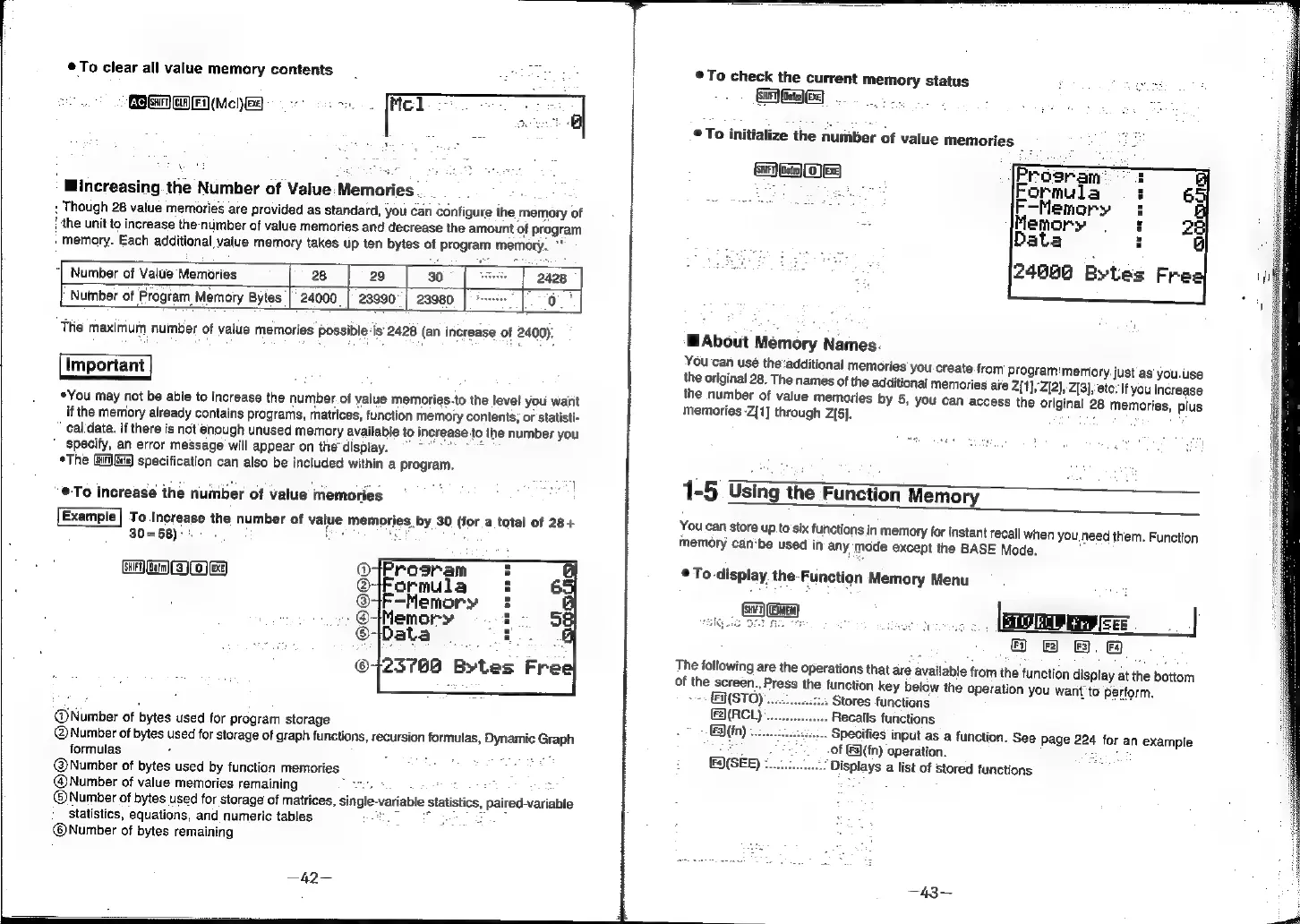
Mincreasing.
the
Number
of
Value:Memories
ven
:
Though
28
value
memories
are
provided
as
standard,
you
can
configure
the
memory
of
}
the
unit
to
increase
the
number
of
value
memories
and
decrease
the
amount
of
program
Memory.
Each
additional
value
memory
takes
up
ten
bytes
of
Program
memory.
*
2408
]
o.*|
Number
of
Value
Memories
28 29
30
Nuiber
of
Program
Memory
Bytes
|
24000
|
23990°|
23980
The
maximum
number
of
value
memories
possible
-is
2428
(an
increase
of
2400):
Important
*You
may
not
be
able
to
increase
the
number.
of
value
memories.to
the
level
you
want
if
the
memory
already
contains
programs,
matrices,
function
memory
contents,
or
statisti-
cal
data.
if
there
is
not’enough
unused
memory
available
to
increase
to
the
number
you
"
specify,
an
error
message
will
appear
on
the
display.
=
:
e
*The
specification
can
also
be
included
within
a
program.
A
iste
et
4 :
1
“@To
increase
the
number
of
value
memories
To
increase
the
number
of
value
memories
by
30
(for
a
total
of
28
+
30=58):
GA
Gm
S)o)
eg
Q
:
@7Formula
:
6
@4F-Memory
§
.
@Memory
:
5
©-Data
:
©723769
Bytes
@Number
of
bytes
used
for
program
storage
@Number
of
bytes
used
for
Storage
of
graph
functions,
recursion
formulas,
Dynamic
Graph
formulas
:
5
oe
@Number
of
bytes
used
by
function
memories
@Number
of
value
memories
remaining
are
:
@Number
of
bytes
used
for
storage
of
matrices,
single-variable
statistics,
paired-variable
statistics,
equations,
and
numeric
tables
fe
iste
@©Number
of
bytes
remaining
To
check
the
current
memory
status
Gage]
To
initialize
the
number
of
value
memories
MAbout
Memory
Names
You
can
use
the:additional
memories
you
create
from
program:'memory
just
as
you.use
the
original
28,
The
names
of
the
additional
memories
are
Z[1},Z[2},
Z[3},
ete:
Ifyou
increase
the
number
of
value
memories
by
5,
you
can
access
the
original
28
memories,
plus
memories
-Z[1]
through
(5).
cai
1-5
Using
the
Function
Memory
SS
Eemory
You
can
store
up.to
six
functions
in
memory
for
instant
recall
when
you,
need
them.
Function
memory
can‘be
used
in
any
‘mode
except
the
BASE
Mode.
,
©
To
display
the-Function
Memory
Menu
@
®
B
f&
The
following
are
the
operations
that
are
available
from
the
function
display
at
the
bottom
of
the
screen.,
Press
the
function
key
below
the
operation
you
want
to
perform.
&N(STO).
Stores
functions
(2(RCL)
Recalls
functions
Ei\(fn)
...
.-
Specifies
input
as
a
function.
See
Page
224
for
an
example
be
;
of
(3)(fn)
operation.
see
(SEE)
¢.....:,
‘Displays
a
list
of
stored
functions
a