EasyManua.ls Logo

Casio CFX-9800G - Page 40

Casio CFX-9800G
206 pages
Print Icon
To Next Page IconTo Next Page
To Previous Page IconTo Previous Page
Loading...
®
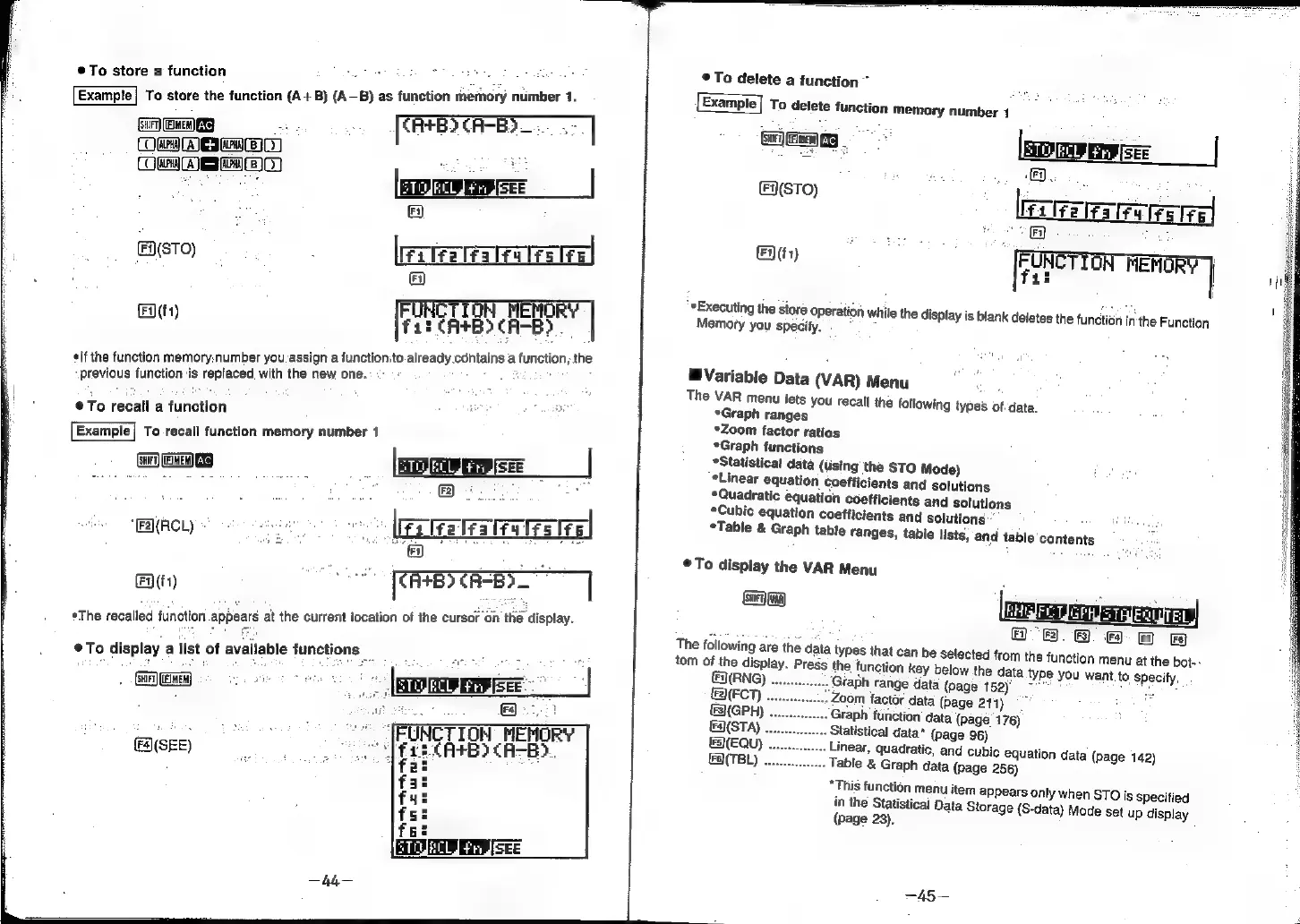
To
store
a
function
Example}
To
store
the
function
(A+B) (A—B)
as
function
memory
number
1.
rw
AES
ABI)
Oem
ea}
(en
Ac}
os
:
[cB
CAB)
i
|
FN(STO)
;
[Fila
lfa
leu
lrslfe
FA
RENORY
at
Fat
CRBS
CHEE
3
¢lf
the
function
memory:number
you.
assign
a
functionito.already.contains
a
function,
the.
previous
function
is
replaced
with
the
new
one.
To
recall
a
function
,
Bie
eT
i
To-recall
function
memory
number
1
(Sa
(EEN)
XS
;
SEE
wmrey
ee
[ETE
aes
z
a
7
71)
RRB
CHES
|
*The
recalled
function
appears
at
the
current
location
of
the
cursor
on
the
display.
eTo
display
alist
of
available
functions
Gar
aw)
(Fs)
cy
TI
RHEHOR
TCAs)
CH
(SEE)
Fi
It
1f
f
f4
fs
f
©
To
delete
a
function”
To
delete
function
memory
number
1
Bee
legates
ena
ceaceal
ee)
:
my
[RETO
rer)
FERORY
}
it
|!
“*Executing
the
store
operation
while
the
display
is
blank
deletes
the
function
in:
the
Function
Memory
you
specify.
.
Variable
Data
(VAR)
Menu
i
The
VAR
menu
jets
you
recall
the
following
types
of-data.
*Graph
ranges
*Zoom
factor
ratios
*Graph
functions
*Statistical
data
(using
the
STO
Mode)
Linear
equation
Coefficients
and
solutions
*Quadratic
equation
coefficients
and
solutions
Cubic
equation
coefficients
and
solutions:
;
*Table
&
Graph
table
ranges,
table
lists,
and
table
contents
©
To
display
the
VAR
Menu
8
ese
usriste
TEL
Fi)
F3}.
(Fa)
[FB
Fs}
The
following
are
the
data
types
that
can
be
selected
from
the
function
menu
at
the
bot--
tom
of
the
display.
Press
the
function
key
below
the
data
type
you
want
to
specify.
(RNG)
.
;
Gfaph
range
data
(page
152)'
(FCT)
:
Zoom
factor
data
(Page
211)
(GPH)
. .
Graph
function’
data
(page'
176)
§B(STA)
Statistical
data*
(page
96)
&S(EQU)
Linear,
quadratic,
and
cubic
equation
data
(page
142)
€8(TBL)
Table
&
Graph
data
(page
256)
“This
function
menu
item
appears
only
when
STO
is
specified
in
the
Statistical
Data
Storage
(S-data)
Mode
set
up
display
(page
23).
—45—