EasyManua.ls Logo

Casio CFX-9800G - Page 41

Casio CFX-9800G
206 pages
Print Icon
To Next Page IconTo Next Page
To Previous Page IconTo Previous Page
Loading...
|
eT
Ht
hi
i
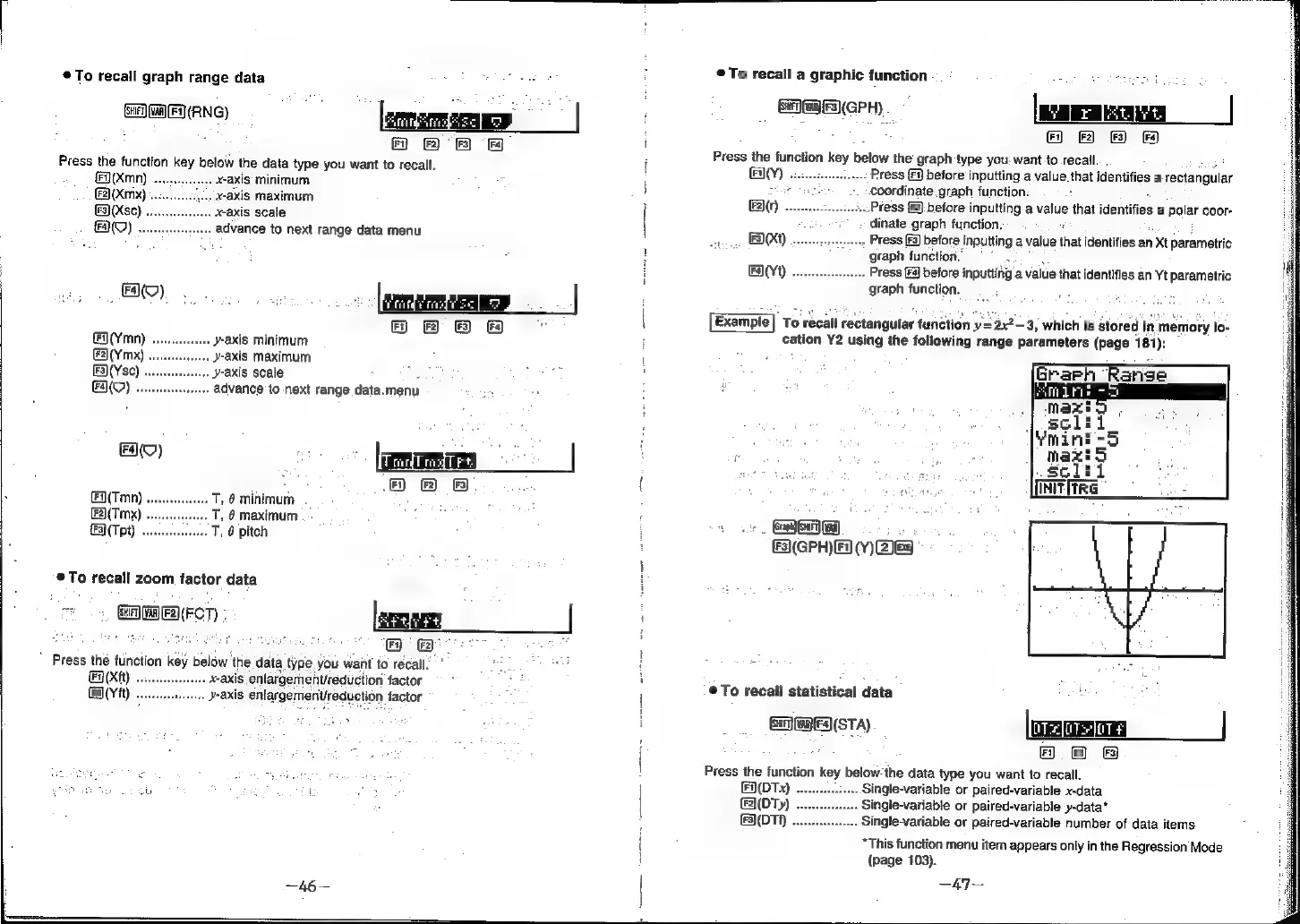
©To
recall
graph
range
data
©
recall
a
graphic
function
(GPH)
MEDANG
a
|
|
|
:
(
)
Fnmsmndtc]
2
Fi)
(F2)
(3)
(Fa)
7
A
eB)
&
I
Press
the
function
key
below
the
data
type
you
want
to
recall.
Press
the
function
key
below
the
graph
type
you:
want
to
recall.
.
Press
[Fy
before
inputting
a
value
that
identifies
a
rectangular
(Xn)
x-axis:
minimum
tate
coordinate.
graph
function:
F2](Xmx)
.
-axis
maximum
F2)(r)
..Press
[2
before
inputting
a
value
that
identifies
a
polar
coor-
F3)(Xsc)
~axis
scale
;
dinate
graph
function.
FAQ)
.
idvance
to
next
range
data
menu
Gis
MIO)
casncg
does
Press
(F3)
before
inputting
a
value
that
identifies
an
Xt
parametric
:
o
.
;
“graph
function.”
°°
FAY1)
oes
Press
[Fa]
before
inputting’a
value
that
identifies
an
Yt
parametric
graph
function.
FO)...
.
Se
.
Frittntrsct
|
8B
DB
a
Example
To
recall
rectangular
function
y=
=
2x2
3,
which
is
Stored
i
in
memory
lo-
cation
Y2
using
the
following
range
parameters
(page
181):
y-axis
minimum
.
y-axis
maximum
7
i
.
y-axis
scale
:
E
.
advance
to
next
range
data.menu
ae
4
8
B
(
,
pie
iape
aN
S
€(Tmn)
T,
@
minimum
.
:
.
/
a
oe
;
=
_
&2\(Tmx)
T,
6
maximum
:
am
(Tet)
T,
6
pitch
&3)(GPH)
Fa
(Y)
2&8
®To
recall
zoom
factor
data
mt
GF
Ga)
FACT)
«
a
eo
*
Press
the
function
key
below
the
data
|
type
you
wait
to
recall.
Fn
(xtt)
axis
enlargernent/reduction
factor
®@To
recall
statistical
data
F2}(Y
it)
y-axis
enlargement/reduction
factor
GDED(STA)
F)
2)
FS)
Press
the
function
key
below-the
data
type
you
want
to
recall.
FA(DTx)
..
..
Single-variable
or
paired-variable
x-data
F2(DTy)
..
Single-variable
or
paired-variable
y-data*
FS)(DTA)
...
..
Single-variable
or
paired-variable
number
of
data
items
*This
function
menu
item
appears
only
in
the
Regression
Mode
(page
103).
—47—