EasyManua.ls Logo

Casio CFX-9800G - Page 45

Casio CFX-9800G
206 pages
Print Icon
To Next Page IconTo Next Page
To Previous Page IconTo Previous Page
Loading...
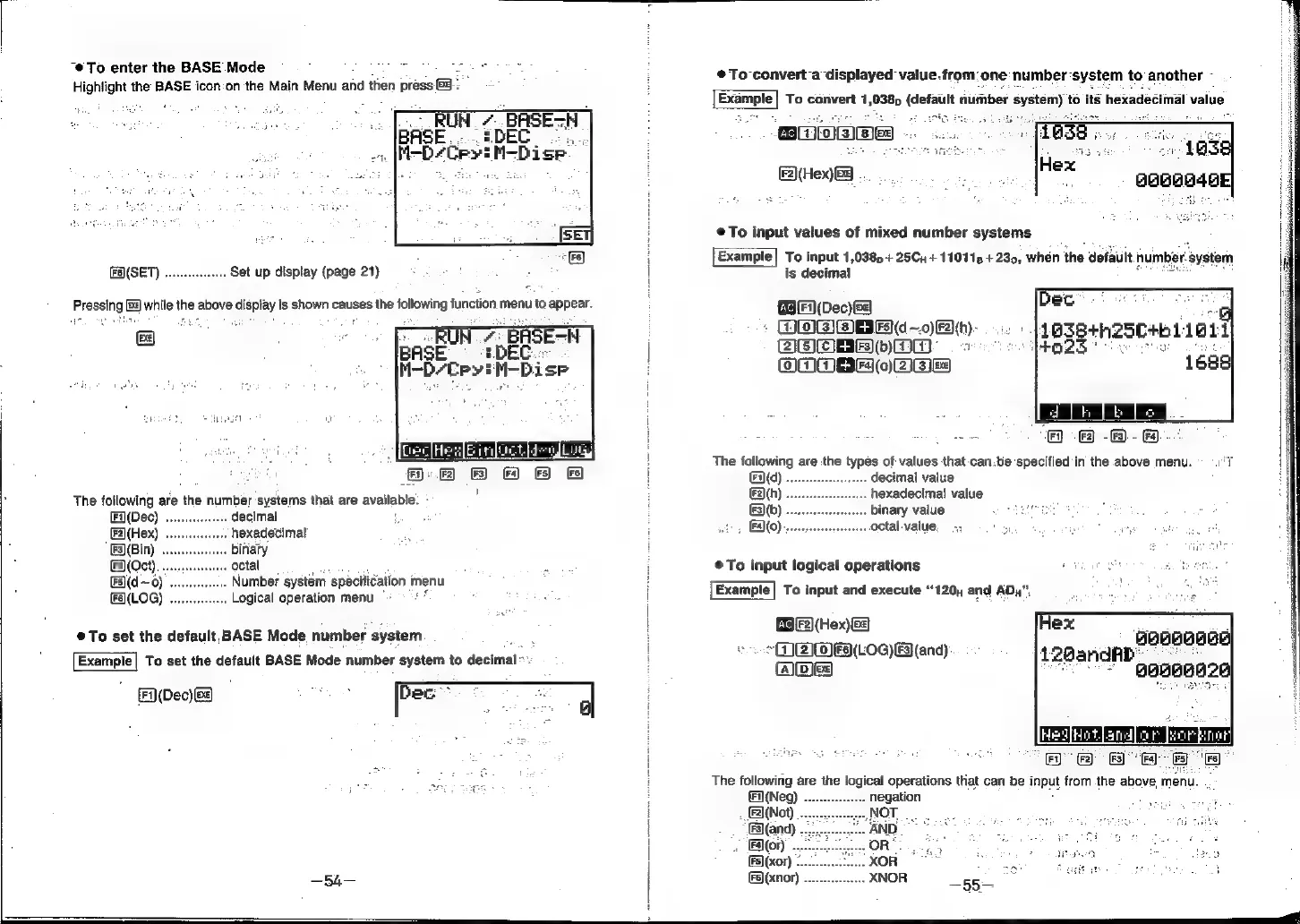
“To
enter
the
BASE
Mode
:
she
Highlight
the
BASE
icdn
‘oh
the’
Mali:
Ménard
'then
prees
©
®@To-convert-a
displayed
value.from:
one
number:
system
to
another
~
ightigl
e
i
:
Bramble
To
convert
1,038
(default
fiumber
ayetemn)
‘to
ité
hexadecimal
value
.
Eon
ii
ees
(F2)(Hex)
Bg
...
a
H
@To
input
values
of
mixed
number
systems
©
|
Example|
To
input
1,038
+
25Cy
+
110115
+
230,
when
the
default
number.
‘system
(F6)(SET)
....
Set
up
display
(page
21)
:
:
|
is
decimal
Pressing
Ee)
while
the
above
display
|
is
shown
causes
the
following
function
menu
to
appear.
(Fi)
(Dec)
Be
.
a
nr
!
*
DOIBIBBEG—o)Fh):
1038+n25C+b1
1011
BOMEAbDMm
=
SS
PROZS
oe
ors
H
OOMBF
0)
2IEF
1688]
'
be
age
i
=
2
a
2
_E
5
|
ache
=
me
a
Ff
©
-&)-
Ff).
aa
“at
:
|
The
following
are
the
types
of
values
that
can.be
specified
'in
the
above
menu.
©
°)'t
yoke
2
B
&
@
Es)
|
fd)
decimal
value
:
The
following
are
‘the
number
systems
that
are
available.
:
|
Bh)
nexodeclmal
pall,
(Fi(Dec)
...
decimal
[F3)(b)
binary
value
(F2](Hex)
hexadecimal
+,
EO)
octal-value
(F3)(Bin)
binary
os
FA
(Oct)
octal
é
;
ij
@
To
input
logical
operations
a
a
=
hos,
tel
news
nour
prenu
i
[Example]
To
input
and
execute
“120,
and
ADu”
eres
|
|
GB
F2)(Hex
©To
set
the
default,
BASE
Mode.
number
system
i
(Hex)
|
»
(I)
(LOG)
F3)(and)
Example|
To
set
the
default
BASE
Mode
number
system
to
decimal
~
t
Abe
(Fi)(Dec)
see
Dec
The
following
are
the
logical
operations
ttiat
can
be
input
from
the
above,
menu.
(Neg)
...
negation
s
(Not)
To.
Mas
a
Sita
ne
.
(and)
eee
:
oe
@