EasyManua.ls Logo

Casio CFX-9800G - Page 47

Casio CFX-9800G
206 pages
Print Icon
To Next Page IconTo Next Page
To Previous Page IconTo Previous Page
Loading...
mStacks
cae
:
i
L
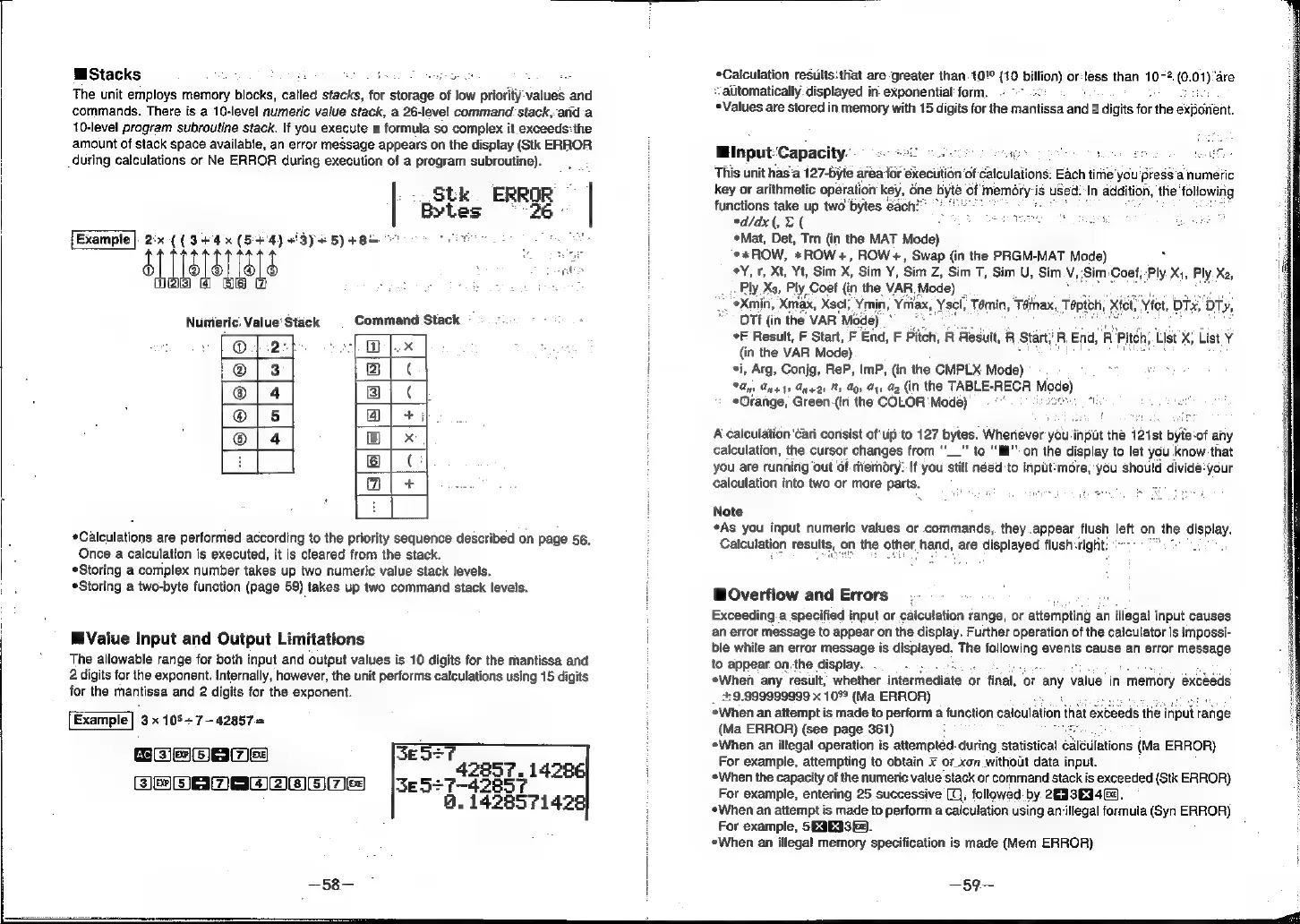
The
unit
employs
memory
blocks,
called
stacks,
for
storage
of
low
priority
values
and
commands.
There
is
a
10-level
numeric
value
stack,
a
26-level
command
stack,
arid'a
10-level
program
subroutine
stack.
If
you
execute
a
formula
so
complex
it
exceeds:the
amount
of
stack
space
available,
an
error
meSsage
appears
on
the
display
(Stk
ERROR
during
calculations
or
Ne
ERROR
during
execution
of
a
program
subroutine).
Stk.
ERROR
Bytes
26
Example
|.
2:«
((3+4
(544)
#3y#
5)
+82
"oo
ers
SUEY
Numeric.
Value‘
Stack
Command
Stack
®
|
2:
2}
@
|..x
@/3
2)
|
¢
@®|4
3]
|
¢
@|5
@i
+i
@|4
B)
|
x
|
i
|
¢
[am
+
|
*Calculations
are
performed
according
to
the
priority
sequence
described
on
page
56.
Once
a
calculation
is
executed,
it
is
cleared
from
the
stack.
Storing
a
complex
number
takes
up
two
numeric
value
stack
levels.
Storing
a
two-byte
function
(page
59)
takes
up
two
command
stack
levels.
Value
Input
and
Output
Limitations
The
allowable
range
for
both
input
and
output
values
is
10
digits
for
the
mantissa
and
2
digits
for
the
exponent.
Internally,
however,
the
unit
performs
calculations
using
15
digits
for
the
mantissa
and
2
digits
for
the
exponent.
Example|
3
x
105+
7-42857=
{sc
[ES)
EG]
Ee3)
=
jira)
a
ESECIES|
[eal
ESPANA
Eales
—58-—
*Calculation
results:that
are
greater
than.10!°
(10
billion)
or:tess
than
10-2.
(0.
01)"are
automatically
displayed
in:
exponential:
form.
*Values
are
stored
in
memory
with
15
digits
for
ihe
mantissa
and
2
digits
for
the
exporient.
Minput:Capacity.
2
:
This
unit
has'a
127-byte
area
foie
execution
of
calculations.
Each
time’
you
press
anumeric
key
or
arithmetic
operation
key,
61
é
Sn
addition,
the’
following
functions
take
up
two
bytes
éach?
,
she
ed/dx(,
X
(
«Mat,
Det,
Trn
(in
the
MAT
Mode)
**xROW,
*ROW+,
ROW+,
Swap
(in
the
PRGM-MAT
Mode)
.
*Y,
1,
Xt,
Yt,
Sim
X,
Sim
Y,
Sim
Z,
Sim
T,
Sim
U,
Sim
v,
Sim
-Coef,
Ply
Xj,
Ply
Xa,
Ply
Xa,
Ply.
Coef
{in
the
VAR.
Mode)
_
*Xmin,
xmax,
Xsel;,
it
oy
aX,
Ysel,
Tamin,
Témax,
Toptch,
Xfet,
Vict,
bTx,
DTy,
OT#
(in
the
VAR’
Moc
¢F
Result,
F
Start,
F
End,
F
Pitch,
R
Result,
R
Start,’
R,
End,
R
Pitch,
List
xX,
List
Y
{in
the
VAR
Mode)
*i,
Arg,
Conjg,
ReP,
ImP,
(in
the
CMPLX
Mode)
Gin
Any
ty
Fne2s
Ms
My
Gi
Me
(in
the
TABLE-RECR
Mo
e)
*Orange,
Green-(in
the
COLOR
Mode)
aa
A
calculation
'can
consist
of
up
to
127
bytes.
Whenever
you
input
thé
121st
byte-of
any
calculation,
the
cursor
changes
from
"__”
to
“lll’”
on
the
display
to
let
you
know.
that
you
are
running
out
of
memory:
If
you
‘till
néed
to
inpt:more,
you
should
divide:
your
calculation
into
two
or
more
parts.
Note
*As
you
input
numeric
values
or
commands,
they.appear
flush
left
on
the
display.
Calculation
results,
on
the
other,
hand,
are
‘aleplayed
flush
sright:
=
WOverfiow
and
Errors
Exceeding
a
specified
input
or.calculation
range,
or
attempting
an
illegal
input
causes
an
error
message
to
appear
on
the
display.
Further
operation
of
the
calculator
is
impossi-
ble
while
an
error
message
is
displayed.
The
parce
events
cause
an
error
message
to
appear
on.the
display..
When
any
result,
whether
intermediate
or
final,
‘or
any
value
in
|
memory
exceeds
++
9.999999999
x
10°
(Ma
ERROR)
When
an
attempt
is
made
to
perform
a
function
calculation
that
(Ma
ERROR)
(see
page
361)
When
an
illegal
operation
is
attempted.
during
statistical
cal
ildtions
(Ma
ERROR)
For
example,
attempting
to
obtain
¥
or_xon
witholt
data
input.
«When
the
capacity
of
the
numeric
value
stack
or
command
stack
is
exceeded
(Stk
ERROR)
For
exampie,
entering
25
successive
(Q),
followed.
by
28339469.
*When
an
attempt
is
made
to
perform
a
calculation
using
an-illegal
formula
(Syn
ERROR)
For
example,
SE3E33f).
When
an
illegal
memory
specification
is
made
(Mem
ERROR)
eds
the
input
a
—59~-