EasyManua.ls Logo

Casio CFX-9800G - Page 54

Casio CFX-9800G
206 pages
Print Icon
To Next Page IconTo Next Page
To Previous Page IconTo Previous Page
Loading...
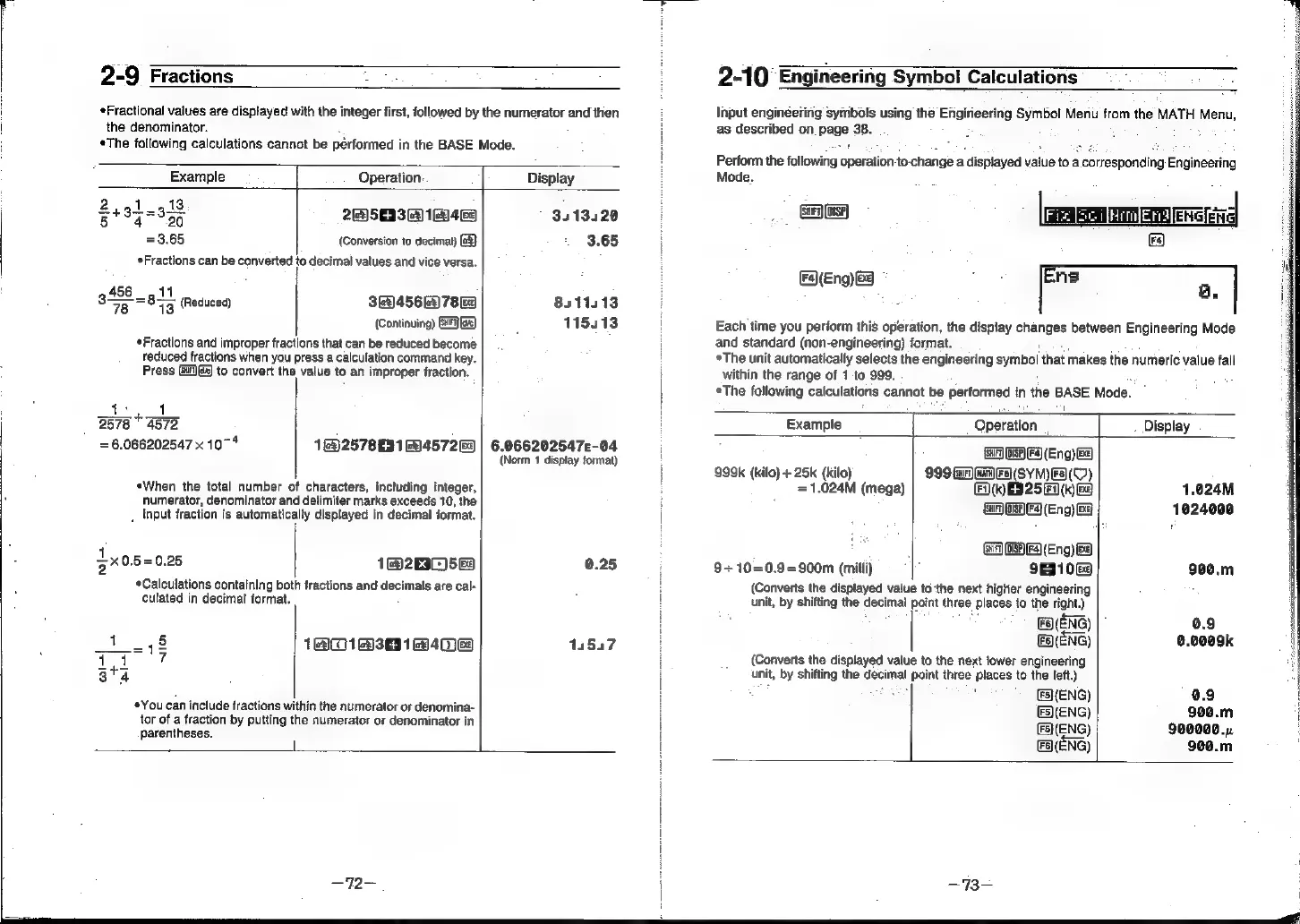
2-9
Fractions
Fractional
values
are
displayed
with
the
integer
first,
followed
by
the
numerator
and
then
|
the
denominator.
¢The
following
calculations
cannot
be
pérformed
in
the
BASE
Mode.
Example
Operation:
Display
2,41
13
=
Bt3y359
2@)5033
2)
16149
3413420
=3.65
(Conversion
to
decimal)
@3}
3.65
*Fractions
can
be
converted
to
decimal
values
and
vice
versa.
3
8l
Reduced
3e456@)7eu
8311113
(Continuing)
Ga)
115413
Fractions
and
improper
fractions
that
can
be
reduced
become
reduced
fractions
when
you
press
a
calculation
command
key.
Press
@)@)
to
convert
the
value
to
an
improper
fraction.
1A
2578
©
4572
7
2
als
ns
“pls
3x0.
=
6.066202547
x
10~*
1@)2578
63
1457263
«When
the
total
number
of
characters,
including
integer,
numerator,
denominator
and
delimiter
marks
exceeds
10,
the
5=0.25
Calculations
containing
bot!
culated
in
decimal
format.
i]
NIM
_
input
fraction
is
automatically
displayed
in
decimal
format.
1@)2EIC)5&3
h
fractions
and
decimals
are
cal-
11131
4
g
*You
can
include
fractions
within
the
numerator
or
denomina-
tor
of
a
fraction
by
putting
t
parentheses.
he
numerator
or
denominator
in
6.066202547c-04
(Norm
1
display
format)
0.25
14557
—72—
2-10
Engineering
Symbol
Calculations
Input
engineering
symbols
using
the
Efigirieering
Symbol
Menu
from
the
MATH
Menu,
as
described
on.
page
38.
Perform
the
following
‘operation
to-change
a
displayed
value
to
a
corresponding
Engineering
Mode.
-
Ds
Freee
iain
area
4)
FAEng)
Ba
o
[Ers
a.
Each
time
you
perform
this
operation,
the
display
changes
between
Engineering
Mode
and
standard
(non-engineering)
format.
The
unit
automatically
selects
the
engineering
symbol
that
makes
the
numeric
value
fall
within
the
range
of
1
to
999.
The
following
calculations
cannot
be
performed
in
the
BASE.
Mode.
Example
Operation
.
Display
GA
UHED
(Eng)
ea)
999k
(kilo)
+
25k
(kilo)
999
Gan)
an)
Fs)(SYM)FS(O)
.
=
1.024M
(mega)
FD)
ES
25
(k)
ee
1.024M
GA
OF)F9
(Eng)
BE
1024000
GAGA
Fa
(Eng)
@e
9+10=0.9=900m
(milli)
91069
900.m
(Converts
the
displayed
value
to
‘the
next
higher
engineering
unit,
by
shifting
the
decimal
potent
three
places
to
the
right.)
(ENG)
0.9
FS\(ENG)
0.0009k
(Converts
the
displayed
value
to
the
next
lower
engineering
unit,
by
shifting
the
decimal
point
three
places
to
the
left.)
7
:
FS}(ENG)
0.9
&S\(ENG)
900.m
(F5}(ENG)
900000...
FaENG)
9¢0.m
-~73-