EasyManua.ls Logo

Casio CFX-9800G - Page 55

Casio CFX-9800G
206 pages
Print Icon
To Next Page IconTo Next Page
To Previous Page IconTo Previous Page
Loading...
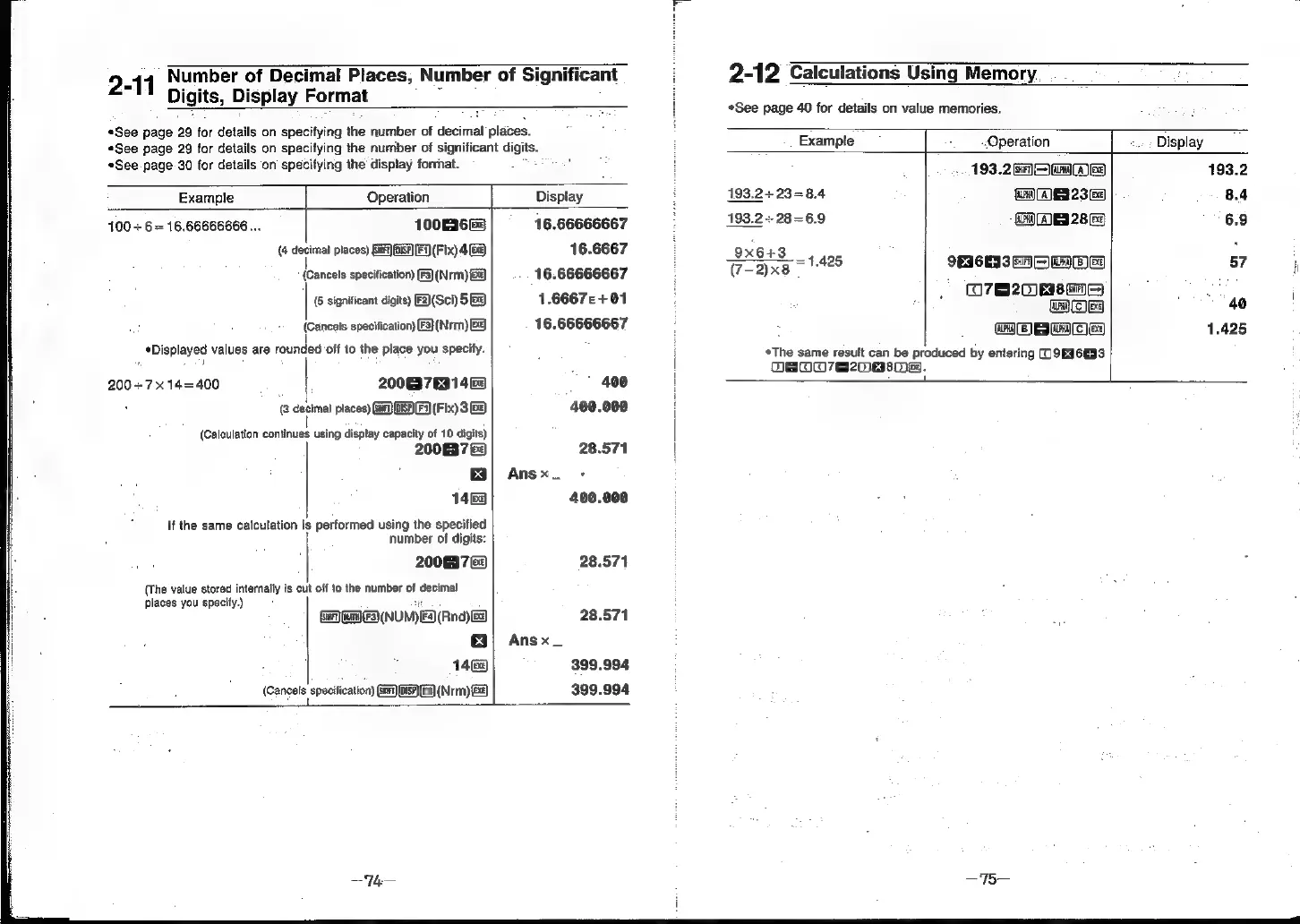
2-11
Number
of
Decimal
Places,
Number
of
Significant
i
2-12
Calculations
Using
Memory.
_
Digits,
Display
Format
i
*See
page
40
for
details
on
value
memories.
*See page
29
for
details
on
specifying
the
number
of
decimal
places.
«See page
29
for
details
on
specifying
the
number
of
significant
digits.
Example
Operation
-.
;
Display
*See
page-30
for
details
on’
specifying
the
display
forrhat.
:
H
».
193.2269
eA
193.2
Example
Operation
Display
193.2
+
23=8.4
Gra)
(AE
23
Ge
8.4
100
+6
=
16,.66666666...
100EI6E3
16.66666667
193.2
+
28=6.9
CHE
28
Ge
6.9
(4
decimal
places)
[Sir]
(15F]
[F1)
(Fix)
4G)
16.6667
Ox6+
3
458
cseaes
<
(Cancels
specification)
(F3)(Nrm)
&@
16.66666667
:
(7-2)x8
Suueniees
:
=
I
(6
significant
digits)
F(Sci)
5S
1.66672+01
O7
m2
40
i
(Cancels.
specification)
(F3}(Nrm)
16.66666667
(OC
C3)
=
[te]
ral)
1.425
Displayed
values
are
rounded
‘off
to
the
place
you
specify.
i
*The
same
result
can
be
produced
by
entering
(O9EI6E33
cis
|
OBOO7e20asHe.
200
+7x14=400
20063763146
400
|
:
(3
decimal
places)
(ie)
OSA
(Fix)
3G8)
400.000
|
(Calculation
continues
using
display
capacity
of
10
digits)
i
2006372
28.571
|
Ea)
Ansx_
-:
1468
400.000
number
of
digits:
2008372
28.571
:
[
(The
value
stored
internally
is
cut
off
to
the
number
of
decimal
places
you
specify.)
i
!
i
y
If
the
same
calculation
is
performed
using
the
specified
i
(Snr)
ua
NUM)
F4)(Rnd)
ee
28.571
|
Ans
x
_
1468
399.994
(Cancale
specteaton
OS)
F3)
(Nrm)
Ge
399.994