EasyManua.ls Logo

Casio CFX-9800G - Page 69

Casio CFX-9800G
206 pages
Print Icon
To Next Page IconTo Next Page
To Previous Page IconTo Previous Page
Loading...
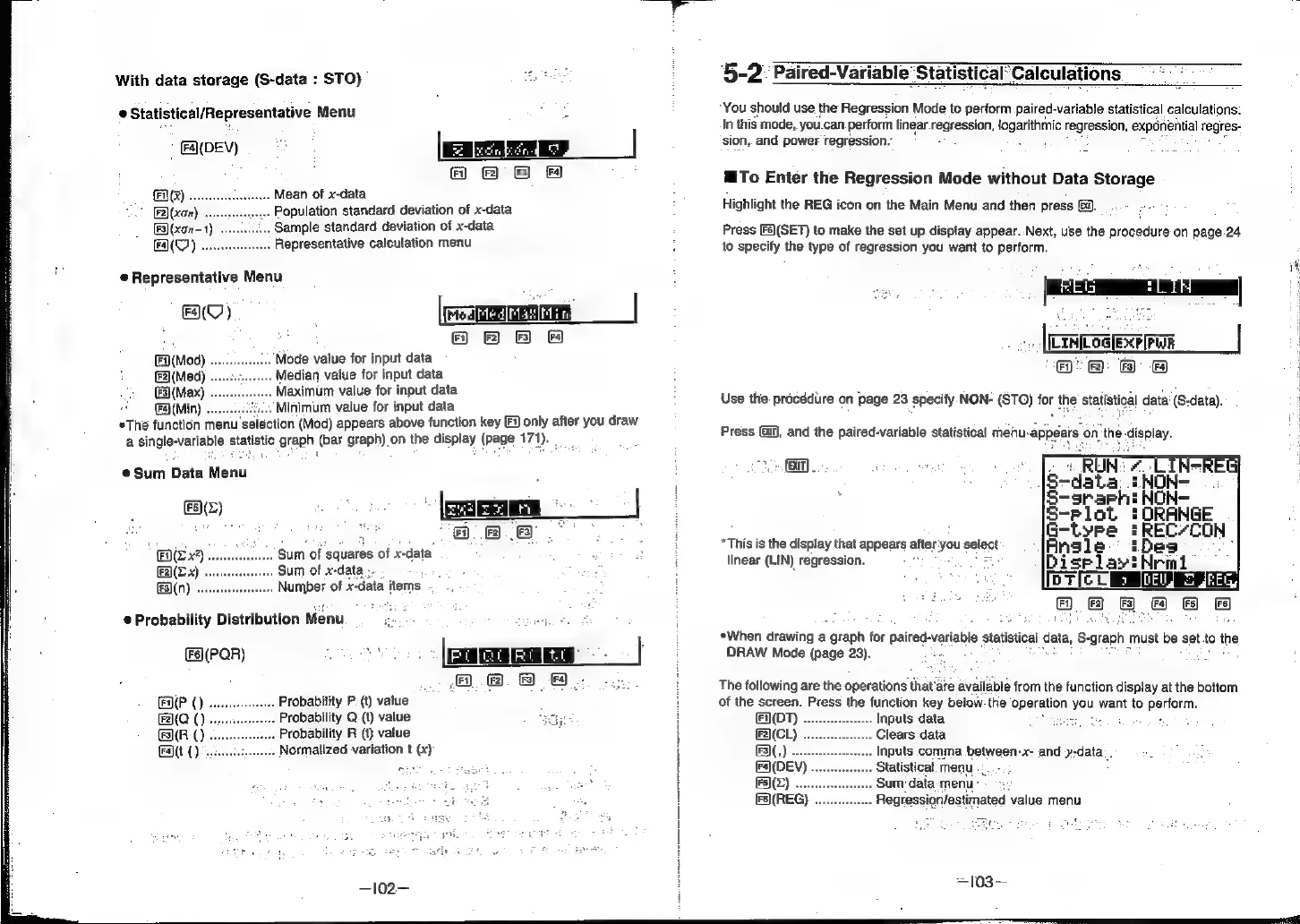
With
data
storage
(S-data
:
STO)
e
Statistical/Representative
Menu
|
GADEY)
>
[aren
|
Hf
&
fF
Mean
of
x-data
Population
standard
deviation
of
x-data
Sample
standard
deviation
of
x-data
Representative
calculation
menu
®
Representative
Menu
HY)
Fa)(Mod)
Mode
value
for
input
data
(F2](Med)
ledian
value
for
input
data
(Fs)
(Max)
laximum
value
for
input
data
Fa}
(Min)
Minimum
value
for
input
data
sie
function
menu
selection
(Mod)
appears
above
function
key
[i
only
after
you
draw
a
single-variable
statistic
graph
(bar
graph)
on
the
display
(page
171).
:
Sum
Data
Menu
ee)
2
©
|B
8
sum
of
‘squares
of
x-data
.
Sum
of
x-data
;-
.
Numper
of
x-data
items
.
F(Z
x?)
.
@
Probability
Distribution
Menu
ie
:
i
(F)(PQR)
oe
a
'
0
8.
8
a)
A(P
()
.
Probability
P(t)
value
Fa(Q
()
.
Probability
Q
(t)
value
meer
F3](R
()
.
Probability
R
(t)
value
Fatt
().:
.
Normalized
variation
t
(x)
‘5-2
Paired-Variable
StatisticalCalculations
“You
should
use
the
Regression
Mode
to
perform
paired-variable
statistical
calculations.
In
this
mode,
you.can
perform
linear
regression,
login
regression,
exponential
regres-
sion,
and
power
regression.’
MTo
Enter
the
Regression
Mode
without
Data
Storage
Highlight
the
REG
icon
on
the
Main
Menu
and
then
press
&).
Press
[Fs)(SET)
to
make
the
set
up
display
appear..Next,
use
the
procedure
on
page.24
to
specify
the
type
of
regression
you
want
to
perform.
[emesis
|
oF)?
2):
6)
4)
Use
the:
procédure
on
page
23
specify
NON-
(STO)
for
the
statistical
data’
(S-data).
Press
(i),
and
the
paired-variable
statistical
mehu-appears
onthe
display.
eres
(3.01)
*This
is
the
display
that
appears
after:
you
select
linear
(LIN)
regression.
5
¢When
drawing
a
.
graph
for
paired:
variable
Statistical
data,
S-
-graph
must
be
set
to
the
DRAW
Mode
(page
23).
.
The
following
are
the
operations
that’are
available
from
the
function
display
at
the
bottom
of
the
screen.
Press
the
function
key
below:
the
epstation
Jeu
want
to
o:pelform:
Inputs
data
;
Clears
data
Inputs
comma
between-x-
and
y-data:
.
Statistical.
menu
.:.
Sum:
data
menu