EasyManua.ls Logo

Casio CFX-9800G - Page 68

Casio CFX-9800G
206 pages
Print Icon
To Next Page IconTo Next Page
To Previous Page IconTo Previous Page
Loading...
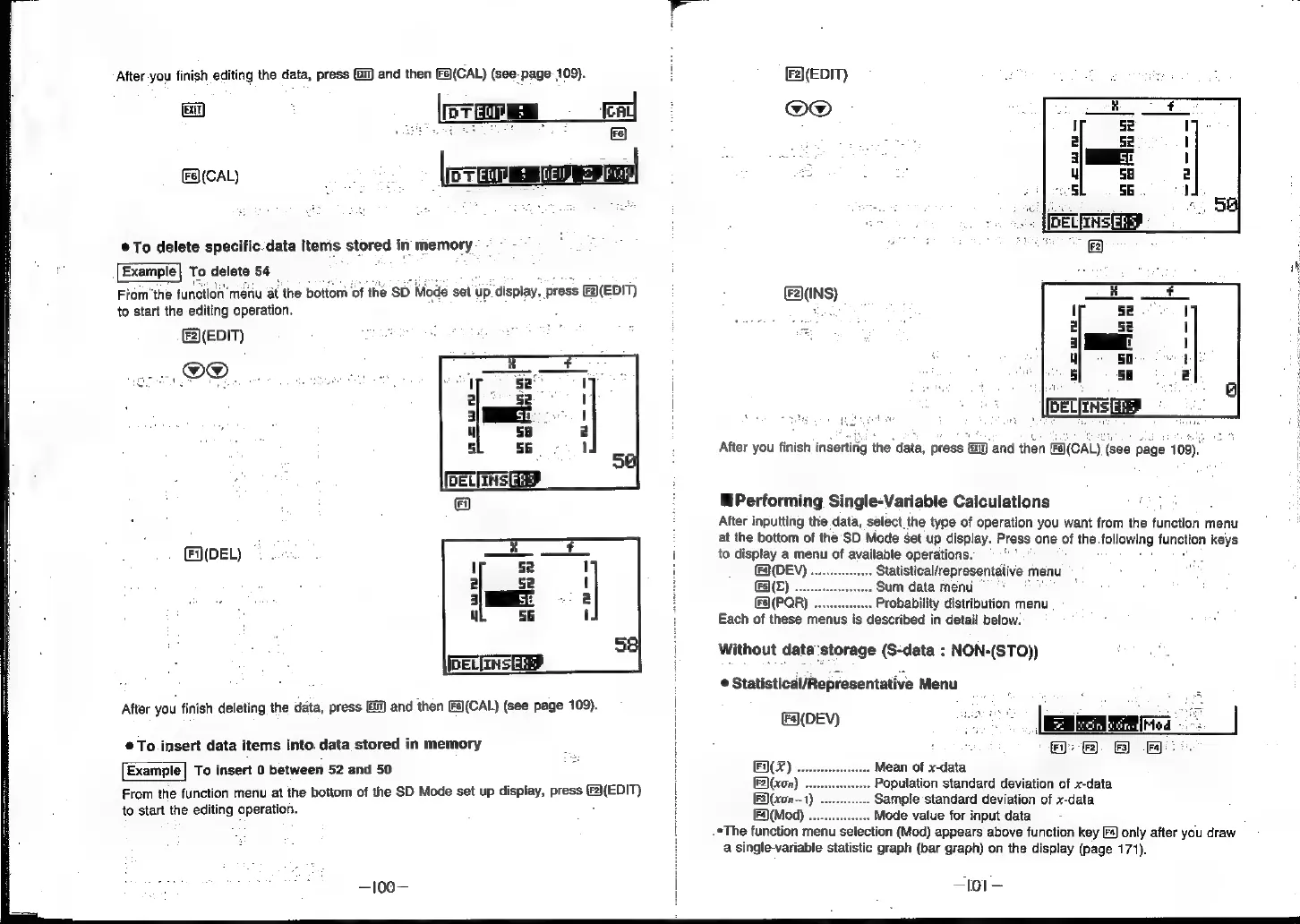
After
you
finish
editing
the
data,
press
(8)
and
then
[Fs)(CAL)
(see-page
109).
ENT
Tee
ICAL)
ee
[rer
To
delete
specific.data
items
stored
in
memory
-
Example
To
delete
54
Ica
Fiom’the
function’
menu
at
the
bottom
of
‘the
sb
Mode
set
up.display,
press
(EDIT)
to
start
the
editing
operation.
EDIT)
B®.
((DEL)
After
you
finish
deleting
the
data,
press
and
then
[Fa(CAL)
(see
page
109).
©
To
insert
data
items
into.
data
stored
in
memory
Example|
To
insert
0
between
52
and
50
From
the
function
menu
at
the
bottom
of
the
SD
Mode
set
up
display,
press
een")
to
start
the
editing
operation.
—100—
F2](EDIT)
@O@
(F2\(INS)
After
you
finish
insertirig
the
data,
press
[i
and
then
FA(CAL)
(see
page
109).
@Performing
Single-Variable
Calculations
After
inputting
the
data,
select.
the
type
of
operation
you
want
from
the
function
menu
at
the
bottom
of
the
SD
Mode
set
up
display.
Press
one
of
the
following
fungiton
keys
to
display
a
menu
of
available
operations.
(FA(DEV)
........--
Statistical/representative
menu
FS)(E)
..
Sum
data
menu
Fa(PQR)
Probability
distribution
menu
Each
of
these
menus
is
described
in
detail
below.
Without
data'storage
(S-data
:
NON-(STO))
©
Statistical/Representative
Menu
(F4](DEV)
F(X)
Mean
of
x-data
F2)(xon)
Population
standard
deviation
of
x-data
F3)(xon—1)
..
Sample
standard
deviation
of
x-data
[F4)(Mod)
.
Mode
value
for
input
data
*The
function
menu
selection
(Mod)
appears
above
function
key
[s)
only
after
you
draw
a
single-variable
statistic
graph
(bar
graph)
on
the
display
(page
171).
—L01-—