EasyManua.ls Logo

Casio CFX-9800G - Page 67

Casio CFX-9800G
206 pages
Print Icon
To Next Page IconTo Next Page
To Previous Page IconTo Previous Page
Loading...
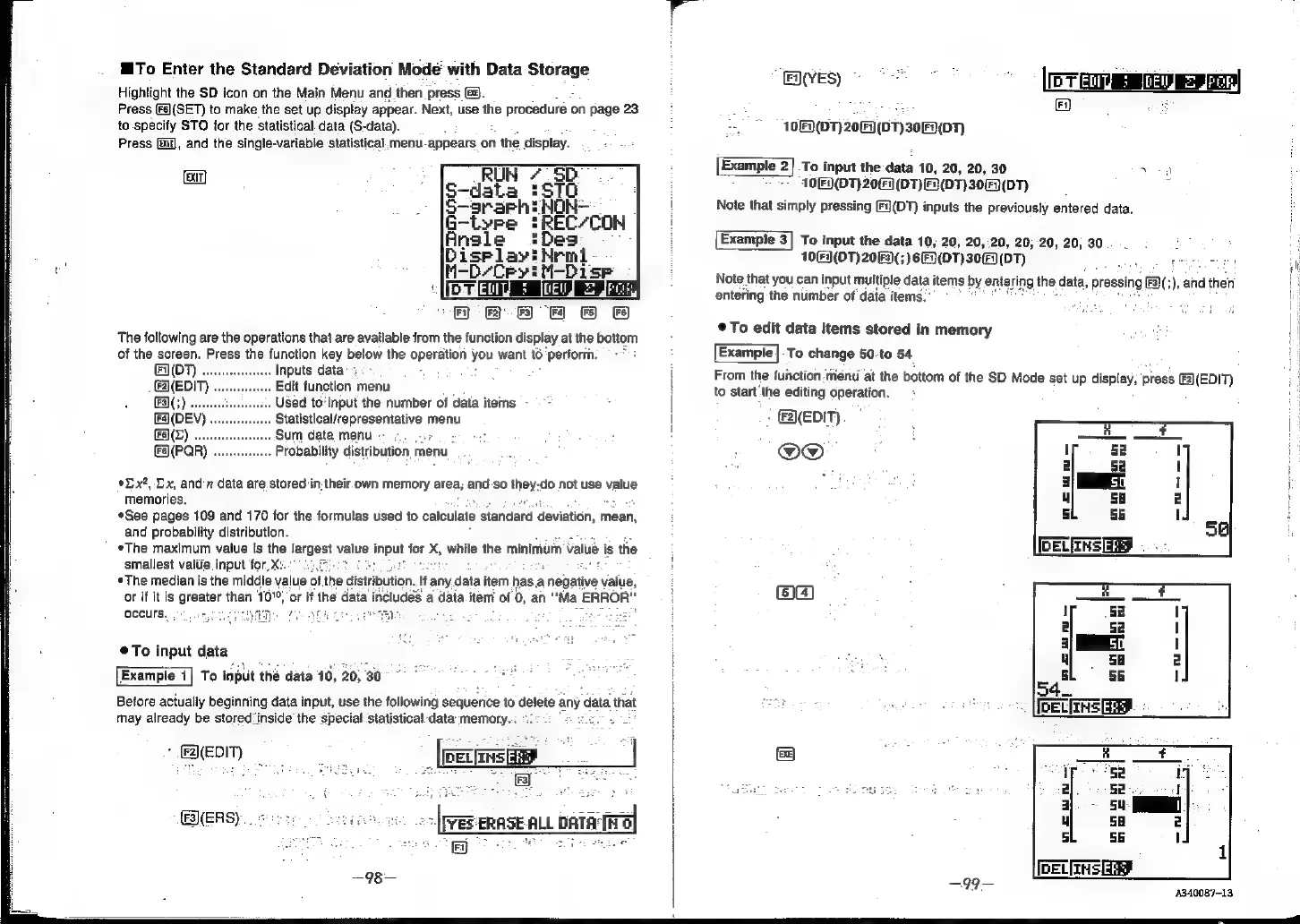
To
Enter
the
Standard
Deviation
Mode
with
Data
Storage
Highlight
the
SD
icon
on
the
Main
Menu
and
then
press
G8).
Press
Fal(SET)
to
make
the
set
up
display
appear.
Next,
use
the
procedure
on
page
23
to
specify
STO
for
the
statistical
data
(S-data).
Press
i),
and
the
single-variable
statistical.
menu-appears
on
1
the
display.
EXIT]
:
RUN
7.
SD.
-—data
=ST0
.
|(S-srarhiNon-
G-tyre
#REC/CON
Ansle
Disriay!Nemt
-D/Ceyi
M-Dise
BIGMEML
§
(EU.
2
gPe
Fr)
2
FS)
F)
&
Fe
The
following
are
the
operations
that
are
available
from
the
function
display
at
the
bottom
of
the
screen.
Press
the
function
key
below
the
operation
you
want
t6
‘perform.
=
(D7)
.
Inputs
data’:
Edit
function
menu
Used
to-input
the
number
of
data
items
Statistical/representative
menu
Sum
data
menu
«:
;
Probability
distribution
menu
*Lx?,
Dx,
and
7
data
are
stored
in.their.
own
memory
area;
and
so
they-do
not
use
value
memories.
*See
pages
109
and
170
for
the
formulas
used
to
caleulate
standard
‘deviation,
mean,
and
probability
distribution.
*The
maximum
value
is
the
largest
value
input
for
X,
while
the
minimum
value
i
is
the
smallest
valtie
input
for,
X:.
«The
median
is
the
middie
value
of th
or
if it
is
greater
then
10°,
‘or
if
the
occurs.
See
tribution.
If
any.data
item
has
a
negative
value,
includes
a
data
item
of
0,
an
“Ma
ERROR"
To
input
data
Example
1|
To
input
thé
data
10,
20,
30
Before
actually
beginning
data
input,
use
the
following
sequerice
to
delete
any
data
that
may
already
be
stored‘inside
the
‘special.
statistical
data
memory.
:
:
She
all
~
(peansé
SERS)...«
3
-
[rev
trase
ALL
patatiral
i]
~—98—
'
EX(VES)
[PTE
Ee
ee
A
Fi,
10[F)(DT)
207
(DT)30F(DT)
Example
2]
To
input
the
data
10,
20, 20,
30
vow
10[F)(DT)
2067
(DT)
F)(DT)
309
(D7)
.
Note
that
simply
pressing
(DT)
inputs
the
previously
entered
data.
Example
3]
To
input
the
data
10,
20,
20,20,
20, 20, 20;
30...
Note
that
you
can
input
multiple
data
items
by
entering
the,
data,
pressing
F3)(;),
and
then
entering
the
number
of
data
items."
10(9(DT)
2063)(;)6E)(DT)30(F)(DT)
s
geitivawnseeeeteet
©To
edit
data
items
stored
in
memory
os
'
Example
|-To
change
50-to
54
From
the
function:menu
at
the
bottom
of
the
SD
Mode
set
up
display,
press
(EDIT)
;
to
start
the
editing
operation.
-
&2\(EDIT)
@O®@
A340087-13,